A320 Neo Instructor Operating Station
Instructor User Guide
Map Workspace
13 Oct 2017
Page 234
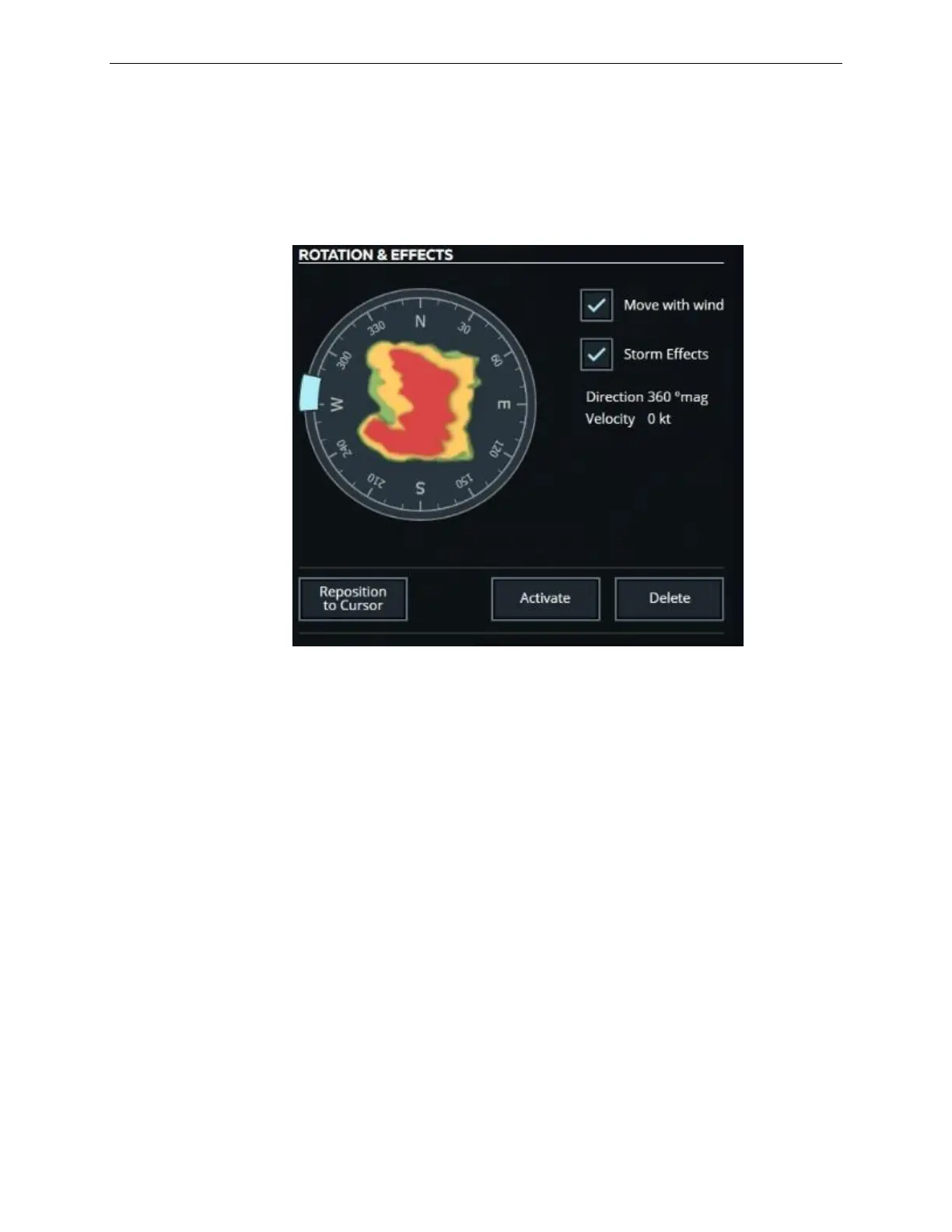
15.4.2.3.4 ROTATION EFFECTS Section
This section is displayed as soon as a storm type is selected. Once a storm is selected,
this section offers the controls necessary to edit the storm.
Figure 142 STORM PROPERTIES –ROTATION & EFFECTS
15.4.2.3.5 Storm Rotation Graph
The Storm Rotation Graph is an interactive graph that features a light blue cursor that
allows the instructor to rotate the storm between 0-360 degrees. Touch and hold the
cursor and move it around the dial to rotate storm.
15.4.2.3.6 Reposition to Cursor
Tap this button to reposition the center of the selected storm to the cursor location on
the map.
15.4.2.3.7 Move with wind
Tap this checkbox to move the selected storm in accordance with the wind
environment parameters.
15.4.2.3.8 Storm Effects
Tap this checkbox to activate lightning on the visual scene. This effect is shown
within the physical boundaries of the storm.



 To Next Page