Garmin G2000 Pilot’s Guide for the Cessna T240
190-01263-01 Rev. A282
Flight ManageMent
SYSteM
OVeRVieW
Flight
inStRUMentS
eiS
aUDiO Panel
& CnS
Flight
ManageMent
haZaRD
aVOiDanCe
aFCS
aDDitiOnal
FeatUReS
aPPenDiCeSinDeX
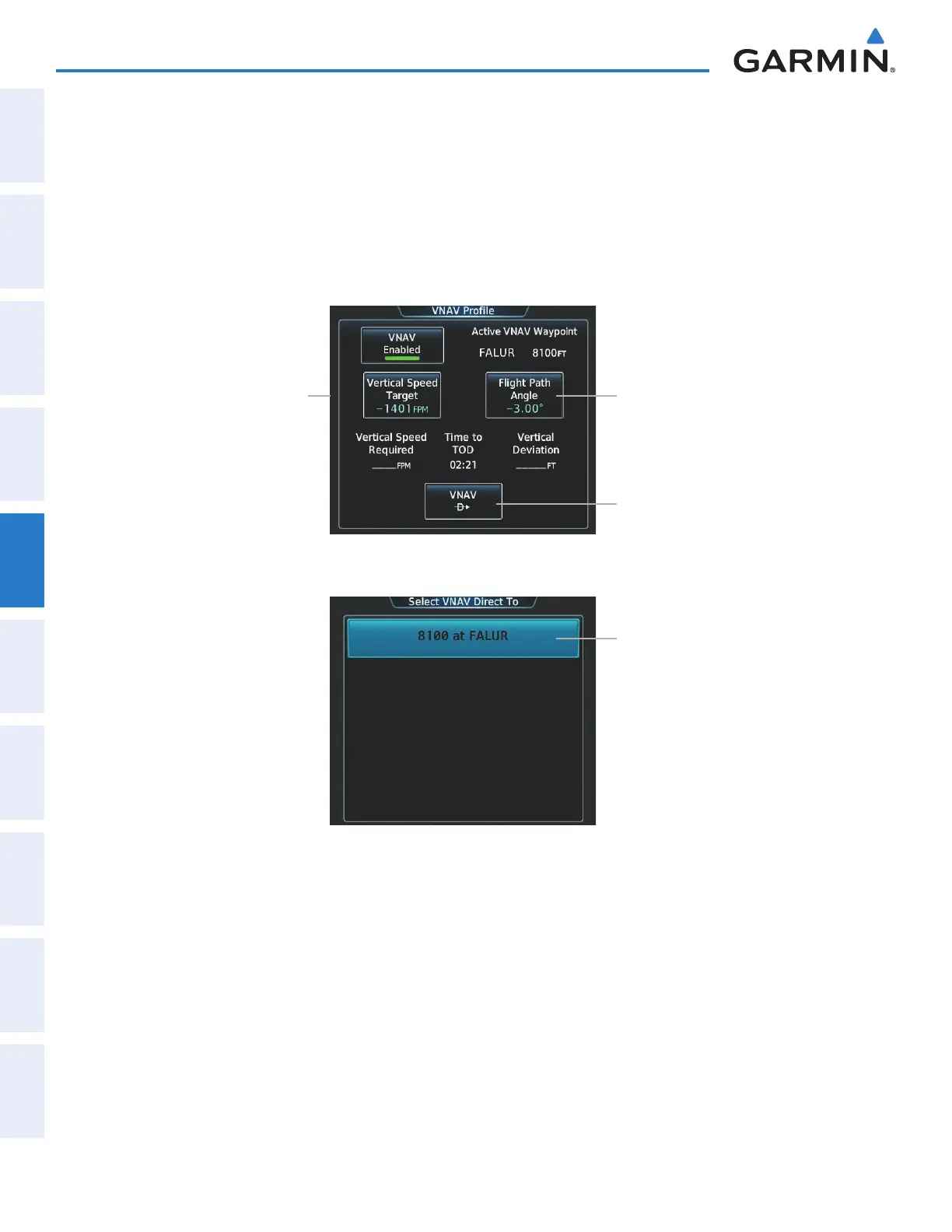
The system allows a vertical navigation direct-to to any waypoint in the active flight plan with an altitude
constraint “designated” for vertical guidance. Selecting the VNAV ¯ Button on the VNAV Profile Screen
allows the flight plan to be flown, while vertical guidance based on the altitude constraint at the VNAV direct-to
waypoint is provided. The altitude change begins immediately and is spread along the flight plan from current
position to the vertical direct-to waypoint, not just along the leg for the direct-to waypoint. A direct-to with
altitude constraint activated by pressing the ¯ Key also provides vertical guidance, but would bypass flight plan
waypoints between the current position in the flight plan and the direct-to waypoint. A top of descent (TOD)
point is computed based on the default flight path angle; descent begins once the TOD is reached.
Figure 5-135 VNAV Profile Screen - Vertical Navigation Profile Modification
VNAV ¯ Button
Flight Path Angle Button
Vertical Speed Target Button
Figure 5-136 Selecting the VNAV Direct To Waypoint
VNAV Waypoint Selection Button
Activating a vertical navigation direct to:
1) From Home, touch Flight Plan > VNAV
2) Touch the VNAV ¯ Button to display the Select VNAV Direct To Screen with a list of possible Vertical
navigation direct to choices.
3) Scroll the list, if necessary, and touch a VNAV waypoint selection button.
4) Touch the Activate Button.
5) Touch the Activate Button in response to “Activate Vertical ¯: NNNNNFT at XXXXXX” to initiate the vertical
navigation direct to. Vertical guidance begins to the altitude constraint for the selected waypoint. To cancel the
request, touch the Cancel Button.
This manual downloaded from http://www.manualowl.com



 To Next Page