Garmin G2000 Pilot’s Guide for the Cessna T240
190-01263-01 Rev. A310
Flight ManageMent
SYSteM
OVeRVieW
Flight
inStRUMentS
eiS
aUDiO Panel
& CnS
Flight
ManageMent
haZaRD
aVOiDanCe
aFCS
aDDitiOnal
FeatUReS
aPPenDiCeSinDeX
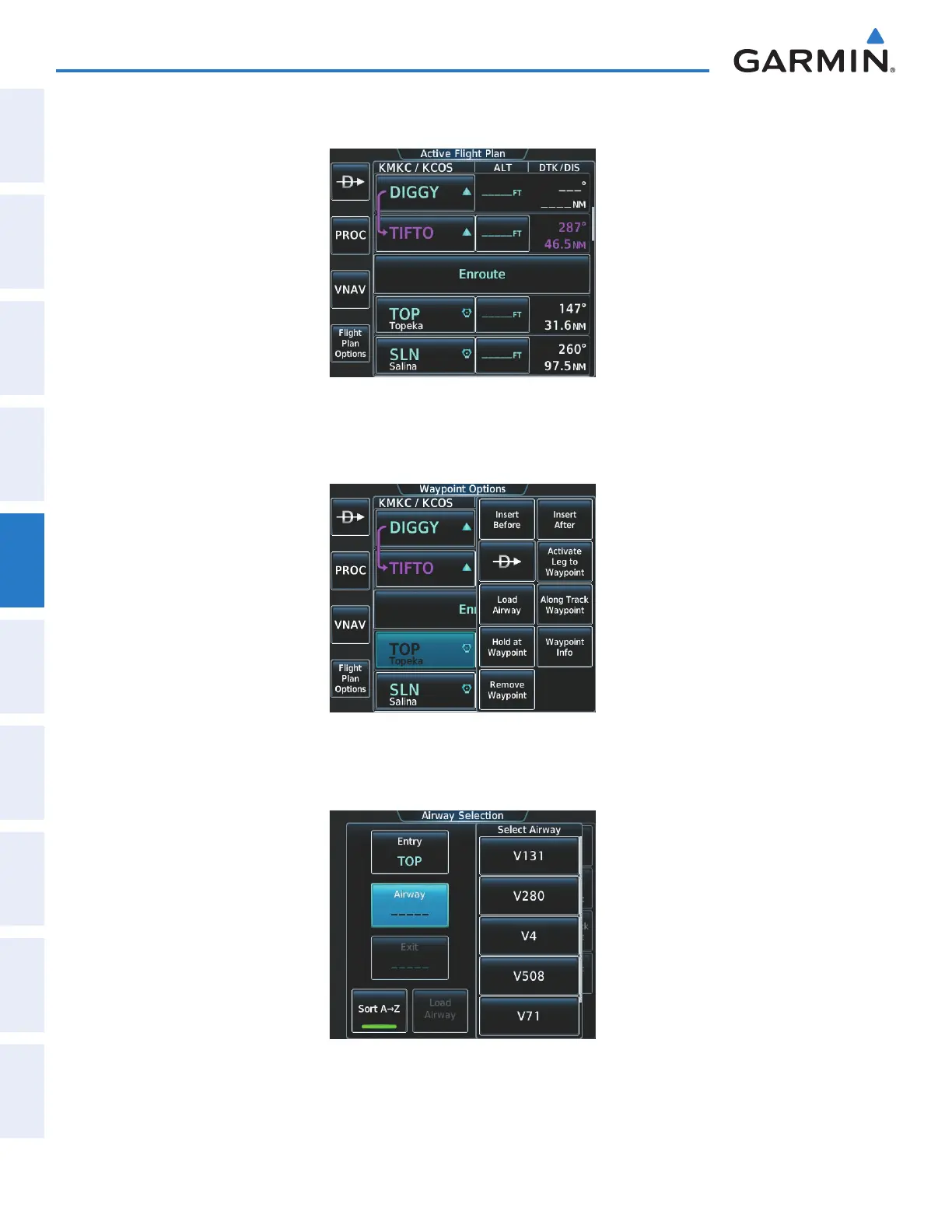
e) Touch the Enter Button. TOP is inserted into the flight plan as in Figure 5-162.
Figure 5-162 TOP Inserted into the Flight Plan
f) Touch the desired waypoint selection button (TOP) to display the Waypoint Options Window (Figure 5-163).
Figure 5-163 Begin Selecting the Airway
g) Touch the Load Airway Button to display the list of available airways for TOP as seen in Figure 5-164.
Figure 5-164 List of Available Airways for TOP
This manual downloaded from http://www.manualowl.com



 To Next Page