Garmin G2000 Pilot’s Guide for the Cessna T240
190-01263-01 Rev. A312
Flight ManageMent
SYSteM
OVeRVieW
Flight
inStRUMentS
eiS
aUDiO Panel
& CnS
Flight
ManageMent
haZaRD
aVOiDanCe
aFCS
aDDitiOnal
FeatUReS
aPPenDiCeSinDeX
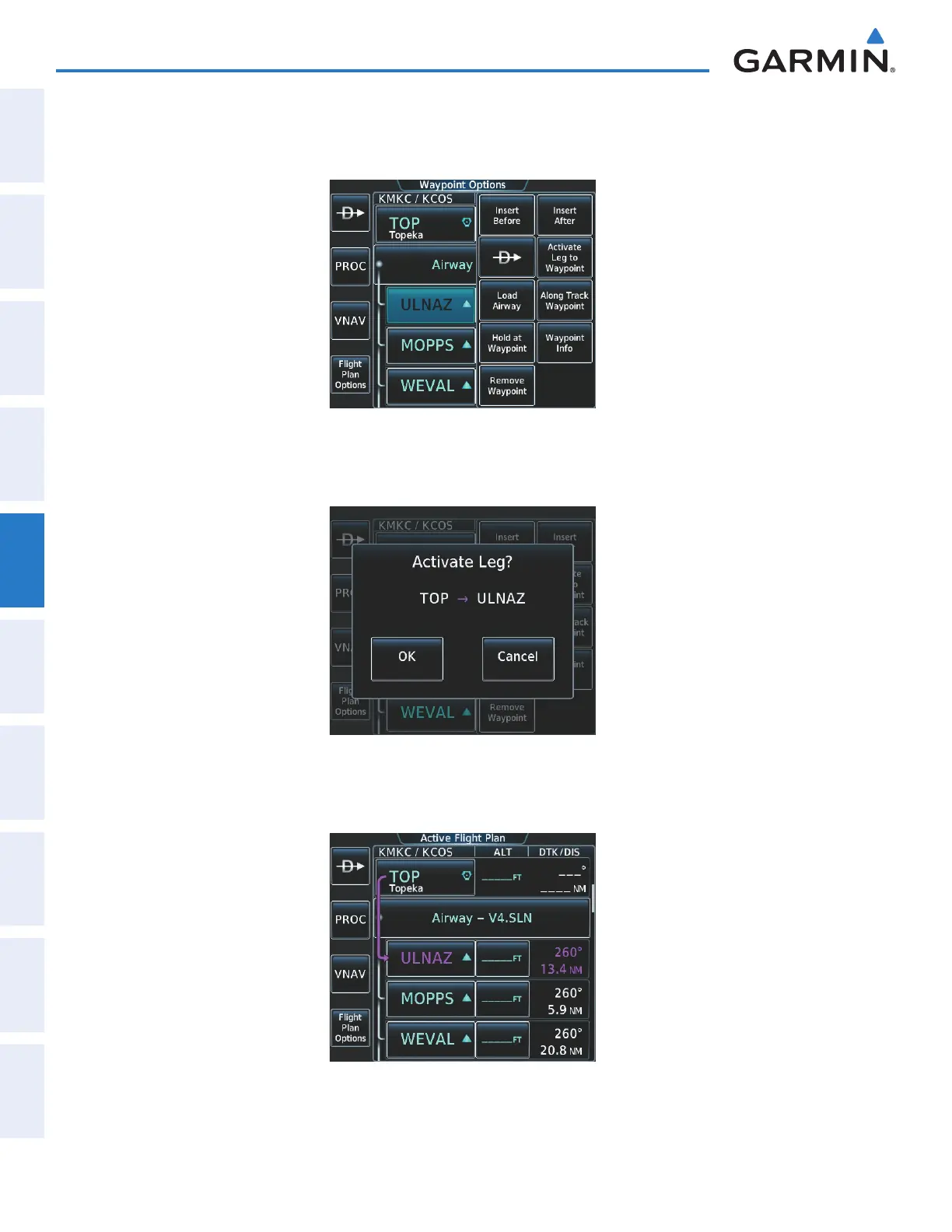
5) Making V4 the active leg of the flight plan.
a) Touch the ULNAZ Button to display the Waypoint Options Window as shown in Figure 5-168.
Figure 5-168 Activating V4 Leg
b) Touch the Activate Leg to Waypoint Button. The confirmation window is now displayed as in Figure 5-169.
Figure 5-169 Comfirm Active Leg
c) Touch the OK Button to activate the leg (Figure 5-170).
Figure 5-170 V4 Leg is Active
This manual downloaded from http://www.manualowl.com



 To Next Page