Garmin G2000 Pilot’s Guide for the Cessna T240
190-01263-01 Rev. A322
Flight ManageMent
SYSteM
OVeRVieW
Flight
inStRUMentS
eiS
aUDiO Panel
& CnS
Flight
ManageMent
haZaRD
aVOiDanCe
aFCS
aDDitiOnal
FeatUReS
aPPenDiCeSinDeX
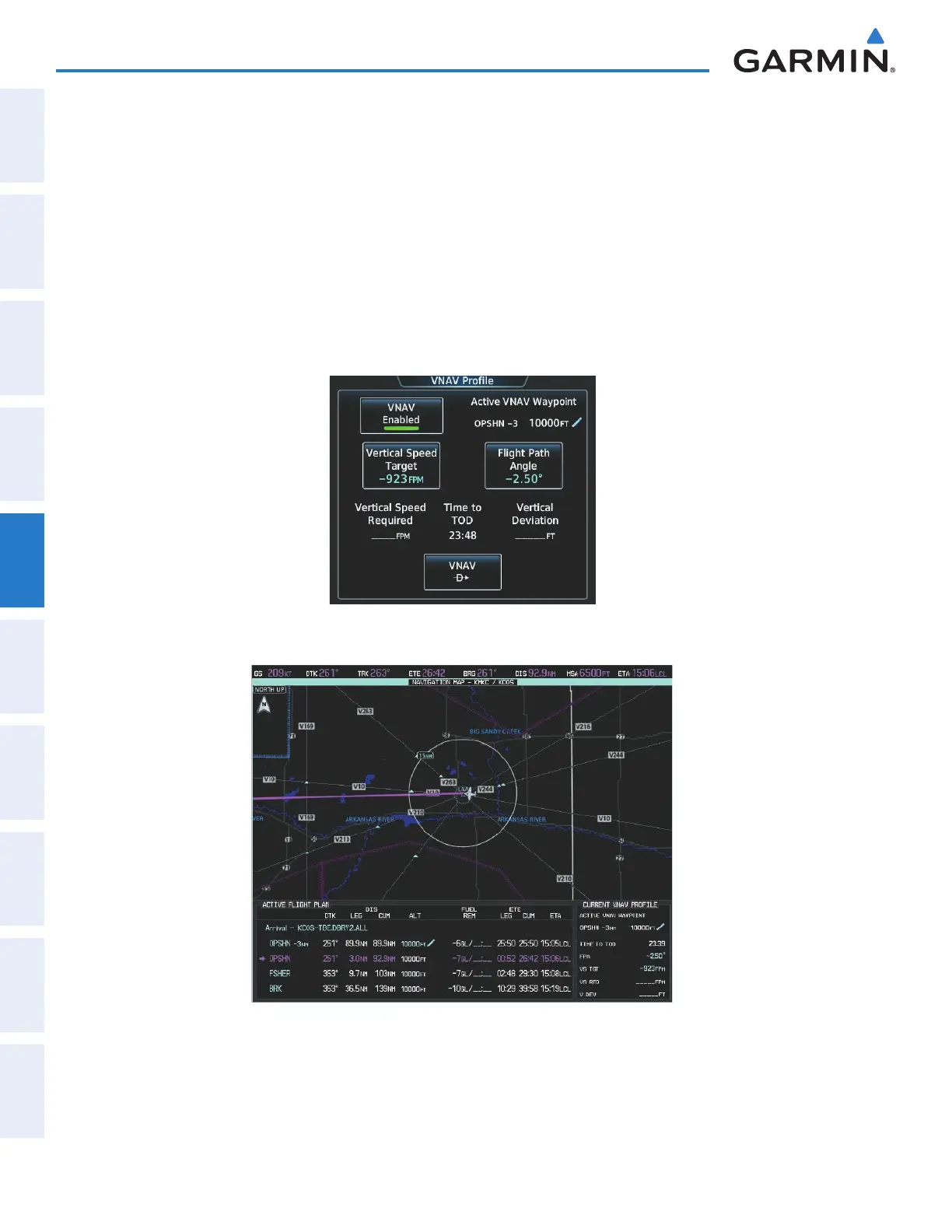
14) As the aircraft approaches OPSHN, it may be desirable to adjust the speed, or steepness of the upcoming
descent. The default Flight Path Angle (FPA) is -2.5 degrees and a required vertical speed is computed to
maintain the -2.5 FPA. To change the vertical flight path, perform the following steps.
a) From Home, touch Flight Plan > VNAV to display the VNAV Profile Screen as shown in Figure 5-191.
b) Touch the Vertical Speed Target Button to adjust the vertical speed, or touch the Flight Path Angle Button
to adjust the FPA. Touching either button will display the keypad to select the desired value.
Note the information now displayed in the ‘CURRENT VNV PROFILE’ box (Figure 5-192). Also, note the offset
waypoint (orange box) and gray circle are now displayed on the map. The gray circle marks the Top of Descent
(TOD). In this example, vertical guidance is provided at the TOD that results in a -2.5 degree FPA descent to an
altitude of 10,000 feet upon reaching the offset waypoint.
Figure 5-191 Adjusting the Descent
Figure 5-192 Adjusting the Descent
c) Touch the Enter Button to accept the selected value.
This manual downloaded from http://www.manualowl.com



 To Next Page