Tuning D1 Servo Drive User Manual
6-14 HIWIN MIKROSYSTEM CORP.
(3) Zoom in and zoom out functions
Plot view window allows user to zoom in and zoom out on X axis and Y axis. If user would like to
observe a certain segment of a graph, he can use reference lines to select the desired segment and
zoom in. Icons on toolbar are described as below.
- : Zoom in on the segment selected by reference lines on X axis.
- : Undo zoom in function.
- : Redo zoom in function.
- : Cancel zoom in function.
- : Zoom in on the segment selected by reference lines on Y axis.
- : Cancel zoom in function on Y axis.
(4) Zoom in or zoom out on X axis
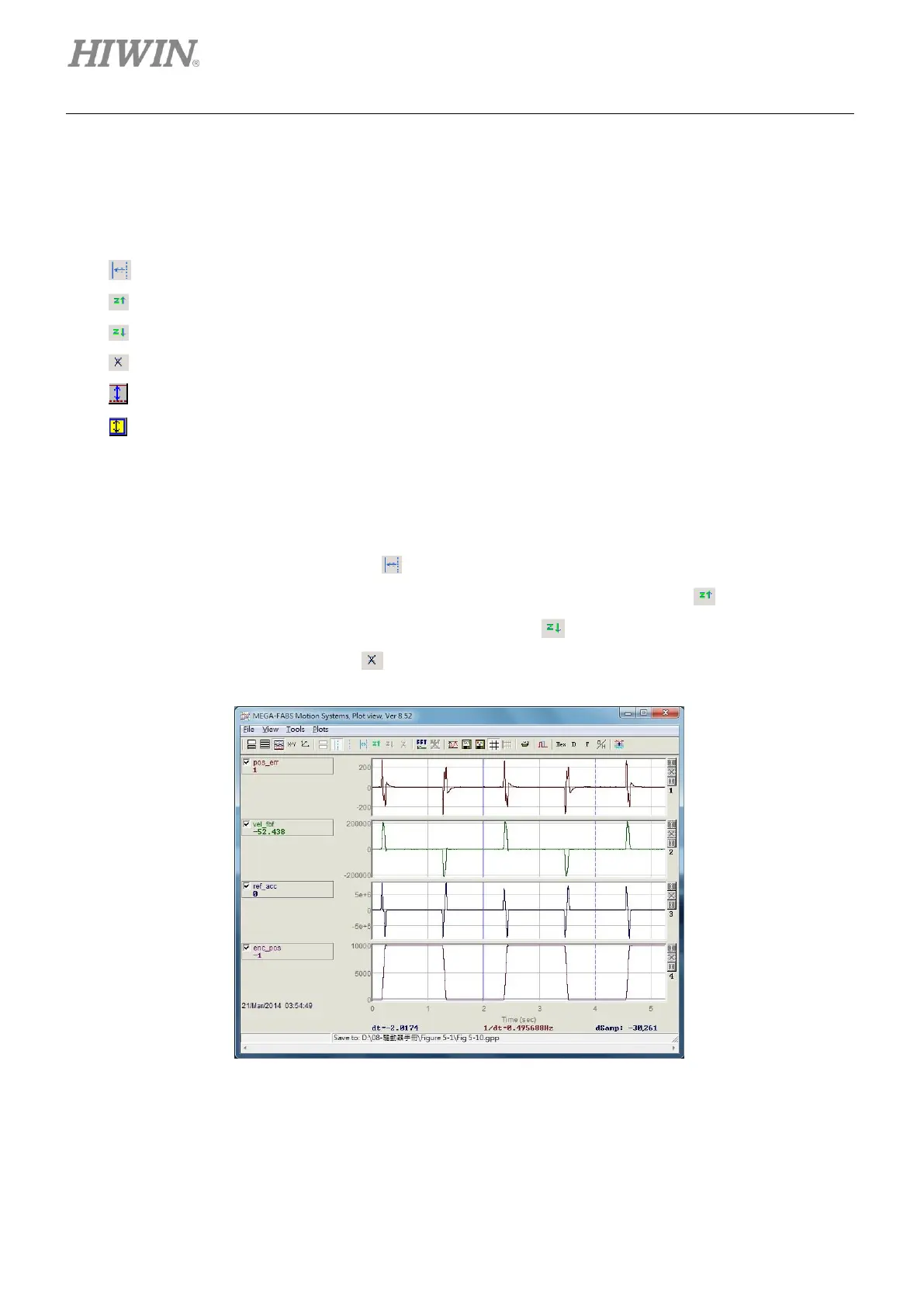
As figure 6.5.1.3, if user would like to zoom in on the segment between 2 seconds and 4 seconds,
user can left click and right click on the graph to show two reference lines (blue line and blue dotted
line) to select this segment. Click on to zoom in, as figure 6.5.1.4. Repeat the above steps to see
more closely on the segment between 2 seconds and 3 seconds. Click on to go back to the
segment between 2 seconds and 4 seconds. Click on to return to the segment between 2
seconds and 3 seconds. Click on to return to the original graph, as figure 6.5.1.3.
Figure6.5.1.3



 To Next Page