# Hardware option Alternative hardware option
1
Staple finisher
1
• Oset stacker
1
• Paper transport
• Paper transport with folding option
2
1500-sheet tray
2
None
3
2000-sheet tandem tray
3
• 2 x 550-sheet tray
3
• Cabinet
3
4 Optional 550-sheet tray None
5
Booklet finisher
4
Staple, hole punch finisher
4
1
Cannot be installed together with a booklet finisher or staple, hole punch finisher.
2
Must be always installed together with an optional 550-sheet tray and either the 2 x 550-sheet tray or 2000-sheet
tandem tray.
3
Must be always installed together with an optional 550-sheet tray.
4
Must be always installed together with an optional 550-sheet tray and one of the following: 2 x 550-sheet tray,
2000-sheet tandem tray, or cabinet.
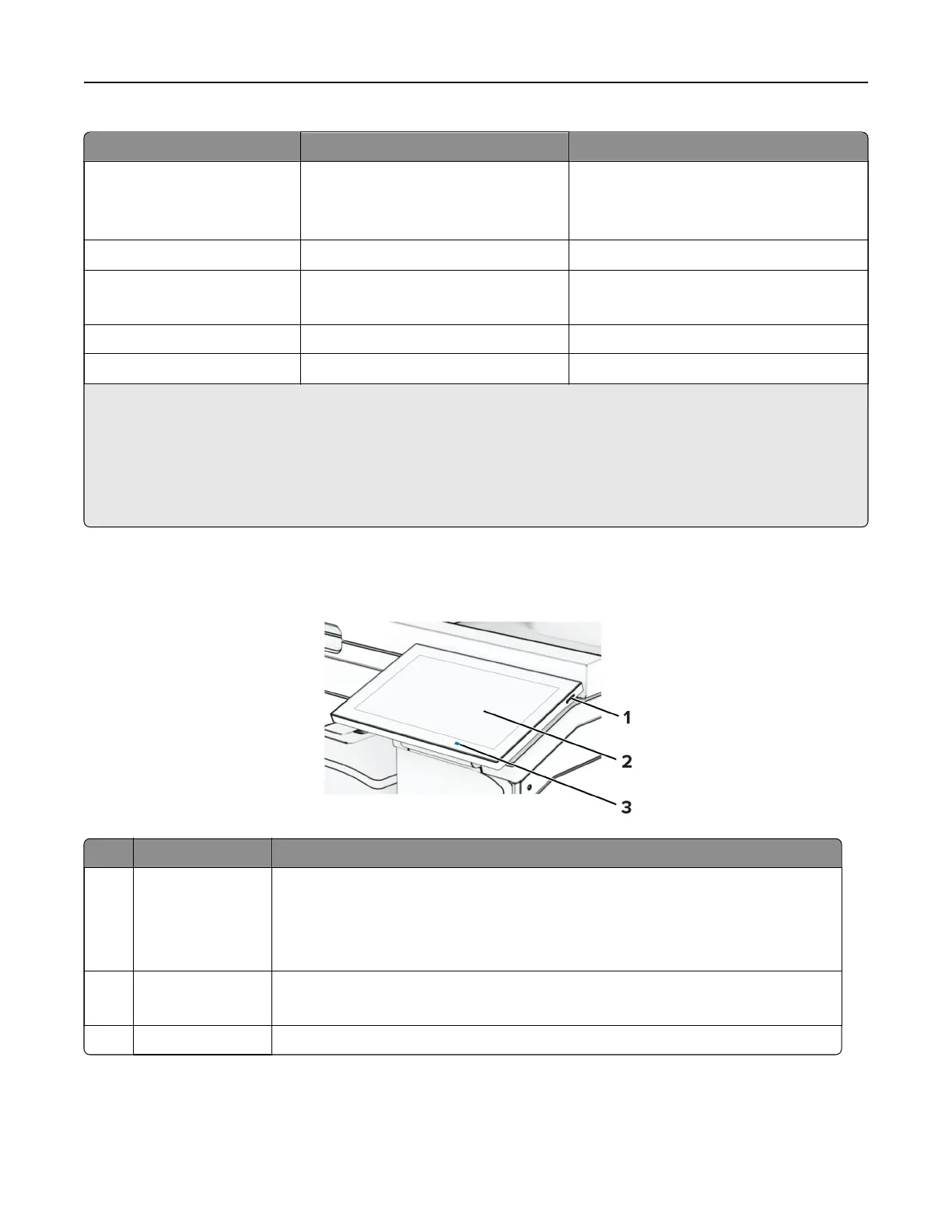
Using the control panel
Control panel part Function
1 Power button
• Turn on or turn o the printer.
Note: To turn o the printer, press and hold the power button for five seconds.
• Set the printer to Sleep mode.
• Wake the printer from Sleep or Hibernate mode.
2 Display
• View the printer messages and supply status.
• Set up and operate the printer.
3 Indicator light Check the status of the printer.
Learn about the printer 13



 To Next Page