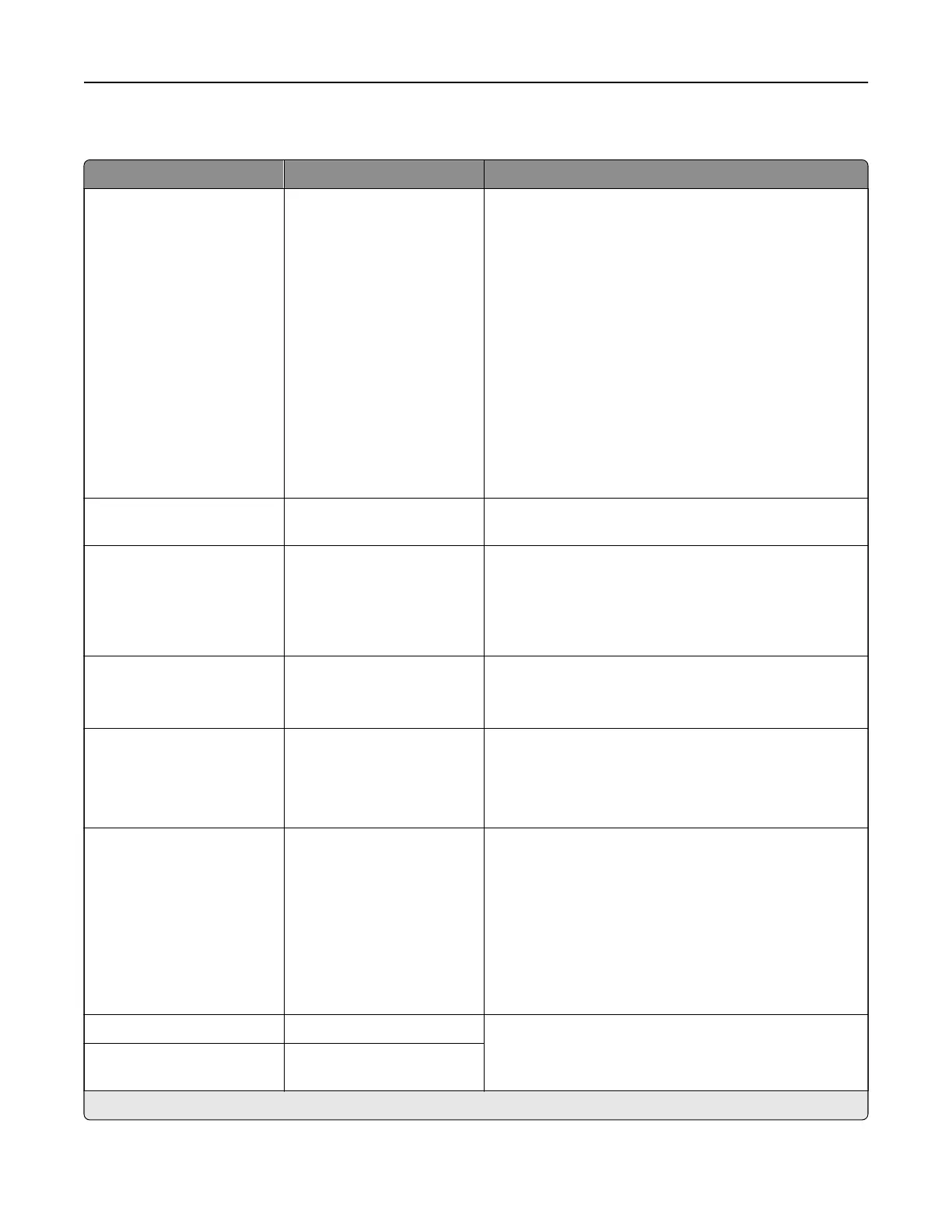
PCL
Menu item Settings Description
Font Source Resident*
Disk
Download
Flash
Font Card
All
Select the source which contains the default font
selection.
Notes:
• Disk—appears only and if a non‑defective,
non‑read/write protected hard disk that contains
fonts is installed.
• Download—appears only if downloaded fonts
exist in the printer memory.
• Flash—appears only if a non‑defective,
non‑read/write protected
flash
memory that
contains fonts is installed.
• Font Card—appears only if a valid font card is
installed or an intelligent storage drive is
configured.
Font Name [List of available fonts]
(Courier*)
Select a font from the specified font source.
Symbol Set [List of available symbol
sets] (10U PC‑8*)
Specify the symbol set for each font name.
Note: A symbol set is a set of alphabetic and numeric
characters, punctuation, and special symbols. Symbol
sets support the dierent languages or specific
programs such as math symbols for scientific text.
Pitch 0.08–100.00 (10.00*) Specify the pitch for fixed or monospaced fonts.
Note: This menu item refers to the number of
fixed
‑space characters in a horizontal inch of type.
Orientation Portrait*
Landscape
Reverse Portrait
Reverse Landscape
Specify the orientation of text and graphics on the page.
Lines per Page 1–255 Specify the number of lines of text for each page printed
through the PCL® data stream.
Notes:
• This menu item activates vertical escapement that
causes the selected number of requested lines to
print between the default margins of the page.
• 60 is the U.S. factory default setting. 64 is the
international factory default setting.
PCL5 Minimum Line Width 1–30 (2*) Set the initial minimum stroke width value of any job
printed in 1200 dpi through the applicable emulator.
PCLXL Minimum Line
Width
1–30 (2*)
Note: An asterisk (*) next to a value indicates the factory default setting.
Printer menus 310



 To Next Page