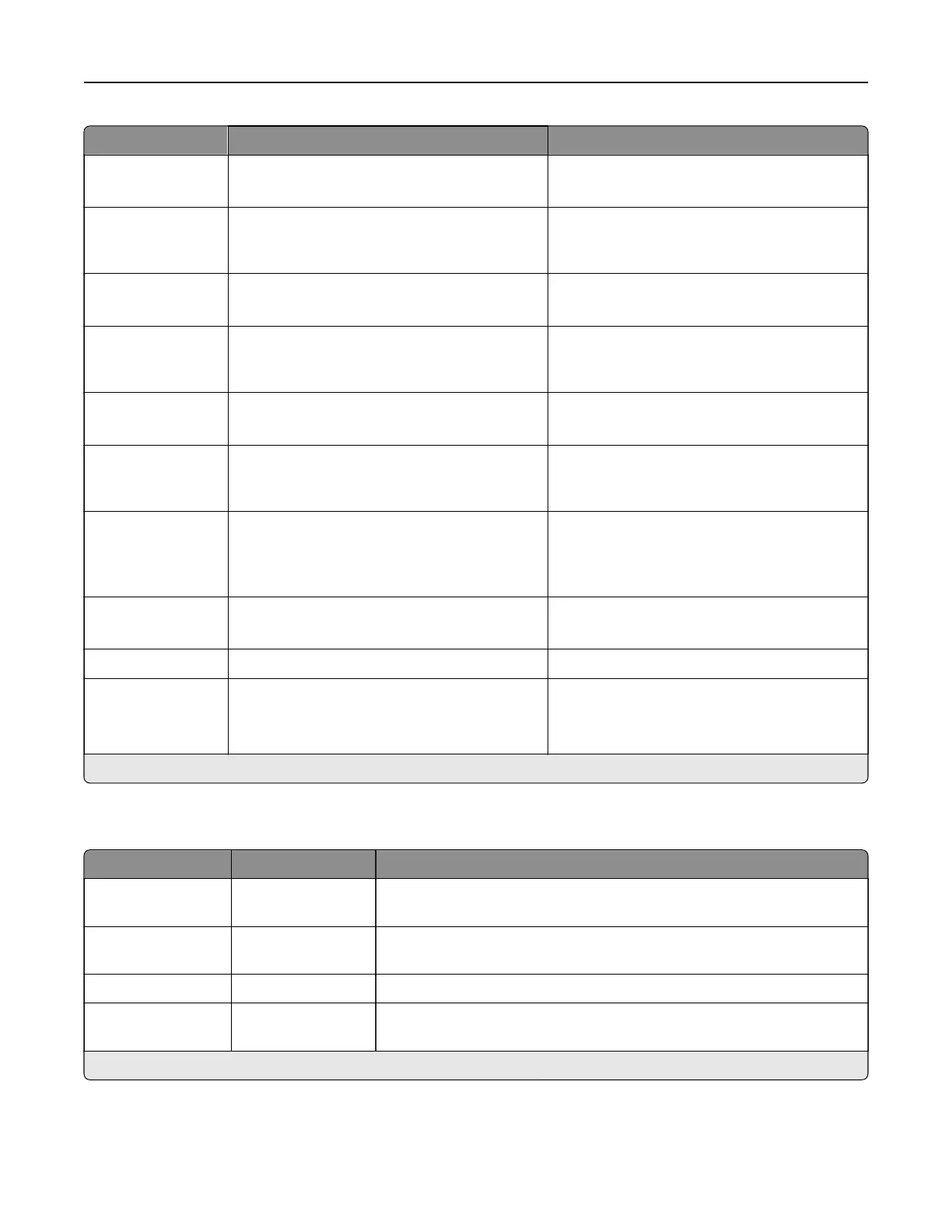
Menu item Settings Description
Email Log
Wrapped Alert
O*
On
Set the printer to send the administrator an
email when log entries are wrapping.
Log Full Behaviorr Wrap Over Oldest Entries*
Email Log Then Delete All Entries
Determine how the printer resolves log
storage issues when the log fills its allotted
memory.
Email % Full Alert O*
On
Set the printer to send the administrator an
email when the log fills its allotted memory.
% Full Alert Level 1–99 (90*) Determine if the space occupied by the log
equals or exceeds the value of the full alert
level.
Email Log
Exported Alert
O*
On
Send an email notification to the administrator
when a log is exported.
Email Log Settings
Changed Alert
O*
On
Set the printer to send an email to the
administrator when the value of the Enable
Audit menu is changed.
Log Line Endings LF (\n)*
CR (\r)
CRLF (\r\n)
Determine how the printer handles line
endings in the log file, depending on the
operating system that the
file
is parsed or
viewed.
Digitally Sign
Exports
O*
On
Set the printer to sign exported security logs
automatically.
Clear Log The setting is user-defined. Delete all audit logs.
Export Log Syslog (RFC 5424)
Syslog (RFC 3164)
CSV
Export logs from the printer or flash drive.
Note: An asterisk (*) next to a value indicates the factory default setting.
Login Restrictions
Menu item Settings Description
Login failures 1–10 (3*) Specify the number of failed login attempts before the user is locked
out.
Failure time frame 1–60 minutes (5*) Specify the time frame that failed login attempts are allowed before the
user is locked out.
Lockout time 1–60 minutes (5*) Specify the amount of time where no logins are allowed.
Web Login Timeout 1–120 minutes (10*) Specify the amount of time that a remote interface such as a web page
can remain idle before the user is logged o automatically.
Note: An asterisk (*) next to a value indicates the factory default setting.
Printer menus 370



 To Next Page