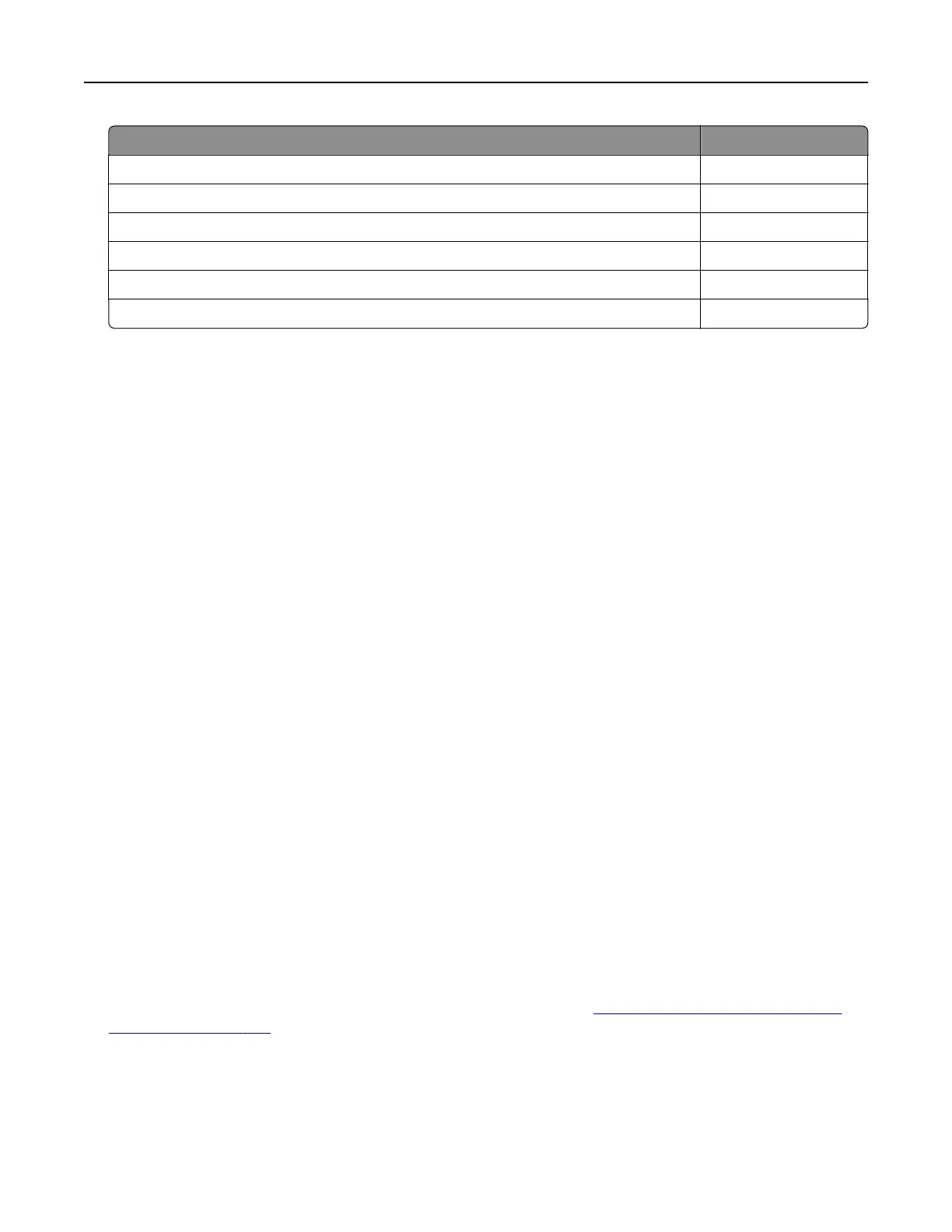
Region Numeric code
European Economic Area, Western Europe, Nordic countries, Switzerland 2
Asia Pacific 3
Latin America 4
Rest of Europe, Middle East, Africa 5
Australia, New Zealand 6
Invalid region 9
Note: To find the region settings of the printer and toner cartridge, print the Print Quality Test Pages.
From the control panel, navigate to Settings > Troubleshooting > Print Quality Test Pages.
Refilled regular [color] cartridge
The printer has detected a Lexmark Regular cartridge that has been refilled with non‑genuine toner by a
party other than Lexmark.
Select OK to continue.
All printer component life indicators are designed to function with Lexmark supplies and parts and may
deliver unpredictable results when using supplies or parts in your Lexmark printer that are remanufactured
by parties other than Lexmark.
For more information, see the printer statement of limited warranty.
Non‑Lexmark supply
The printer has detected a non‑Lexmark supply or part installed in the printer.
Your Lexmark printer is designed to function best with genuine Lexmark supplies and parts. Use of third-
party supplies or parts may aect the performance, reliability, or life of the printer and its imaging
components.
All life indicators are designed to function with Lexmark supplies and parts and may deliver unpredictable
results if third-party supplies or parts are used. Imaging component usage beyond the intended life may
damage your Lexmark printer or associated components.
Warning—Potential Damage: Use of third-party supplies or parts can aect warranty coverage.
Damage caused by the use of third-party supplies or parts may not be covered by the warranty.
To accept any and all of these risks and to proceed with the use of non-genuine supplies or parts in your
printer, touch and hold the error message on the display using two fingers for 15 seconds. When a
confirmation dialog box appears, touch Continue.
If you do not want to accept these risks, then remove the third-party supply or part from your printer and
install a genuine Lexmark supply or part. For more information, see
“Using genuine Lexmark parts and
supplies” on page 383.
If the printer does not print after clearing the error message, then reset the supply usage counter.
1 From the control panel, navigate to Settings > Device > Maintenance > Configuration Menu > Supply
Usage And Counters.
2 Select the part or supply that you want to reset, and then select Start.
Troubleshoot a problem 524



 To Next Page