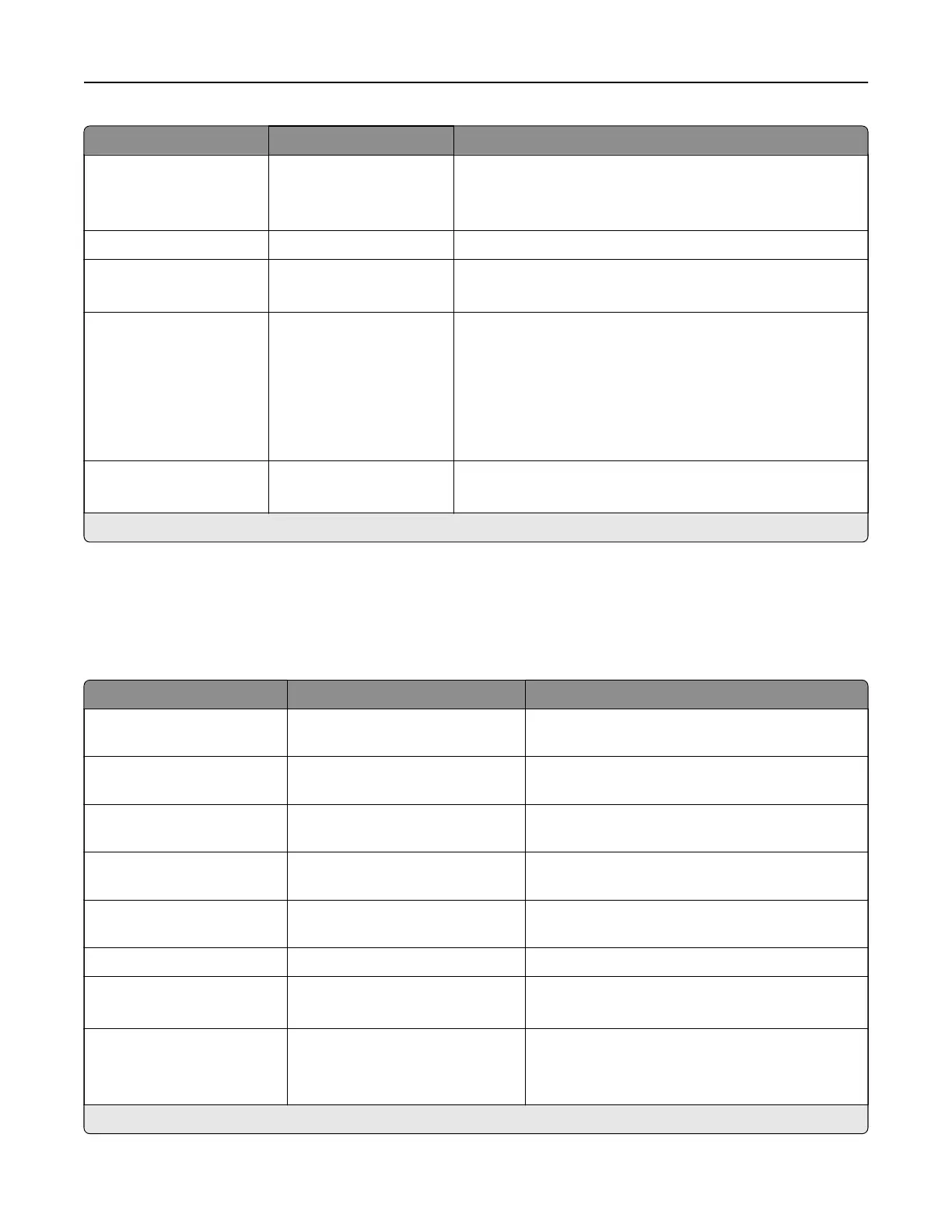
Menu item Settings Description
Sides O*
Short Edge
Long Edge
Specify the orientation of the original document when
scanning on both sides of the document.
Darkness 1–9 (5*) Set the darkness of the output.
Orientation Portrait*
Landscape
Specify the orientation of text and graphics on the page.
Original Size [List of paper sizes] Set the paper size of the original document.
Notes:
• Mixed Sizes is the U.S. factory default setting. A4 is
the international factory default setting.
• This setting may vary depending on your printer
model.
Use Multi‑Page TIFF O
On*
Choose between single‑ and multiple‑page TIFF files.
Note: An asterisk (*) next to a value indicates the factory default setting.
E-mail
Email Setup
Menu item Settings Description
Primary SMTP Gateway The setting is user-defined. Type the IP address or host name of the primary
SMTP server for sending email.
Primary SMTP Gateway
Port
1–65535(25*) Enter the port number of the primary SMTP server.
Secondary SMTP Gateway The setting is user-defined. Type the server IP address or host name of your
secondary or backup SMTP server.
Secondary SMTP Gateway
Port
1–65535 (25*) Enter the server port number of your secondary
or backup SMTP server.
SMTP Timeout 5–30 seconds (30*) Set the time before the printer times out if the
SMTP server does not respond.
Reply Address The setting is user-defined. Specify a reply address in the email.
Always use SMTP default
Reply Address
On
O*
Always use the default reply address in the SMTP
server.
Use SSL/TLS Disabled*
Negotiate
Required
Specify whether to send an email using an
encrypted link.
Note: An asterisk (*) next to a value indicates the factory default setting.
Printer menus 333



 To Next Page