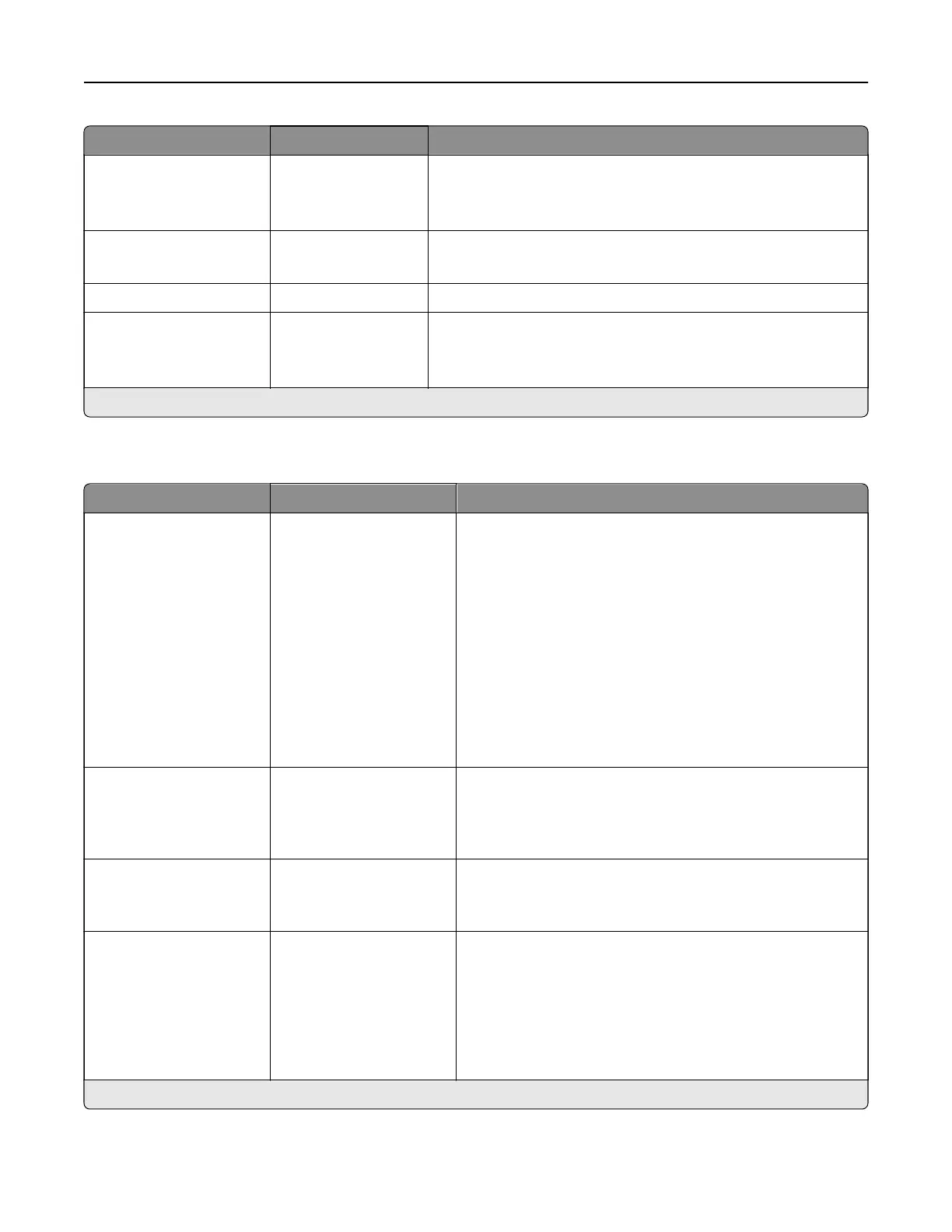
Menu item Settings Description
Pages per Side
Orientation
Auto*
Landscape
Portrait
Specify the orientation of multiple page images when using the
Pages per Side menu.
Pages per Side Border None*
Solid
Print a border around each page image when using the Pages
per Side menu.
Copies 1–9999 (1*) Specify the number of copies for each print job.
Print Area Normal*
Fit to page
Whole Page
Set the printable area on a sheet of paper.
Note: An asterisk (*) next to a value indicates the factory default setting.
Finishing
Menu item Settings Description
Staple Job O*
1 staple, top left corner
2 staples, left
1 staple, top right corner
2 staples, top
1 staple, bottom left
corner
2 staples, bottom
1 staple, bottom right
corner
2 staples, right
Specify the staple position for all print jobs.
Note: This menu item appears only when a staple
finisher
is installed.
Staple Test Start Determine whether the staple finisher is functioning
properly.
Note: This menu item appears only when a staple finisher
is installed.
Hole Punch O*
On
Punch holes along the edge of the printed output.
Note: This menu item appears only when a staple, hole
punch
finisher
is installed.
Hole Punch Mode 2 holes
3 holes
4 holes
Set the hole punch mode for the printed output.
Notes:
• 3 holes is the U.S. factory default setting. 4 holes is
the international factory default setting.
• This menu item appears only when a staple, hole
punch, or booklet finisher is installed.
Note: An asterisk (*) next to a value indicates the factory default setting.
Printer menus 303



 To Next Page