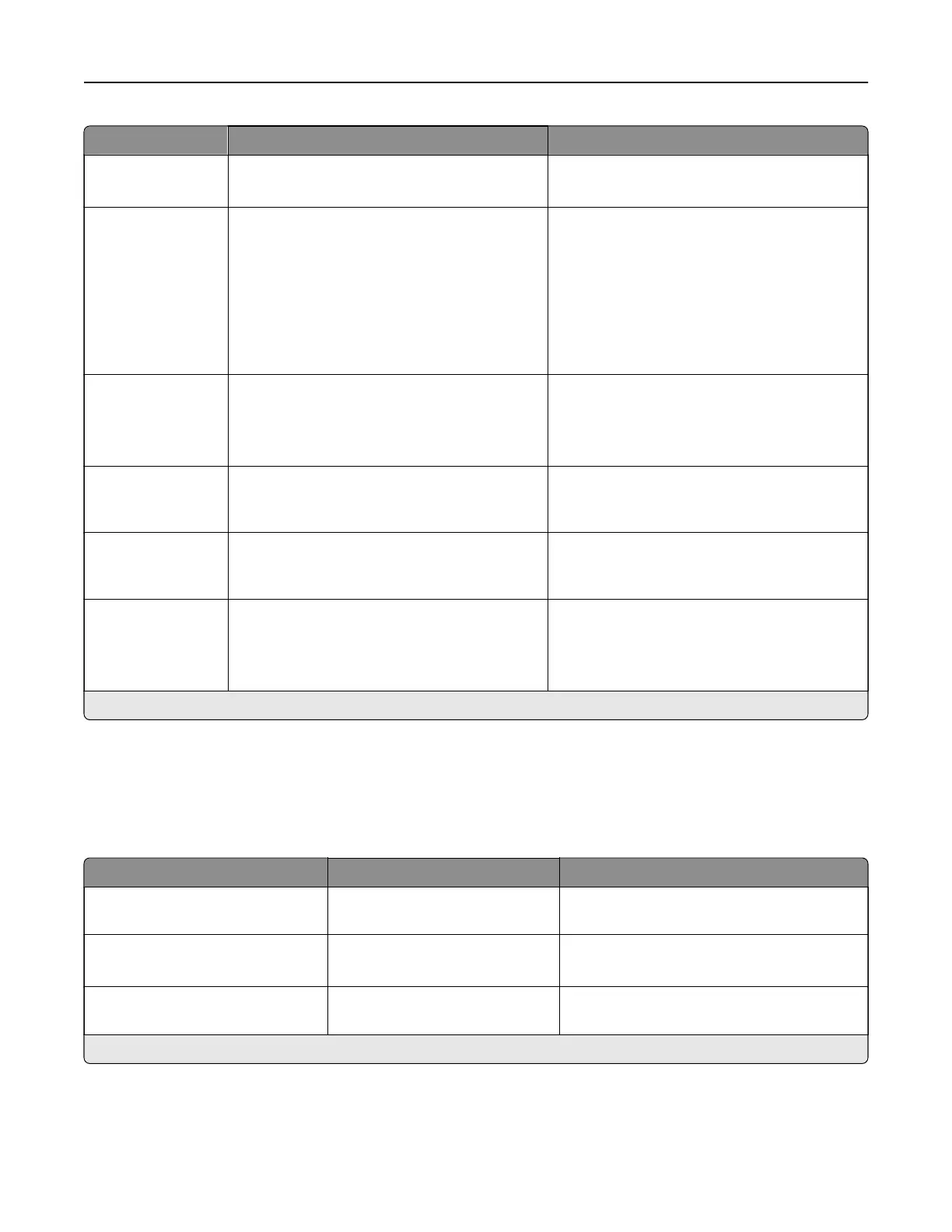
Menu item Settings Description
Default Print
Permission Login
Username/Password*
Username
Set the default login for Print Permission.
Security Reset
Jumper
Enable “Guest” access*
No Eect
Specify user access to the printer.
Notes:
• Enable “Guest” access gives anyone
access to all aspects of the printer.
• No
Eect
may make access to the
printer impossible when the required
security information is unavailable.
Use Intelligent
Storage Drive for
User Data
O
On*
Enable the intelligent storage drive to store
user data.
Note: This menu item is disabled when a
hard disk is installed.
Minimum
Password Length
0–32 (0*) Specify the minimum password length that is
used for internal accounts such as Password
and Username/Password accounts.
Enable
Password/PIN
Reveal
O
On*
Show the password or personal identification
number.
Allow Encryption
of Service
Nonvolatile
Memory
O*
On
Enable the encryption of service nonvolatile
memory in your device.
Note: This setting is available if Encrypt
Service Nonvolatile Memory is disabled.
Note: An asterisk (*) next to a value indicates the factory default setting.
Cloud Services
Cloud Services Enrollment
Menu item Settings Description
View More Information The setting is a read-only
information.
View more information on the usage of
Lexmark Cloud Services.
Enable communication with
Lexmark Cloud Services
O*
On
Enable the printer to communicate with
Lexmark Cloud Services.
View Current Status The setting is a read-only
information.
View the connection status between the
printer and Lexmark Cloud Services.
Note: An asterisk (*) next to a value indicates the factory default setting.
Printer menus 373



 To Next Page