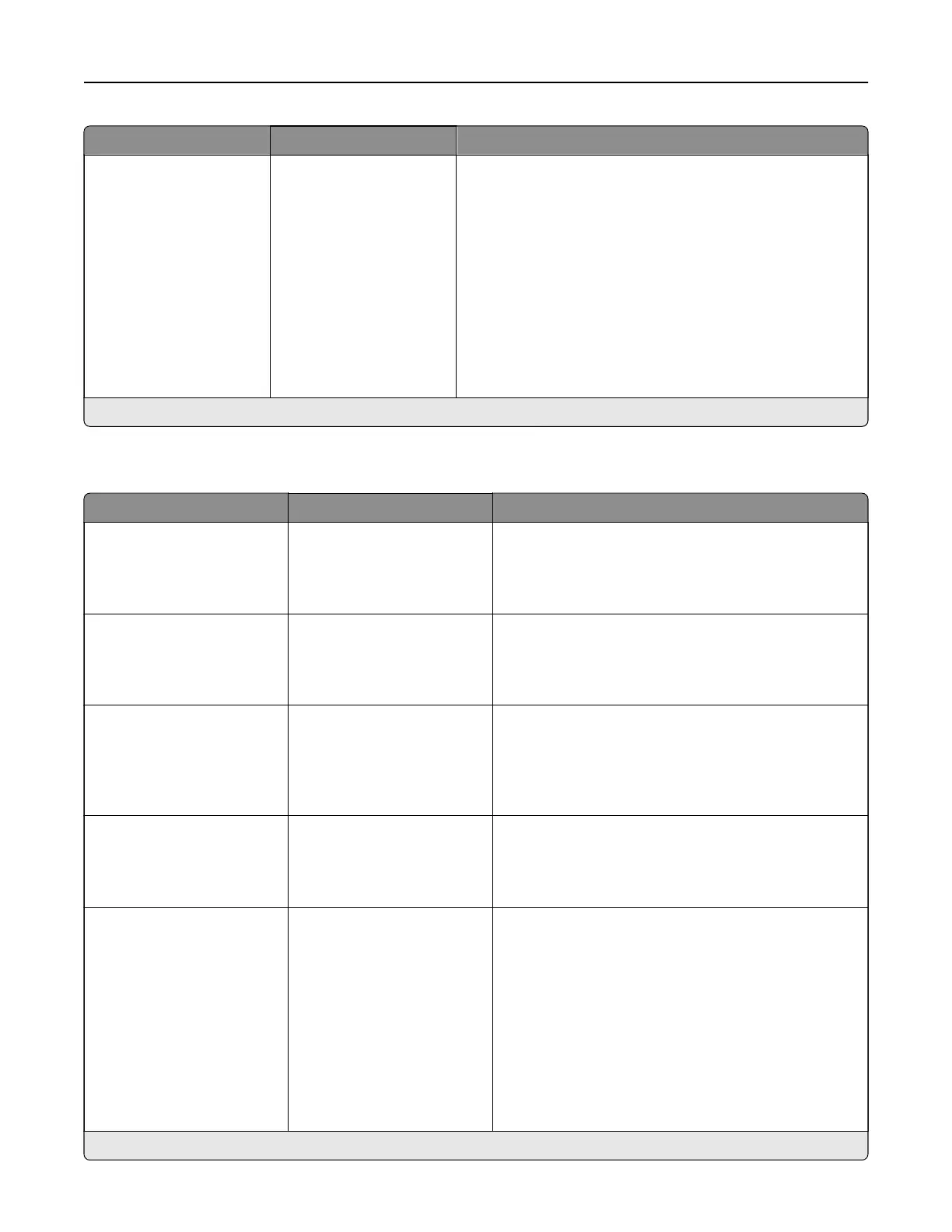
Menu item Settings Description
Oset Pages None*
Between Copies
Between Jobs
Oset the output of each print job or each copy of a print
job.
Notes:
• Between Copies osets each copy of a print job if
Collate is set to On [1,2,1,2,1,2]. If Collate is set to O
[1,1,1,2,2,2], then each set of printed pages is oset,
such as all pages designated as 1 and all pages
designated as 2.
• Between Jobs sets the same oset position for the
entire print job regardless of the number of copies
printed.
Note: An asterisk (*) next to a value indicates the factory default setting.
Setup
Menu item Settings Description
Printer Language PCL Emulation
PS Emulation*
Set the printer language.
Note: Setting a printer language default does not
prevent a software program from sending print jobs
that use another printer language.
Job Waiting O*
On
Preserve print jobs requiring supplies so that jobs not
requiring the missing supplies can print.
Note: This menu item appears only when a storage
drive is installed.
Job Hold Timeout 0–255 (30*) Set the time in seconds that the printer waits for user
intervention before it holds jobs that require
unavailable resources.
Note: This menu item appears only when a storage
drive is installed.
Download Target RAM*
Flash
Disk
Specify where to save all permanent resources that
have been downloaded to the printer.
Note: This menu item appears only when a storage
drive is installed.
Printer Usage Max Speed
Max Yield*
Determine if the retraction hardware disengages or
engages the color developer units during printing.
Notes:
• When set to Max Yield, the hardware remains
engaged with the color developer units when the
printer is idle.
• When set to Max Speed, the hardware remains
engaged with the color developer units
regardless of whether a job contains mono or
color content.
Note: An asterisk (*) next to a value indicates the factory default setting.
Printer menus 304



 To Next Page