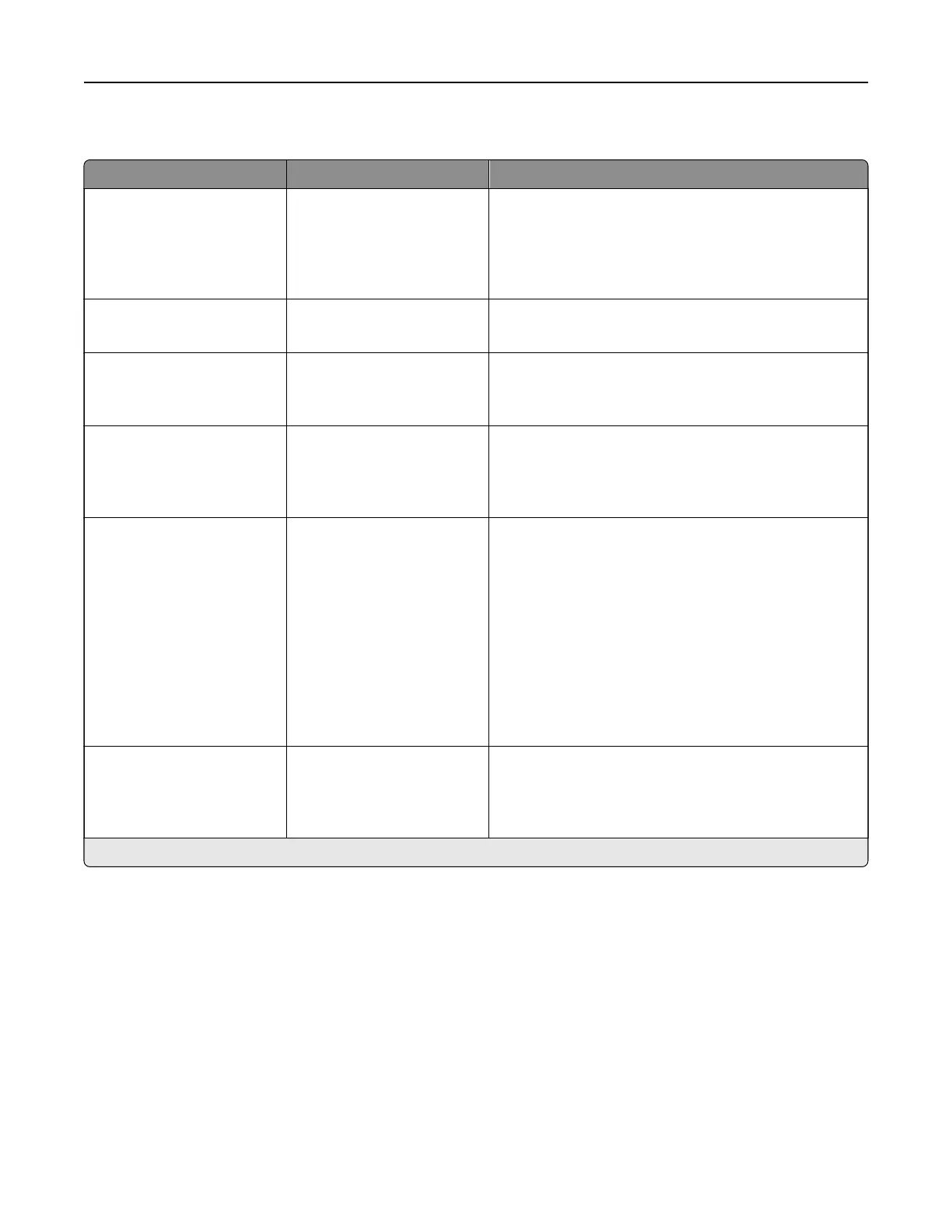
PostScript
Menu item Settings Description
Print PS Error O*
On
Print a page that describes the PostScript® emulation
error.
Note: When an error occurs, processing of the job
stops, the printer prints an error message, and the
rest of the print job is flushed.
Minimum Line Width 1–30 (2*) Set the minimum stroke width.
Note: Jobs printed in 1200 dpi use the value directly.
Lock PS Startup Mode O
On*
Disable the SysStart file.
Note: Enabling the SysStart
file
exposes your printer
or network to a security risk.
Image Smoothing O*
On
Enhance the contrast and sharpness of low‑resolution
images.
Note: This setting has no
eect
on images with a
resolution of 300 dpi or higher.
Font Priority Resident*
Flash/Disk
Establish the font search order.
Notes:
• Resident—sets the printer to search its memory
for the requested font before searching the
storage drive.
• Flash/Disk—sets the printer to search the storage
drive for the requested font before searching the
printer memory.
• This menu item appears only when a storage
drive is installed.
Wait Timeout O
On*
Enable the printer to wait for more data before
canceling a print job.
Note: When set to On, 40 seconds is the factory
default setting.
Note: An asterisk (*) next to a value indicates the factory default setting.
Printer menus 309



 To Next Page