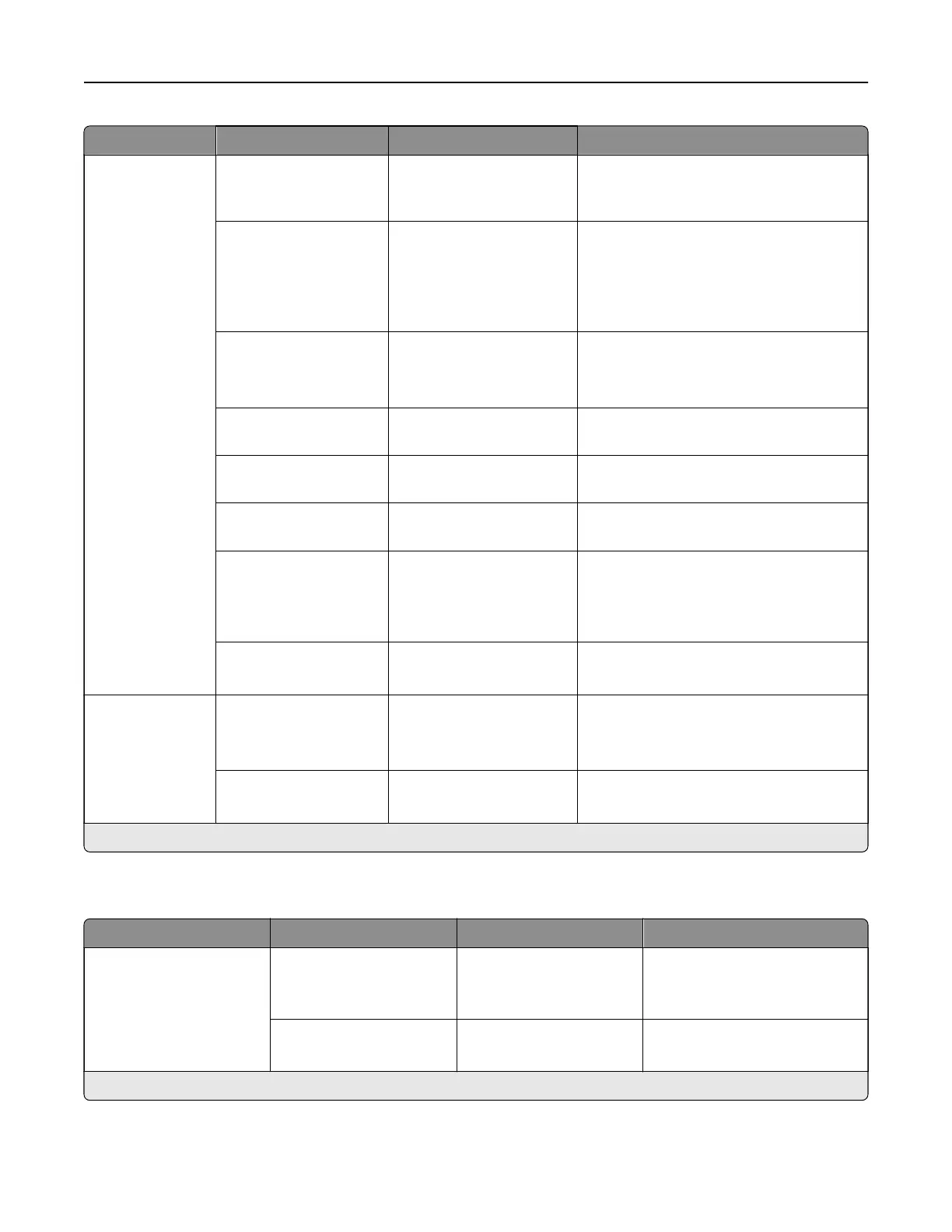
Menu item Submenu item Settings Description
Error Prevention ADF Multifeed Sensor O
On*
Set the printer to detect when the ADF
picks more than one sheet of paper at
once.
Auto Continue O
On*
Let the printer continue processing or
printing a job automatically after clearing
certain attendance conditions.
Note: When set to On, the default
setting is 5 seconds.
Auto Reboot Reboot when idle
Reboot always*
Reboot never
Set the printer to restart when an error
occurs.
Max Auto Reboots 1–20 (2*) Set the number of automatic reboots that
the printer can perform.
Auto Reboot Window 1–525600 (720*) Set the number of seconds before the
printer performs an automatic reboot.
Auto Reboot Counter The setting is a read‑only
information.
Show the number of automatic reboots
that the printer has performed.
Display Short Paper
Error
On
Auto‑clear*
Set the printer to show a message when
a short paper error occurs.
Note: Short paper refers to the size of
the paper loaded.
Page Protect O*
On
Set the printer to process the entire page
into the memory before printing it.
Jam Content
Recovery
Jam Recovery O
On
Auto*
Set the printer to reprint jammed pages.
Scanner Jam Recovery Job level
Page level*
Specify how to restart a scan job after
resolving a paper jam.
Note: An asterisk (*) next to a value indicates the factory default setting.
Power Management
Menu item Submenu item Settings Description
Sleep Mode Profile Print from Sleep Mode Stay awake after printing
Enter Sleep Mode after
printing*
Set the printer to stay awake or
enter Sleep Mode after printing.
Touch to Wake from
Deep Sleep
O
On*
Wake the printer from Deep
Sleep Mode.
Note: An asterisk (*) next to a value indicates the factory default setting.
Printer menus 290



 To Next Page