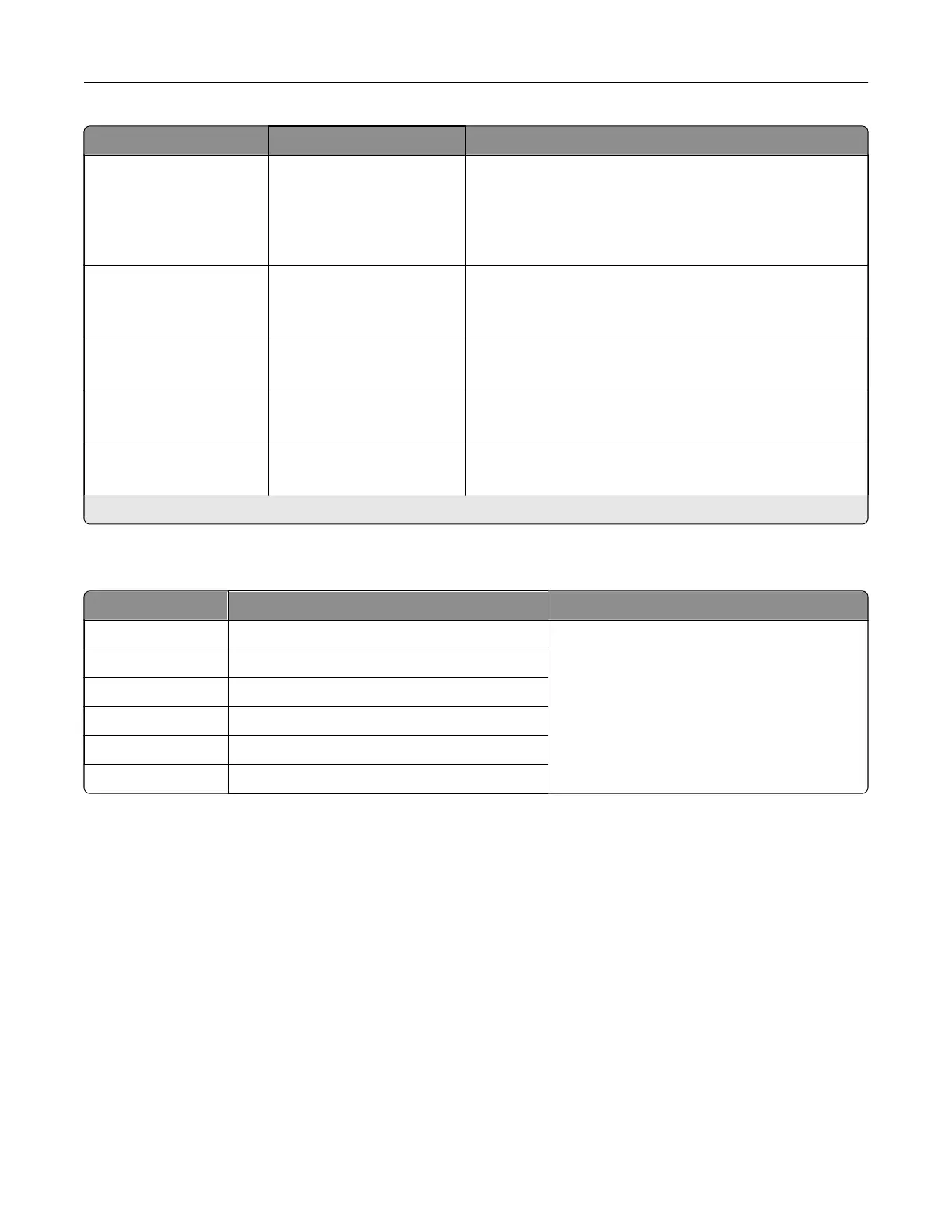
Menu item Settings Description
Custom Job Scanning O*
On
Set the printer to scan the first set of original documents
using the specified settings, and then scan the next set
with the same or
dierent
settings.
Note: This menu item appears only when a storage drive
is installed.
Scan Preview O
On*
Show a scan preview of the original document.
Note: This menu item appears only when a storage drive
is installed.
Allow Save as Shortcut O
On*
Save an email address as a shortcut.
E‑mail Images Sent As Attachment*
Web Link
Specify how to send the images that are included in the
email.
Reset Email Information
After Sending
O
On*
Reset the To, Subject, Message, and Filename fields to
their default values after sending an email.
Note: An asterisk (*) next to a value indicates the factory default setting.
Web Link Setup
Menu item Settings Description
Server The setting is user-defined. Specify the credentials of the server that is
hosting the images that are included in the
email.
Login The setting is user-defined.
Password The setting is user-defined.
Path The setting is user-defined.
File Name The setting is user-defined.
Web Link The setting is user-defined.
Printer menus 339



 To Next Page