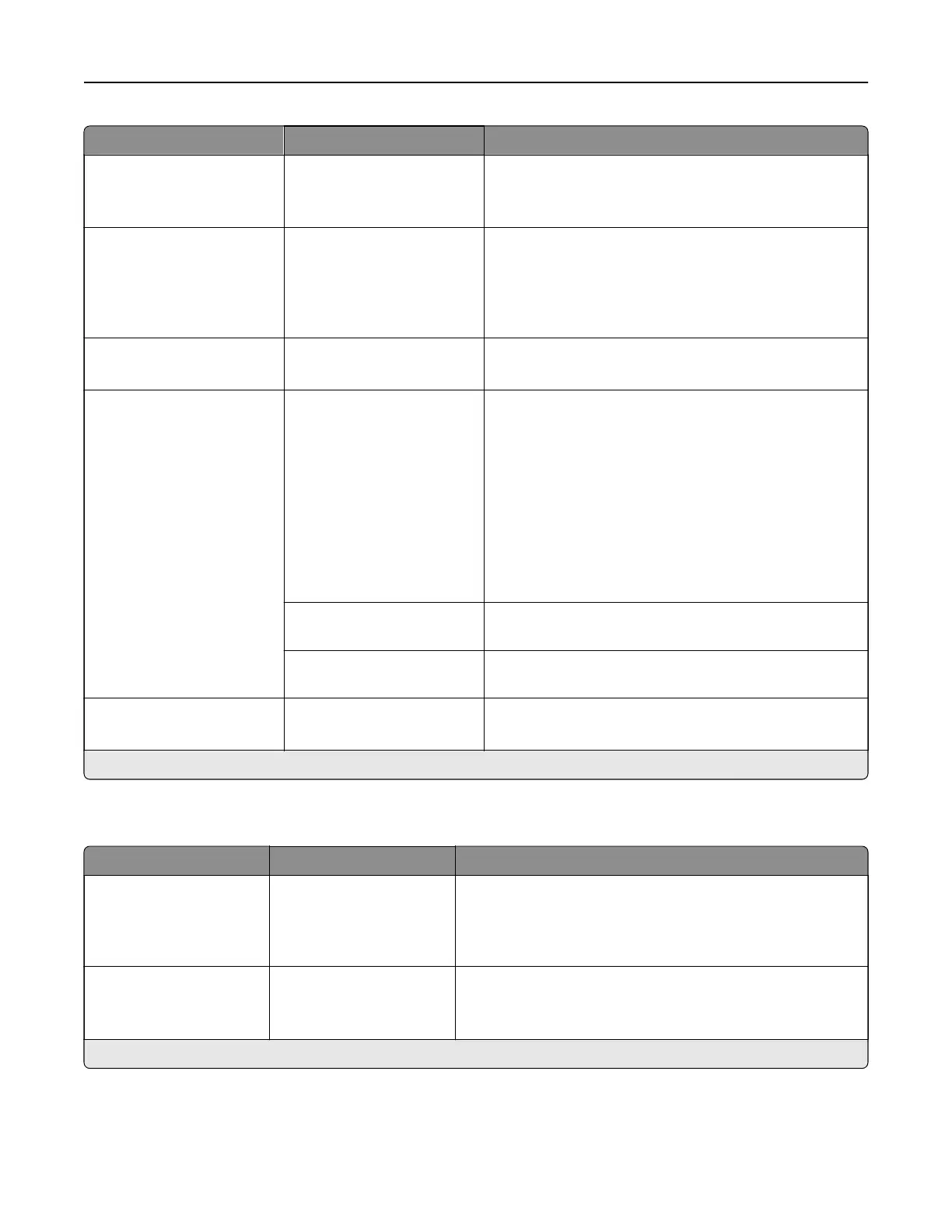
Menu item Settings Description
A4 Width 198 mm*
203 mm
Set the width of the logical page on A4‑size paper.
Note: Logical page is the space on the physical page
where data is printed.
Auto CR after LF On
O*
Set the printer to perform a carriage return after a line
feed control command.
Note: Carriage return is a mechanism that commands
the printer to move the position of the cursor to the
first position on the same line.
Auto LF after CR On
O*
Set the printer to perform a line feed after a carriage
return control command.
Tray Renumber Assign MP Feeder
Assign Tray [x]
Assign Manual Paper
Assign Manual Envelope
Configure the printer to work with a dierent print driver
or custom application that uses a dierent set of source
assignments to request a given paper source.
Choose from the following options:
O*—The printer uses the factory default paper
source assignments.
None—The paper source ignores the Select Paper
Feed command.
0–199—Select a numeric value to assign a custom
value to a paper source.
View Factory Defaults Show the factory default value assigned for each paper
source.
Restore Defaults Restore the tray renumber values to their factory
defaults.
Print Timeout O
On* (90)
Set the printer to end a print job after it has been idle for
the specified amount of time.
Note: An asterisk (*) next to a value indicates the factory default setting.
Image
Menu item Settings Description
Auto Fit On
O*
Select the best available paper size and orientation setting
for an image.
Note: When set to On, this menu item overrides the
scaling and orientation settings for the image.
Invert O*
On
Invert bitonal monochrome images.
Note: This menu item does not apply to GIF or JPEG
image formats.
Note: An asterisk (*) next to a value indicates the factory default setting.
Printer menus 311



 To Next Page