Home
Lexmark
All in One Printer
CX833
Page 235
Lexmark CX833 - Page 235
561 pages
Manual
Save Page as PDF
To Next Page
To Next Page
To Previous Page
To Previous Page
Loading...
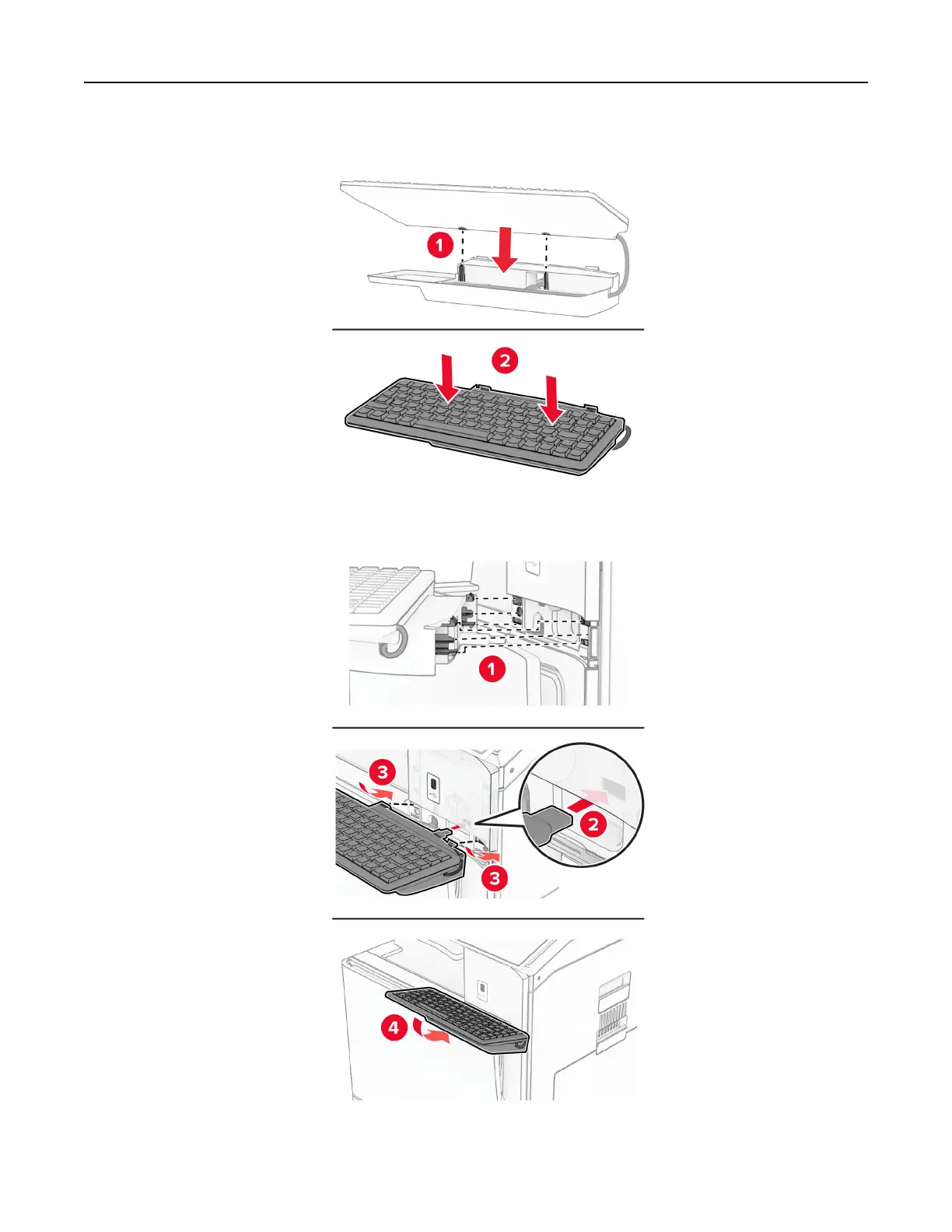
8
Align, and then attach th
e keyboard to the base.
9
Align the shelf
, connect the ke
yboard cable to the printer
,
insert the shelf
, and then attach it to the printer
.
10
T
urn on the printer
.
Set up, install, and configure
235
234
236
Table of Contents
Main Page
Contents
2
Safety information
6
Conventions
6
Product statements
6
Learn about the printer
9
Finding information about the printer
9
Finding the printer serial number
10
Printer configurations
11
Using the control panel
13
Home screen icons
14
Colors of the indicator light
14
Using the automatic document feeder and scanner glass
15
Locating the security slot
15
Selecting paper
15
Paper guidelines
15
Paper characteristics
16
Unacceptable paper
17
Using recycled paper
17
Storing paper
17
Selecting preprinted forms and letterhead
18
Supported paper sizes
18
Paper sizes supported by the basic configuration
18
Paper sizes supported by the optional trays
21
Paper sizes supported by the output bins
23
Paper sizes supported for staple and punch jobs
31
Paper sizes supported for fold jobs
40
Paper sizes supported for offset stacking jobs
49
Supported paper weights
57
Supported paper types
57
Additional printer features and support
61
Supported apps
61
Supported flash drives and file types
61
Available internal options
62
Set up, install, and configure
63
Selecting a location for the printer
63
Printer ports
64
Configuring apps and solutions
65
Setting up Scan Center
65
Using Display Customization
65
Configuring bookmarks
66
Configuring Address Book
67
Setting up and using the accessibility features
67
Activating Voice Guidance
67
Deactivating Voice Guidance
68
Navigating the screen using gestures
68
Using the on-screen keyboard
72
Enabling Magnification mode
72
Adjusting the Voice Guidance speech rate
72
Adjusting the default headphone volume
72
Adjusting the default internal speaker volume
72
Enabling spoken passwords or personal identification numbers
73
Setting up the printer to fax
73
Setting up the fax function using analog fax
73
Setting up the fax function using etherFAX
74
Setting up the fax function using fax server
74
Setting up fax using a standard telephone line
75
Setting up fax in countries or regions with different telephone wall jacks and plugs
78
Connecting to a distinctive ring service
80
Setting the fax date and time
80
Configuring daylight saving time
80
Configuring the fax speaker settings
80
Loading paper and specialty media
80
Setting the size and type of the specialty media
81
Configuring Universal paper settings
81
Loading the 550-sheet tray
81
Loading the 2000-sheet tandem tray
84
Loading the 1500-sheet tray
87
Loading the multipurpose feeder
91
Linking trays
93
Installing and updating software, drivers, and firmware
94
Installing the printer software
94
Installing the fax driver
94
Adding printers to a computer
94
Exporting a configuration file
95
Importing a configuration file
95
Adding available options in the print driver
96
Updating firmware
97
Updating the firmware using the control panel
97
Updating the firmware using the Embedded Web Server
97
Installing hardware options
98
Installing the optional 550-sheet tray
98
Installing the 2 x 550-sheet tray
104
Installing the 2000-sheet tandem tray
110
Installing the cabinet
117
Installing the 1500-sheet tray
123
Installing the staple finisher
129
Installing the offset stacker
140
Installing the paper transport with folding option
146
Installing the staple, hole punch finisher and paper transport option
160
Installing the staple, hole punch finisher and paper transport with folding option
176
Installing the booklet finisher and paper transport option
196
Installing the booklet finisher and paper transport with folding option
211
Installing the keyboard shelf
232
Installing a fax card
236
Installing the card reader
240
Installing an internal solutions port
245
Changing the printer port settings after installing an internal solutions port
251
Networking
251
Connecting the printer to a Wi-Fi network
251
Connecting the printer to a wireless network using Wi-Fi Protected Setup (WPS)
252
Configuring Wi-Fi Direct
252
Connecting a mobile device to the printer
253
Connecting a computer to the printer
253
Deactivating the Wi-Fi network
254
Checking the printer connectivity
254
Setting up serial printing (Windows only)
254
Secure the printer
255
Erasing printer memory
255
Erasing printer storage drive
255
Restoring factory default settings
255
Statement of Volatility
256
Print
257
Printing from a computer
257
Printing from a mobile device
257
Printing from a mobile device using Lexmark Print
257
Printing from a mobile device using Mopria™ Print Service
257
Printing from a mobile device using AirPrint
258
Printing from a mobile device using Wi-Fi Direct®
258
Printing from a flash drive
258
Configuring confidential jobs
259
Printing confidential and other held jobs
260
Printing a font sample list
261
Printing a directory list
261
Placing separator sheets in print jobs
261
Canceling a print job
261
Adjusting toner darkness
262
Copy
263
Making copies
263
Copying photos
263
Copying on letterhead
263
Copying on both sides of the paper
263
Reducing or enlarging copies
264
Collating copies
264
Placing separator sheets between copies
264
Copying multiple pages onto a single sheet
264
Copying cards
265
Creating a copy shortcut
265
E-mail
266
Configuring the SMTP settings
266
Sending an email
273
Creating an email shortcut
274
Fax
275
Sending a fax
275
Scheduling a fax
275
Creating a fax destination shortcut
276
Changing the fax resolution
276
Adjusting the fax darkness
276
Printing a fax log
277
Blocking junk faxes
277
Holding faxes
277
Forwarding a fax
277
Scan
278
Scanning to a computer
278
Scanning to an FTP server
279
Creating an FTP shortcut
279
Scanning to a network folder
280
Configuring a network folder destination
280
Creating a network folder shortcut
280
Scanning to a flash drive
281
Printer menus
282
Menu map
282
Device
283
Preferences
283
Eco-Mode
286
Remote Operator Panel
286
Notifications
287
Power Management
290
Share Data with Lexmark
291
Accessibility
291
Restore Factory Defaults
292
Maintenance
293
Configuration Menu
293
Out of Service Erase
301
Update firmware
301
About this Printer
301
Print
302
Layout
302
Finishing
303
Setup
304
Quality
305
Job Accounting
307
PDF
308
PostScript
309
PCL
310
Image
311
Paper
312
Tray Configuration
312
Media Configuration
313
Bin Configuration
314
Copy
315
Copy Defaults
315
Fax
319
Fax Defaults
319
Fax Mode
319
Fax Setup
320
Fax Server Setup
330
E-mail
333
Email Setup
333
Email Defaults
334
Web Link Setup
339
FTP
340
FTP Defaults
340
USB Drive
344
Flash Drive Scan
344
Flash Drive Print
347
Network/Ports
349
Network Overview
349
Wireless
350
Wi-Fi Direct
353
Mobile Services Management
353
Ethernet
354
TCP/IP
355
SNMP
357
IPSec
358
802.1x
359
LPD Configuration
361
HTTP/FTP Settings
363
ThinPrint
364
USB
364
Restrict external network access
365
Security
366
Login Methods
366
Manage Permissions
366
Local Accounts
367
Default Login Methods
367
Schedule USB Devices
368
Security Audit Log
368
Login Restrictions
370
Confidential Print Setup
371
Encryption
372
Erase Temporary Data Files
372
Solutions LDAP Settings
372
Miscellaneous
372
Cloud Services
373
Cloud Services Enrollment
373
Reports
374
Menu Settings Page
374
Device
374
Print
374
Shortcuts
374
Fax
375
Network
375
Troubleshooting
375
Forms Merge
375
Printing the Menu Settings Page
376
Printer finisher options
377
Using the staple finisher
377
Using the staple, hole-punch finisher
377
Using the offset stacker
378
Using the booklet finisher
379
Using the paper transport with folding option
380
Maintain the printer
381
Checking the status of parts and supplies
381
Configuring supply notifications
381
Setting up email alerts
381
Generating reports and logs
382
Ordering parts and supplies
383
Using genuine Lexmark parts and supplies
383
Ordering a toner cartridge
383
Ordering a black imaging unit
385
Ordering a color imaging kit
386
Ordering the waste toner bottle
386
Ordering a staple cartridge
386
Ordering a maintenance kit
386
Replacing parts and supplies
387
Replacing a toner cartridge
387
Replacing the black imaging unit
389
Replacing the color imaging kit
396
Replacing the waste toner bottle
403
Replacing the fuser
405
Replacing the tray insert
407
Replacing the size guides in the optional 550-sheet tray
408
Replacing the cover in the optional 550-sheet tray
410
Replacing the booklet finisher top bin extension
412
Replacing the hole punch box
414
Replacing the standard bin
415
Replacing the fan cover
417
Replacing the right cover
419
Replacing the glass cleaner tool
420
Replacing the paper transport connector cover
421
Replacing the staple cartridge unit
423
Replacing the staple cartridge in the staple finisher
423
Replacing the staple cartridge in the staple, hole punch finisher
426
Replacing the staple cartridge in the booklet finisher
428
Replacing the staple cartridge holders in the booklet finisher
431
Resetting the supply usage counters
432
Cleaning printer parts
432
Cleaning the printer
433
Cleaning the touch screen
433
Cleaning the scanner
434
Cleaning the printhead lenses
436
Emptying the hole punch box
439
Saving energy and paper
440
Configuring the power save mode settings
440
Adjusting the brightness of the display
441
Conserving supplies
441
Moving the printer to another location
441
Troubleshoot a problem
442
Print quality problems
442
Printer error codes
443
Printing problems
455
Print quality is poor
455
Blank or white pages
455
Dark print
456
Ghost images
457
Gray or colored background
457
Incorrect margins
458
Light print
458
Missing colors
459
Mottled print and dots
460
Print crooked or skewed
461
Solid color or black images
461
Text or images cut off
462
Toner easily rubs off
463
Uneven print density
463
Horizontal dark lines
464
Vertical dark lines
465
Horizontal white lines
465
Vertical white lines
466
Repeating defects
467
Print jobs do not print
468
Confidential and other held documents do not print
468
Job prints from the wrong tray or on the wrong paper
468
Slow printing
469
The printer is not responding
469
Unable to read flash drive
470
Enabling the USB port
470
Clearing jams
470
Avoiding jams
470
Identifying jam locations
471
Paper jam in the standard tray
473
Paper jam in the optional 550-sheet tray
474
Paper jam in the automatic document feeder
476
Paper jam in the multipurpose feeder
478
Paper jam in the 2 x 550-sheet tray
479
Paper jam in the 2000-sheet tandem tray
481
Paper jam in the 1500-sheet tray
481
Paper jam in door B
482
Paper jam in the standard bin
486
Paper jam in the staple finisher
486
Paper jam in the paper transport with folding option
488
Paper jam in the staple, hole punch finisher
491
Paper jam in the booklet finisher
502
Network connection problems
521
Cannot open Embedded Web Server
521
Cannot connect the printer to the Wi-Fi network
521
Hardware options problems
522
Cannot detect internal option
522
Internal solutions port does not operate correctly
522
Parallel or serial interface card does not operate correctly
523
Defective flash detected
523
Not enough free space in flash memory for resources
523
Issues with supplies
523
Replace cartridge, printer region mismatch
523
Refilled regular [color] cartridge
524
Non-Lexmark supply
524
Paper feed problems
525
Paper curl
525
Envelope seals when printing
525
Collated printing does not work
526
Tray linking does not work
526
Paper frequently jams
526
Jammed pages are not reprinted
526
Emailing problems
527
Disabling the “SMTP server not set up” error message
527
Cannot send emails
527
Faxing problems
527
Caller ID is not shown
527
Cannot send or receive faxes using analog fax
527
Can receive but not send faxes using analog fax
528
Can send but not receive faxes using analog fax
528
Cannot set up etherFAX
529
Cannot send or receive faxes using etherFAX
529
Poor fax print quality
529
Missing information on the fax cover page
530
Cannot send the fax cover page from the computer
530
Scanning problems
530
Cannot scan to a computer
530
Cannot scan to a network folder
530
Partial copies of document or photo
531
Poor copy quality
531
Vertical dark streaks when scanning from the ADF
532
Jagged image or text when scanning from the ADF
532
Scan job was not successful
533
Scanner does not close
533
Scanning takes too long or freezes the computer
533
Scanner does not respond
533
Adjusting scanner registration
534
Adjusting ADF registration
534
Color quality problems
534
Modifying the colors in printed output
534
FAQ about color printing
535
The print appears tinted
536
Contacting customer support
537
Recycle and dispose
538
Recycling Lexmark products
538
Recycling Lexmark packaging
538
Notices
539
Product information
539
Edition notice
539
GOVERNMENT END USERS
539
Trademarks
540
Licensing notices
540
Noise emission levels
540
Waste from Electrical and Electronic Equipment (WEEE) directive
541
India E-Waste notice
541
Lithium-ion rechargeable battery
542
Environmental labeling for packaging
542
Product disposal
543
Returning Lexmark cartridges for reuse or recycling
543
Static sensitivity notice
543
ENERGY STAR
544
Temperature information
544
Laser notice
544
Power consumption
545
Product power consumption
545
Sleep Mode
545
Hibernate Mode
546
Off mode
546
Total energy usage
546
Applicability of Regulation (EU) 2019/2015 and (EU) 2019/2020
546
The UK Product Security and Telecommunications Infrastructure Act 2022 (PSTI Act)—Summary Statement ...
546
Thailand NBTC technical standards conformity statementคำประกาศเรื่องการเป็นไปตามมาตรฐานทางเทคนิคของ ...
547
Regulatory notices for wireless products
547
Modular component notice
547
Exposure to radio frequency radiation
547
Innovation, Science and Economic Development Canada
547
European Community (EC) directives conformity
548
United Kingdom (UK) conformity
548
Notice to users in Thailandประกาศถึงผู้ใช้ในประเทศไทย
549
Federal Communications Commission (FCC) compliance information statement
550
European Community (EC) directives conformity
551
United Kingdom (UK) conformity
551
Radio interference notice
552
STATEMENT OF LIMITED WARRANTY FOR LEXMARK LASER PRINTERS, LEXMARK LED PRINTERS, AND LEXMARK MULTIFUN ...
552
Index
555
Related product manuals
Lexmark CX625
299 pages
Lexmark CX522
299 pages
Lexmark CX331
243 pages
Lexmark CX310
256 pages
Lexmark CX410
346 pages
Lexmark CX532
336 pages
Lexmark CX431
254 pages
Lexmark CX737
363 pages
Lexmark CX510
353 pages
Lexmark CX310n
394 pages
Lexmark CX510de
394 pages
Lexmark CX310dn
394 pages



 To Next Page