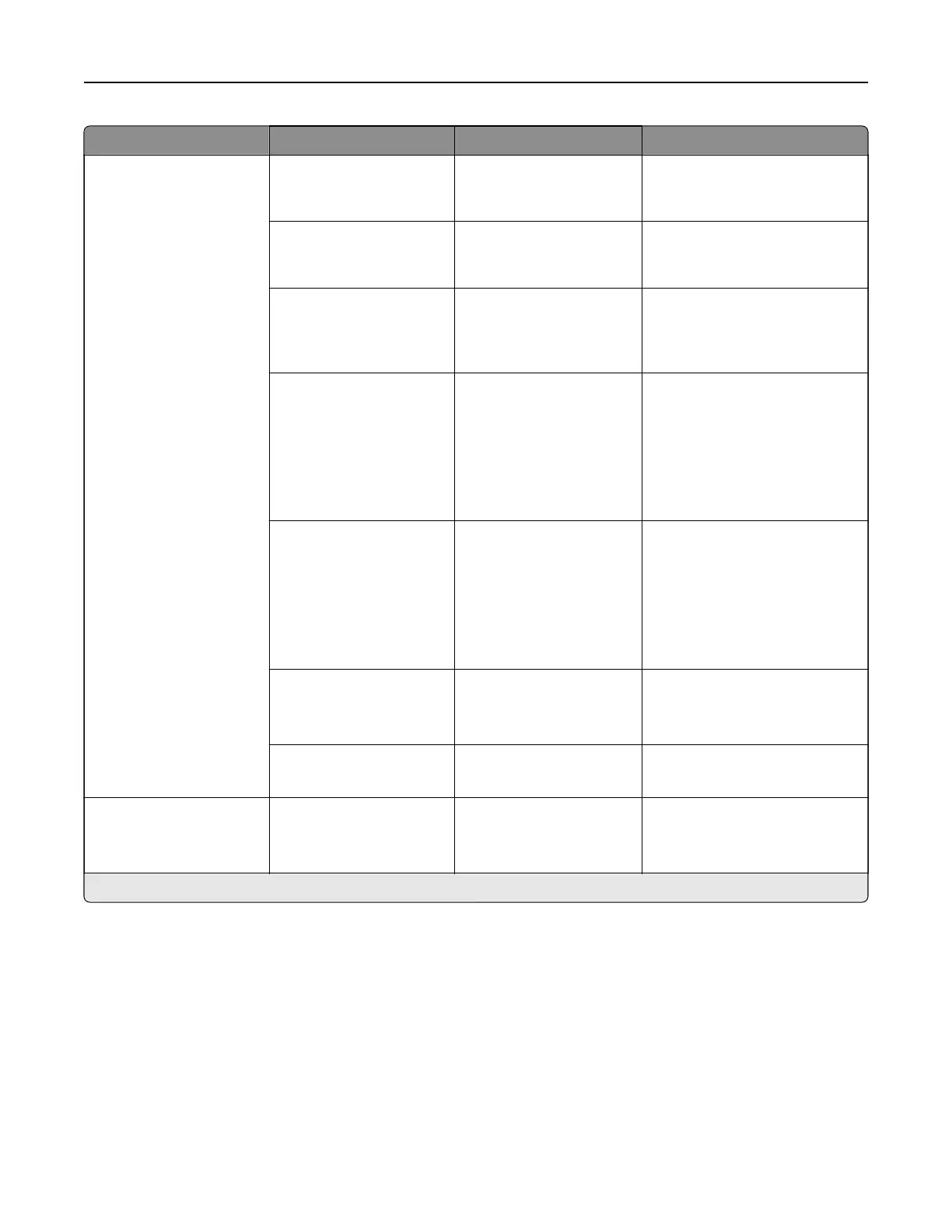
Menu item Submenu item Settings Description
Tray Configuration Size Sensing Tray [x] Sensing (On*) Set the tray to sense
automatically the paper size
loaded into it.
Tray Linking Automatic*
O
Set the printer to link the trays
that have the same paper type
and paper size settings.
Show Tray Insert
Message
O
Only for unknown sizes*
Always
Display a message that lets the
user change the paper size and
paper type settings after
inserting the tray.
Paper Prompts Auto*
Multipurpose Feeder
Manual Paper
Set the paper source that the
user fills when a prompt to load
paper appears.
Note: For Multipurpose
Feeder to appear, in the Paper
menu set Configure MP to
Cassette.
Envelope Prompts Auto*
Multipurpose Feeder
Manual Envelope
Set the paper source that the
user fills when a prompt to load
envelope appears.
Note: For Multipurpose
Feeder to appear, in the Paper
menu set Configure MP to
Cassette.
Action for Prompts Prompt user*
Continue
Use current
Set the printer to resolve paper-
or envelope-related change
prompts.
Multiple Universal Sizes O*
On
Set the tray to support multiple
universal paper sizes.
Reports N/A Menu Settings Page
Event Log
Event Log Summary
Print reports about printer menu
settings, status, and event logs.
Note: An asterisk (*) next to a value indicates the factory default setting.
Printer menus 294



 To Next Page