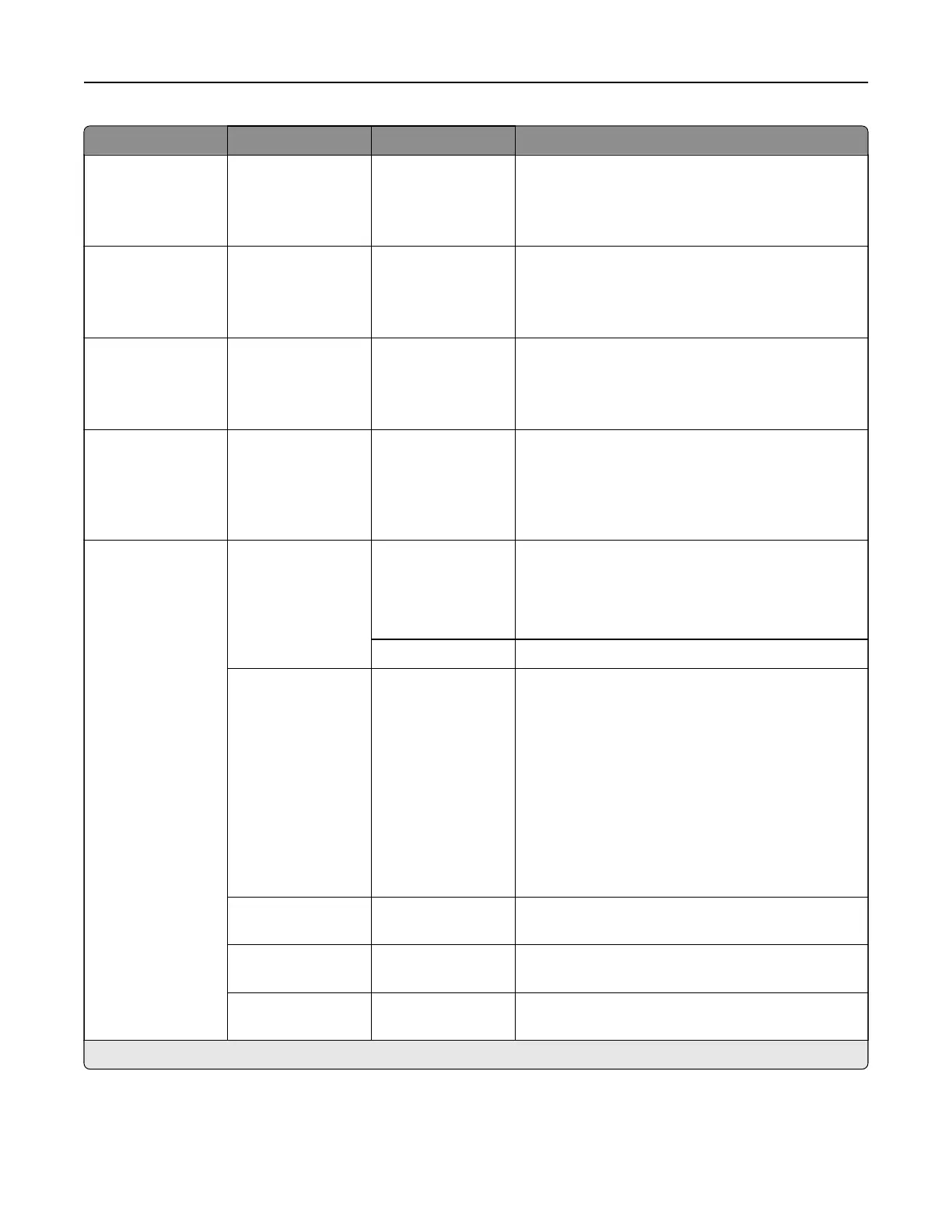
Menu item Submenu item Settings Description
Color Saver N/A O*
On
Reduce the amount of toner used to print graphics
and images.
Note: When set to On, this setting overrides the
value of the Toner Darkne ss setting.
RGB Brightness N/A ‑6 to 6 (0*) Adjust the brightness of every RGB and gray object
on the page.
Note: This setting does not aect files where
CMYK color specifications are used.
RGB Contrast N/A 0 to 5 (0*) Adjust the contrast of every RGB and gray object
on a page.
Note: This setting does not aect files where
CMYK color specifications are used.
RGB Saturation N/A 0 to 5 (0*) Preserve the black and white values while
adjusting the color values of every object on the
page.
Note: This setting does not aect files where
CMYK color specifications are used.
Advanced Imaging Color Balance Cyan (0*)
Magenta (0*)
Ye l l o w (0*)
Black (0*)
Adjust the amount of toner that is used for each
color.
Reset Defaults Reset all color settings to their default values.
Color Correction O
Auto*
Manual
Modify the color settings that are used to print
documents.
Notes:
•
O
—sets the printer to receive the color
correction from the software.
• Auto—sets the printer to apply dierent color
profiles
to each object on the printed page.
• Manual—allows the customization of the RGB
or CMYK color conversions applied to each
object on the printed page.
Color Samples Print Color
Samples
Print sample pages for each of the RGB and CMYK
color conversion tables that are used in the printer.
Color Adjust Color Adjust Calibrate the printer to adjust color variations in the
printed output.
Spot Color
Replacement
Set Custom CMYK Assign specific CMYK values to 20 named spot
colors.
Note: An asterisk (*) next to a value indicates the factory default setting.
Printer menus 306



 To Next Page