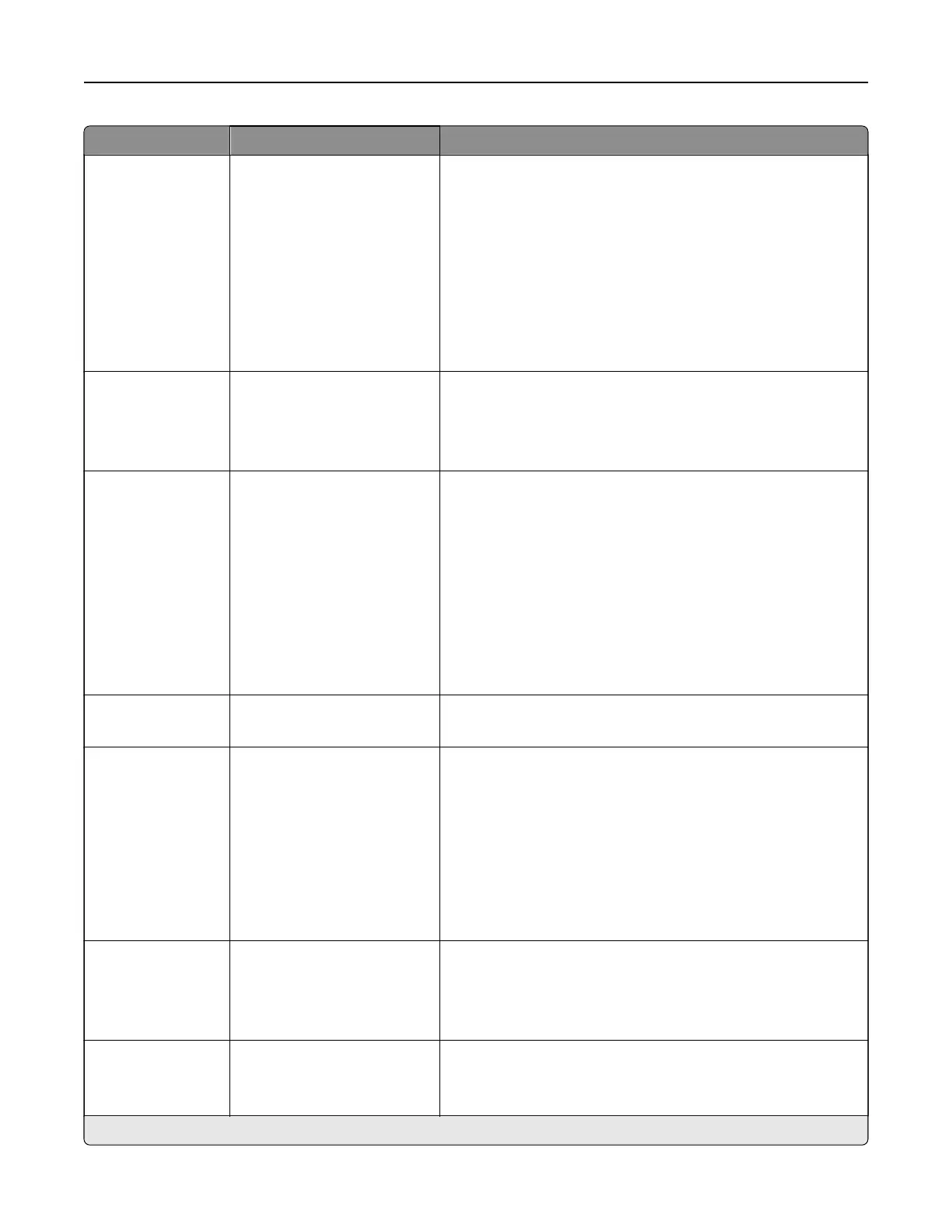
Menu item Settings Description
Staple O*
1 staple, top left corner
2 staples, left
1 staple, top right corner
2 staples, top
1 staple, bottom left corner
2 staples, bottom
1 staple, bottom right corner
2 staples, right
Specify the staple position for all print jobs.
Note: This menu item appears only when a staple
finisher
is
installed.
Hole Punch O*
2 holes
3 holes
4 holes
Set the punch mode for all print jobs.
Note: This menu item appears only when a staple, hole
punch, or booklet
finisher
is installed.
Oset Pages None*
Between Copies
Between Jobs
Oset the output of each print job or each copy of a print job.
Notes:
• Between Copies—osets each copy of a print job if
Collate is set to On [1,2,1,2,1,2]. If Collate—is set to
O
[1,1,1,2,2,2], then each set of printed pages is oset, such
as all pages designated as 1 and all pages designated as
2.
• Between Jobs—sets the same oset position for the
entire print job regardless of the number of copies
printed.
Flip Style Long Edge*
Short Edge
Determine which side of the paper is bound when performing
two-sided printing.
Pages per Side O*
2 pages per side
3 pages per side
4 pages per side
6 pages per side
9 pages per side
12 pages per side
16 pages per side
Print multiple page images on one side of a sheet of paper.
Pages per Side
Ordering
Horizontal*
Reverse Horizontal
Reverse Vertical
Vertical
Specify the positioning of multiple page images when using
the Pages per Side menu.
Pages per Side
Orientation
Auto*
Landscape
Portrait
Specify the orientation of multiple page images when using
the Pages per Side menu.
Note: An asterisk (*) next to a value indicates the factory default setting.
Printer menus 348



 To Next Page