MAINTENANCE AN D SERVICING
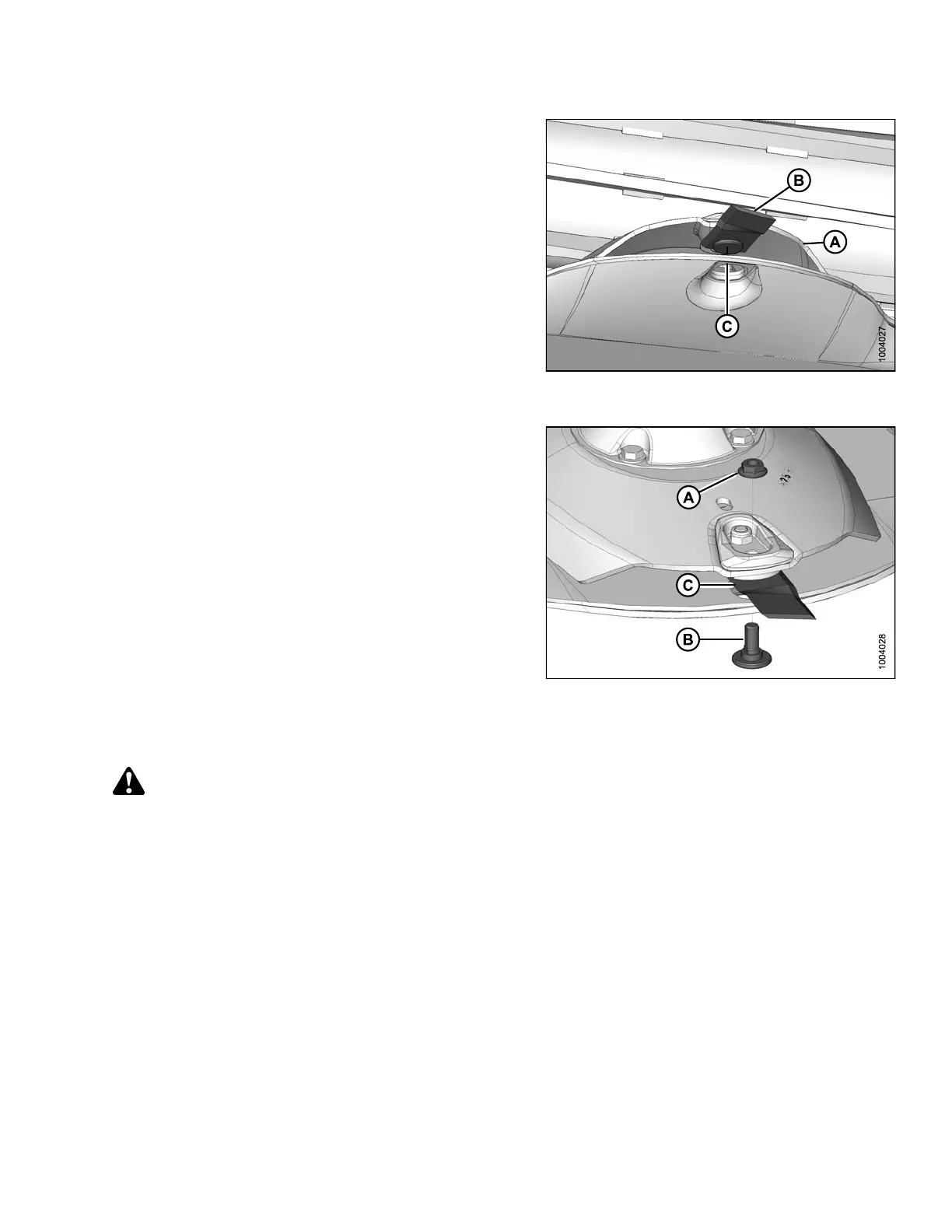
4. Rotate disc (A) s o that blade (B) faces forward and
lines up with hole (C) in rock guard.
Figure 4.58: Cutterblade Aligned with Hole in
Rock Guard
5. Place a pin (or equivalent) in the front hole of the
rock guard to prevent disc rotation while loosening
blade bolts.
6. Clean debris from blade attachment area.
7. Remove nut (A) and discard.
IMPORTAN T:
Nuts are o ne-time-use only. When flipping or changing
a bla de , replace using a new nut only.
8. Remove shoulder bolt (B) and blade (C).
Figure 4.59: Nut, Shoulder Bolt, and
Cutter Blade
Installing Cutterblades
CAUTION
Cutter blades have two cutting edges. Exercise caution when working around the blades. Blades are sharp
and can cause serious injury. Wear gloves when handling blades.
IMPORTAN T:
If you are unsure which direction the spindles rotate, refer to 4.4.4 Cutterbar Crop Stream Confi guration, page 141.
147910 149 Revision A





 To Next Page