OPERATION
3.6 Setting up the Mower Conditioner Hitch
MacDon R113 and R116 pull type mower conditioners are shipped from the factory fitted for either a drawbar or
two-point hitch. Your Dealer will have installed the proper hitch adapter for your tractor.
3.6.1 Installing D rawbar Hitch Adapter
CAUTION
Shut off tractor, engage parking brake, and remove key before working around hitch.
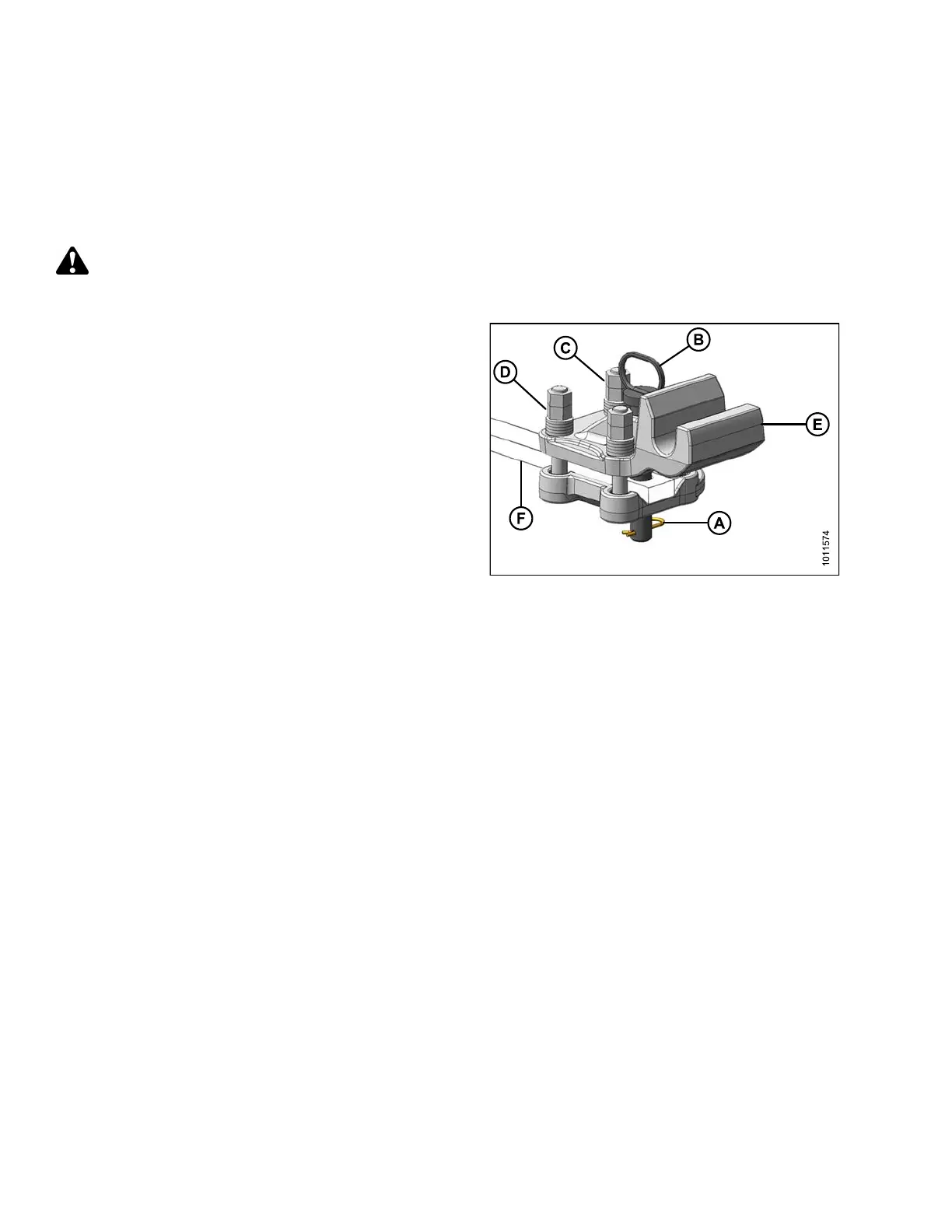
1. Remove hairpin (A) and pin (B).
2. If necessary, loosen four jam nuts (C), and then loosen
four nuts (D) s o that hitch ada pter (E) will slide o n to
tractor drawbar (F).
3. Alignholeinadapter(E)withholeindrawbar(F)and
install pin (B). Secure with hairp in (A).
4. Gradually tighten the four nuts (D) to 400 ft·lbf
(540 N·m).
NOTE:
Ensure hardened w ashers, and Class 10 nuts
supplied with adapter are used .
5. Tighten four jam nuts (C).
Figure 3.21: Drawbar Hitch Adapter
147910
42
Revision A




 To Next Page