MAINTENANCE AN D SERVICING
1. Place a wooden block between two cutterbar discs to
prevent disc rotation while tightening blade bolts.
IMPORTAN T:
Accelerators
can operate in a clockwise or
counterclock
wise direction. Verify the direction of the
disc before i
nstalling accelerators. If yo u are unsure
which dire ct
ion the spindle rotates, refer to 4.4.3
Cutterbar Sp
indles, page 134
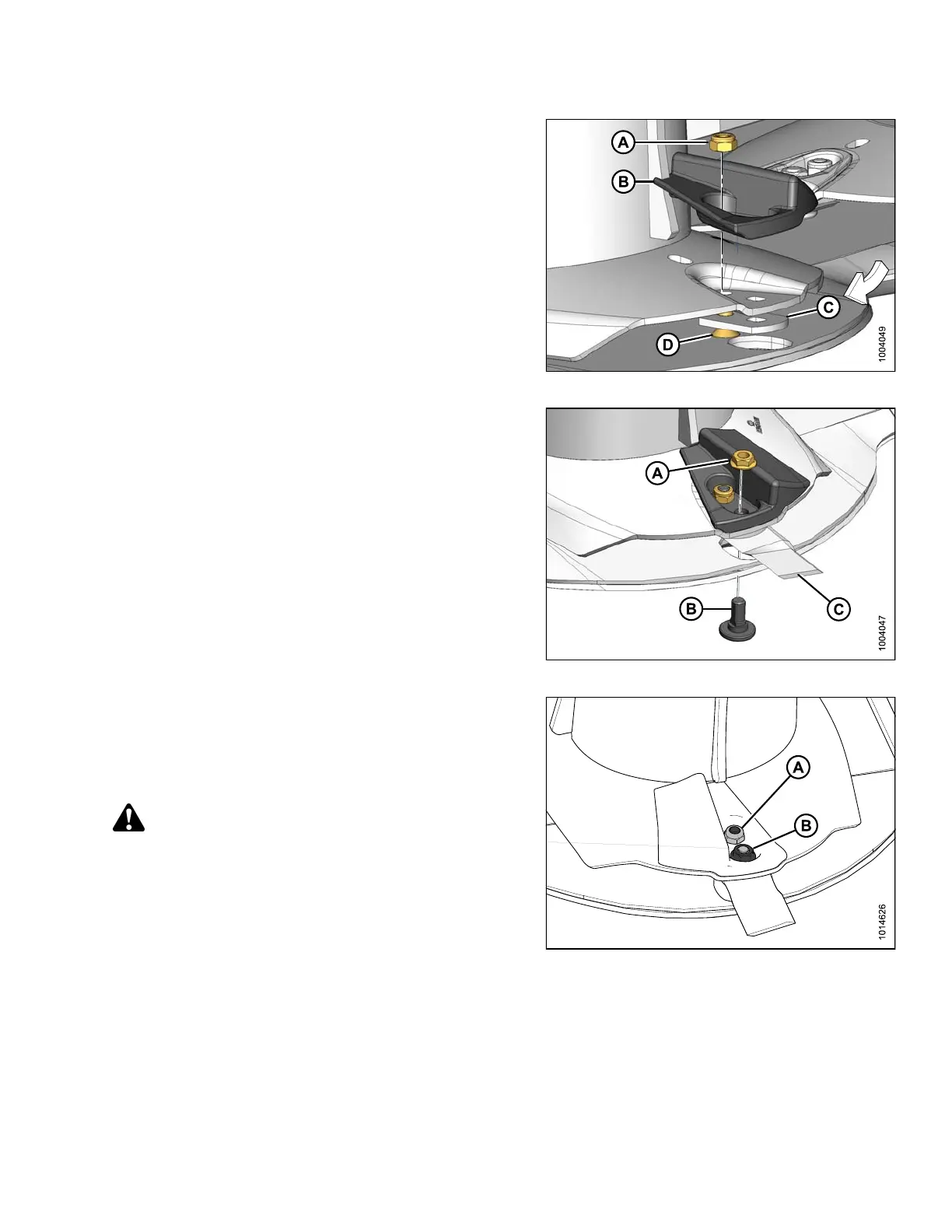
2. Install lock nut (A), accelerator (B), blade holder (C)
andhex-socketbolt(D).DoNOT tighten at this time.
Figure 4.88: Accelerator and Hardware
3. Install nu
t(A),flange bolt (B), and cutterblade (C)
onto disc.
Figure 4.89: Cutterblade and Disc
4. Torque
theinsidenut(A)to43ft·lbf (58 N·m).
5. Torqu
e the outside nut (B), closest to the blade, to
92 ft·
lbf (125 N·m).
6. Repea
t the installation procedure for t he second
accel
erator.
WARNING
Ensure cutterbar is completely clear of foreign
objects. Foreign objects can be ejected with
considerable force when the machine is started and
may result in serious injury or machine damage.
Figure 4.90: Cutterblade and Disc
147910 161 Revision A





 To Next Page