Scan to SMB
6
VarioLink 2221/2821/3621 6-25
6.5 Registering destinations
Programming one-touch dial button
By registering a destination with a one-touch dial button, transmissions can
be performed easily and accurately.
Note
If the "Restrict One-Touch Editing" parameter on the Administrator Set
screen (displayed from the Administrator Management screen) is set to
"ON", [E-Mail Input] is added to the Administrator Management 1 screen
and can be used to register, change and delete one-touch dial buttons.
For details on the Administrator Set screen, refer to the User manual
[Copy Operations].
If the optional fax kit has been installed, the [E-Mail Input] changes to the
[FAX].
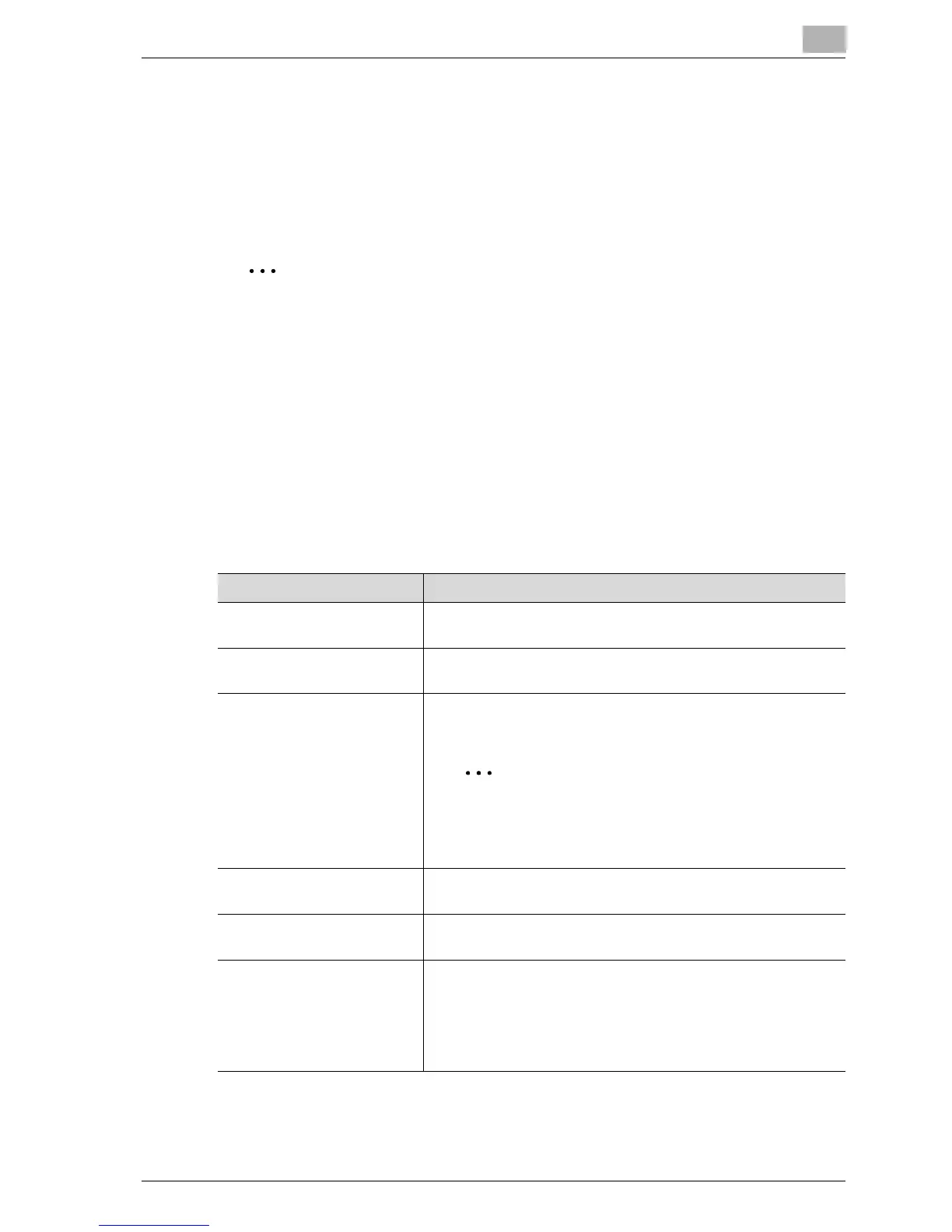
Settings can be specified for the following.
Item Description
Remote Destination Name Type in the destination name that will appear on the one-touch
dial button. Up to 12 characters can be entered.
Host Address Specifies the destination computer with an IP address or host
name.
Directory Type in the file path of the destination folder. Up to 128 charac-
ters can be entered.
Note
A shared folder created on the domain controller of
Windows Server 2003 and Windows Server 2008
cannot be specified.
User Name Type in the login name for the destination computer. Up to 32
characters can be entered.
Password Type in the login password for the destination computer. Up to
14 characters can be entered.
File Type/Coding Method Sets the file type and encoding method for saving data.
You can select from TIFF (multiple), TIFF (single), and PDF for
the file type.
Select either "MH" or "MMR" as the encoding method for the
selected file format. The data capacity is lowest with "MMR"
and highest with "MH".



 To Next Page