Home
Oce
All in One Printer
VarioLink 2221
Page 68 (TX Quality (Max.))
Oce VarioLink 2221 - TX Quality (Max.)
456 pages
Manual
Save Page as PDF
To Next Page
To Next Page
To Previous Page
To Previous Page
Loading...
3
Setu
p
3-32
VarioLi
nk 2221/2821/3
621
TX
Qualit
y (Ma
x.)
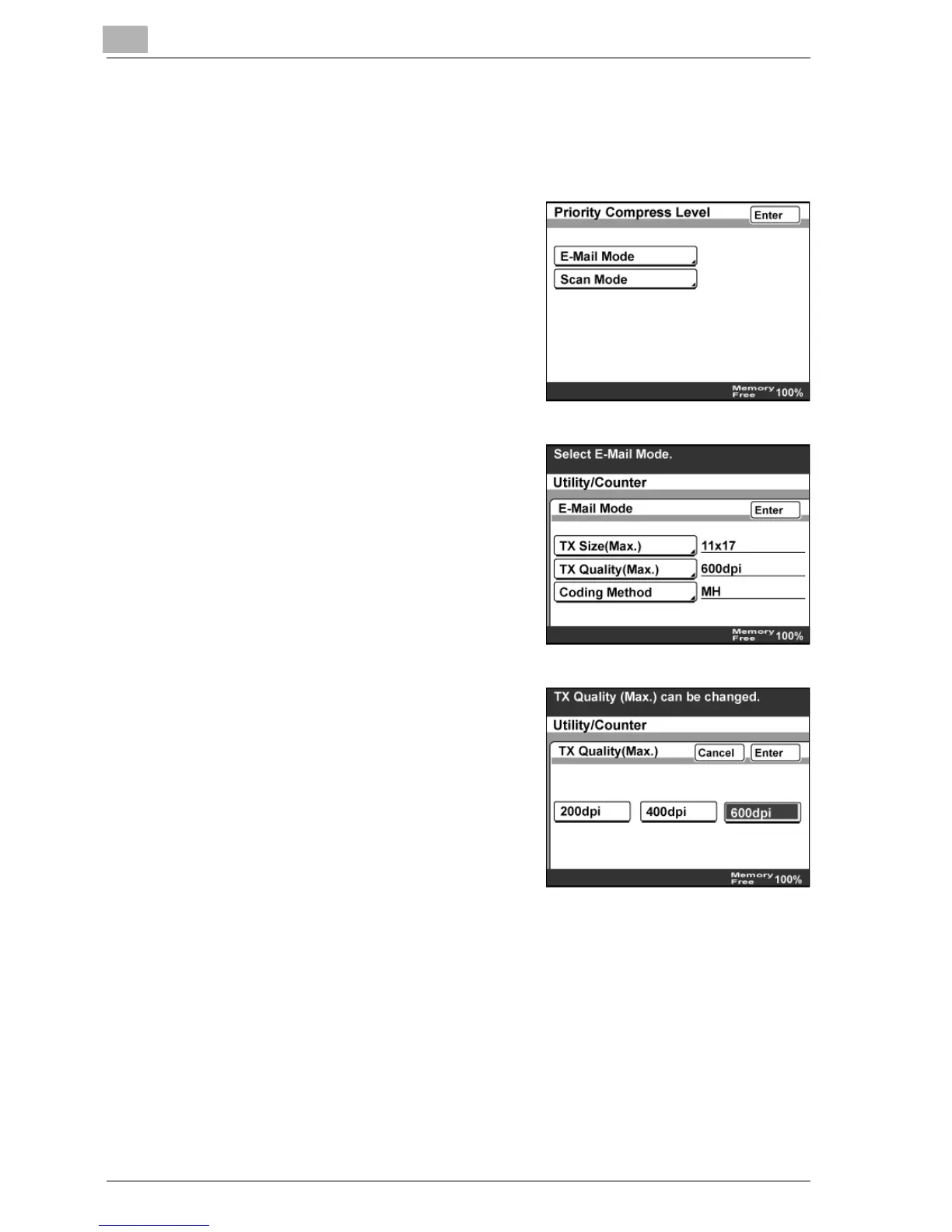
1
In the Net
work Setting screen
, to
uch [Priority Compress L
evel].
2
Touch [E-M
ail Mode
].
3
Touch [TX Q
ualit
y (Max
.)].
4
Select th
e maximum resolution for
transmiss
ion, an
d then
touch [
Enter].
67
69
Table of Contents
Main Page
Default Chapter
3
Table of Contents
3
1 Introduction
15
Energy Star
18
What Is an ENERGY STAR® Product
18
Trademarks and Registered Trademarks
19
License Information
19
Openssl Statement
20
Kerberos
22
About this Manual
23
Structure of the Manual
23
Notations
24
Images that Are Used
24
User Manuals
25
User Manual [Copy Operations]
25
User Manual [Network Scanner Operations] (this Manual)
25
User Manual [Box Operations]
25
User Manual [Print Operations]
25
User Manual [Advanced Scan Operations]
25
User Manual [Facsimile Operations]
25
Explanation of Manual Conventions
26
Safety Advices
26
Sequence of Action
26
Tips
27
Special Text Markings
27
2 Features
29
3 Setup
37
Connecting to a LAN
39
Connecting the LAN Cable
39
Specifying the Network Settings
40
Network Setting Table
40
To Specify Initial Network Settings
43
Basic Settings
45
Settings
45
Dhcp
46
IP Address Setting
47
Subnet Mask
48
Gateway
49
Network Board Set
50
To Specify the Network Board Settings
50
DNS Settings
51
DNS Setting
52
Host Name
52
Domain Name
53
DNS Server Address
53
Machine Name
54
To Specify the Machine Name
54
SMTP Settings
55
SMTP Server Address
56
E-Mail Address
58
SMTP Authentication User Name
59
SMTP Authentication Password
60
POP3 Settings
61
POP3 Server Address
61
POP3 User Name
63
POP3 Password
64
Auto-RX Check
65
Priority Compress Level (E-Mail Mode)
66
TX Size (Max.)
67
TX Quality (Max.)
68
Coding Method
69
Priority Compress Level (Scan Mode)
70
To Specify the Scan Mode Settings
70
Scanner Settings
71
Activity Report
73
RX Doc. Header Print
74
E-Mail Header Text
75
Gateway TX
76
Subject Registration
77
Divide Settings
78
LDAP Setting
80
LDAP Search
80
LDAP Server Setting
81
To Specify the LDAP Server Settings
82
Search Default Setting
84
IP Filtering
85
To Specify IP Filtering Settings
85
Specifying E-Mail Server Settings
87
To the Network Administrator
87
Entering a Domain Name
88
Registering a Domain Name
88
Using a Registered Domain Name
90
Checking the Network Connection (Ping)
91
To Check the Network Connection
91
User Authentication and Account Track
92
If User Authentication Settings Have Been Specified
93
If Account Track Settings Have Been Specified
94
4 Scan to E-Mail
95
Specifying a Destination with a One-Touch Dial Button
97
Selecting a One-Touch Dial Button
97
Specifying a Destination by Touching a One-Touch Dial Button
98
Entering the Number of a One-Touch Dial Button
100
Searching for a One-Touch Dial Button
102
Specifying Chain Dialing
104
Entering an Address
105
To Enter an Address
105
Specifying the Scanning Quality and Zoom Ratio
108
Quality
108
To Specify the Scanning Quality
109
Density
110
To Specify the Density Settings
110
Original Size Set
111
Specifying Additional Functions
112
Specifying the Transmission Report Printing Conditions
113
To Specify the Transmission Report Printing Conditions
113
Specifying 2In1 Transmission
114
Specifying Double-Sided Transmission
115
Specifying Priority Transmission
117
Specifying Timer Transmission
117
Specifying the Stamp Setting
118
Changing the Subject
119
Specifying a Reply Address
120
Specifying a File Name
121
Other Functions
122
If Transmission Could Not be Completed
123
Viewing a Transmission Report
123
Resending
124
Registering Destinations
125
Programming a One-Touch Dial Button
125
To Program a One-Touch Dial Button
126
Changing or Deleting a One-Touch Dial Button
129
Copying a One-Touch Dial Button
130
Registering/Deleting a Secondary Destination
131
Naming an Index
132
To Name an Index
132
Registering Mail Programs
134
To Register a Mail Program
136
Changing/Deleting a Mail Program
139
5 Scan to FTP
141
Specifying a Destination with a One-Touch Dial Button
143
Selecting a One-Touch Dial Button
143
Specifying a Destination by Touching a One-Touch Dial Button
143
Entering the Number of a One-Touch Dial Button
145
Searching for a One-Touch Dial Button
147
Specifying the Scanning Quality and Zoom Ratio
149
Quality
149
To Specify the Scanning Quality
150
Density
151
To Specify a Density Setting
151
Original Size Set
152
Specifying Additional Functions
153
Specifying the Transmission Report Printing Conditions
154
To Specify the Transmission Report Printing Conditions
154
Specifying 2In1 Transmission
155
Specifying Double-Sided Transmission
156
Specifying Priority Transmission
158
Specifying Timer Transmission
158
Specifying the Stamp Setting
159
Specifying the E-Mail Notification Destination
160
Specifying a File Name
161
If Transmission Could Not be Completed
162
Viewing a Transmission Report
162
Resending
163
Registering Destinations
164
Programming a One-Touch Dial Button
164
To Program a One-Touch Dial Button
165
Changing or Deleting a One-Touch Dial Button
169
Copying a One-Touch Dial Button
170
6 Scan to SMB
171
Scan to HDD
173
Specifying a Destination with a One-Touch Dial Button
173
Selecting a One-Touch Dial Button
173
Specifying a Destination by Touching a One-Touch Dial Button
173
Entering the Number of a One-Touch Dial Button
175
Searching for a One-Touch Dial Button
177
Specifying the Scanning Quality and Zoom Ratio
179
Quality
179
To Specify the Scanning Quality
180
Density
181
To Specify a Density Setting
181
Original Size Set
182
Specifying Additional Functions
183
Specifying the Transmission Report Printing Conditions
184
To Specify the Transmission Report Printing Conditions
184
Specifying 2In1 Transmission
185
Specifying Double-Sided Transmission
186
Specifying Priority Transmission
188
Specifying Timer Transmission
189
Specifying the Stamp Setting
190
Specifying the E-Mail Notification Destination
191
Specifying a File Name
192
If Transmission Could Not be Completed
193
Viewing a Transmission Report
193
Resending
194
Registering Destinations
195
Programming One-Touch Dial Button
195
To Program a One-Touch Dial Button
196
Changing or Deleting a One-Touch Dial Button
200
Copying a One-Touch Dial Button
201
7 Internet Faxing
203
Specifying a Destination with a One-Touch Dial Button
205
Selecting a One-Touch Button
205
Specifying a Destination by Touching a One-Touch Dial Button
205
Entering the Number of a One-Touch Dial Button
207
Searching for a One-Touch Dial Button
209
Specifying Chain Dialing
211
Entering an Address
212
To Enter an Address
212
Specifying the Scanning Quality and Zoom Ratio
214
Quality
214
To Specify the Scanning Quality
215
Density
216
To Specify a Density Settings
216
Original Size Set
217
Specifying Additional Functions
218
Specifying the Transmission Source Setting
220
Specifying the Transmission Report Printing Conditions
221
Specifying 2In1 Transmission
222
Specifying Double-Sided Transmission
223
Specifying Rotation Transmission
225
Specifying Priority Transmission
225
Specifying Timer Transmission
226
Specifying the Stamp Setting
227
Changing the Subject
228
Specifying a Reply Address
229
Specifying a File Name
230
If Transmission Could Not be Completed
231
Viewing a Transmission Report
231
Resending
232
Receiving Internet Faxes
233
Settings for Internet Faxing
233
Receiving Internet Faxes Automatically
233
Data the Can be Received
233
Receiving Internet Faxes Manually
234
Registering Destinations
235
Programming a One-Touch Dial Button
235
To Program a One-Touch Dial Button
236
Changing or Deleting a One-Touch Dial Button
239
Copying a One-Touch Dial Button
240
Registering/Deleting a Secondary Destination
241
8 Using an LDAP Server
243
Searching the Destination Information from the Server
245
Basic Search and Detail Search
245
To Search the Destination Information
246
Registering Destination Information to One-Touch Dial Buttons
248
To Register Destination Information to a One-Touch Dial Button
248
Web Connection
251
9 Specifying Settings Using Web Connection
251
Items that Can be Specified Using Web Connection
253
Scan Tab (User Mode)
253
Scan Tab (Administrator Mode)
254
Network Tab (Administrator Mode)
255
Using Web Connection
256
Operating Environment
256
Accessing Web Connection
257
If User Authentication Settings Have Been Applied
258
If Account Track Settings Have Been Applied
258
Page Structure
259
Logging on to Administrator Mode
261
Web Browser Cache
263
For Internet Explorer
263
For Netscape
263
One-Touch Key Registration (User Mode)
264
Naming an Index
271
Registering a One-Touch Dial Destination
273
Registering a Secondary Recipient
275
Changing the Settings for a One-Touch Dial Destination
279
Deleting a One-Touch Dial Destination
281
FAX Program Registration (User Mode)
283
Registering Fax Programs
286
Changing the Settings of the Fax Program
288
Deleting a Fax Program
289
Domain Name Registration (User Mode)
291
To Register Domain Names
291
Export/Import (Administrator Mode)
292
Exporting Data as Files
293
Importing Files
295
TSI Registration
298
To Register Transmission Sources
298
TX Settings (Administrator Mode)
299
Specifying the Transmission Settings
300
Com. Mode
301
RX Settings (Administrator Mode)
302
Specifying the Reception Settings
303
Scan Setting (Administrator Mode)
304
Specifying the Scan Settings
305
TX Document (Administrator Mode)
306
Specifying the Address of the Forwarding Destination
307
RX Document (Administrator Mode)
308
Specifying the Processing of Received Documents at each Line
309
Specifying the Processing of Other Received Documents
311
Report Settings (Administrator Mode)
312
Specifying the Report Output Settings
313
TCP/IP (Administrator Mode)
314
Specifying the TCP/IP Settings
316
IP Filtering
318
To Specify IP Filtering Settings
319
LDAP (Administrator Mode)
320
Specifying the LDAP Settings
320
LDAP Server Setting (Administrator Mode)
321
Registering an LDAP Server
323
Deleting an LDAP Server
325
E-Mail/Internet FAX (Administrator Mode)
326
Specifying the POP3 Settings
329
Specifying the SMTP Settings
331
Specifying the Subject or Text Settings
332
Specifying Other Settings
333
FTP Configuration (Administrator Mode)
334
Specifying the FTP Settings
335
Snmp
336
Specifying the SNMP Setting
336
SSL/TLS (Administrator Mode)
337
When a Certificate Is Created
338
Creating Certificates
339
Deleting Certificates
342
Specifying the SSL/TLS Settings
344
User Authentication (Administrator Mode)
346
Specifying User Authentication Settings
347
10 Specifying Management Settings
349
Available Parameters
351
Administrator Management 1
351
Administrator Management 2
352
Registering Transmission Source Names
353
To Register a Transmission Source Name
353
Specifying Transmission Report Settings (TX Settings)
355
Specifying the Quality/Mode Settings
356
Specifying Comm. Menu Settings
358
Specifying the Print Timing for Received Documents (RX Settings)
360
Memory Lock Time
360
To Specify the Memory Lock Password Setting
362
To Print Manually
364
Specifying the Transmission Report Printing Conditions (Report Settings)
365
Specifying TX Report Settings
366
Specifying the Activity Report Settings
367
Forwarding a Transmission Document to a Specified Destination (TX Forwarding)
368
Specifying the Forwarding Destination
368
Specifying the Processing Method for Received Documents (Document Management)
370
Specifying the Processing of Documents Received on a Port
370
To Specify the Processing Method for Received Documents
371
Specifying the Processing of Documents Received on Other Lines
373
To Specify the Processing of Received Documents
374
Specifying Software Switch Settings (Machine Functions)
376
Software Switch Settings
376
To Specify a Software Switch Setting
378
Specifying Whether or Not the Destination Name Is Inserted (Mode 001)
380
Specifying Settings for Address Input and Broadcast Transmissions (Mode 018)
381
Specifying Settings for the Image in the Results Report (Mode 023)
382
Specifying Administrator Forwarding Settings (Mode 198)
383
Blocking Calls from Callers that Are Not Specified (Mode 306)
384
Specifying Internet Fax Settings (Mode 350)
385
Specifying Whether to Add the Transmission Source Information When Faxing or When Forwarding Received Documents (Mode 352)
386
Specifying SMTP Transmission Timeout Settings (Mode 356)
387
Specifying SMTP Reception Timeout Settings (Mode 357)
388
Specifying POP3 Reception Timeout Settings (Mode 358)
389
Specifying the Default Address Input Screen (Mode 366)
390
Specifying DNS Query Timeout Setting (Mode 367)
391
Including the Scan Transmission Log in the Activity Report (Mode 368)
392
Specifying Switching of the SMTP Server (Mode 371)
393
Specifying the Transmission Interval When E-Mail Messages Are Separated (Mode 372)
394
Specifying the Internet Fax Full Mode Function Settings (Mode 373)
395
Specifying E-Mail Security Functions (Mode 380)
396
Specifying Use of Registered User Authentication Information to Log on to the LDAP Server (Mode 466)
398
Specifying Whether to Enable Access Locks, and Whether to Enable the Password Rules (Mode 469)
399
Specifying the Export File Format (Mode 470)
400
Specifying Settings to Limit the Use of Communication Modes-1 (Mode 475)
401
Specifying Settings to Limit the Use of Communication Modes-2 (Mode 476)
403
Specifying Settings to Limit the Use of Communication Modes-3/Specifying Restrictions for Registering Fax Addresses and Printing Reports and Specifying How One-Touch Dial Recipients Are Displayed (Mode 477)
405
Specifying the Deleting Method for [Del.] in Input Screens (Mode 478)
407
Specifying Settings for Limiting User Authentication to Only Scan Functions (Mode 479)
408
Specifying SSL/TLS Settings
409
To Specify SSL/TLS Settings
409
11 Reports and Lists
411
Checking the Transmission Conditions (TX Report)
413
To Print a Transmission Report
414
Contents of the Report
415
Checking the Reception Conditions (RX Report)
417
Printing a Reception Activity Report
417
Contents of the Report
418
Checking the Destinations Registered in One-Touch Dial Buttons (One-Touch List)
419
Printing the One-Touch List
419
Contents of the List
420
Printing the Mail Program List
421
To Print the Mail Program List
421
Contents of the List
422
Checking the Function Settings (Setting List)
423
Printing the Setting List
423
Contents of the List
424
12 Scan Function Troubleshooting
425
When the Following Are Displayed
427
Network Error List
428
Internet Fax Transmission/Scan to E-Mail
428
Internet Fax Reception
429
Scan to FTP
430
Scan to SMB
431
Troubleshooting
432
Internet Fax Transmission/Scan to E-Mail
432
Internet Fax Reception
433
Other
434
13 Appendix
435
Product Specifications
437
Internet Fax Specifications
437
Scan to E-Mail Specifications
437
Scan to FTP Specifications
438
Scan to SMB Specifications
438
Entering Text
439
To Type Text
439
List of Available Characters
440
Glossary
441
Index
447
Related product manuals
Oce VarioLink 2222c
396 pages
Oce VarioLink 5022
314 pages
Oce VarioLink 4522c
366 pages
Oce VarioStream 7000 SINGLE
384 pages
Oce VL3200x
239 pages
Oce CS193
547 pages
Oce CS2224
76 pages
Oce TDS600
338 pages
Oce TDS320
154 pages
Oce im7520
23 pages
Oce FX3000 SERIES
103 pages
Oce im2330 / im2830
324 pages



 To Next Page