Specifying management settings
10
VarioLink 2221/2821/3621 10-7
10.3 Specifying transmission report settings (TX Settings)
You can specify the default settings for transmission.
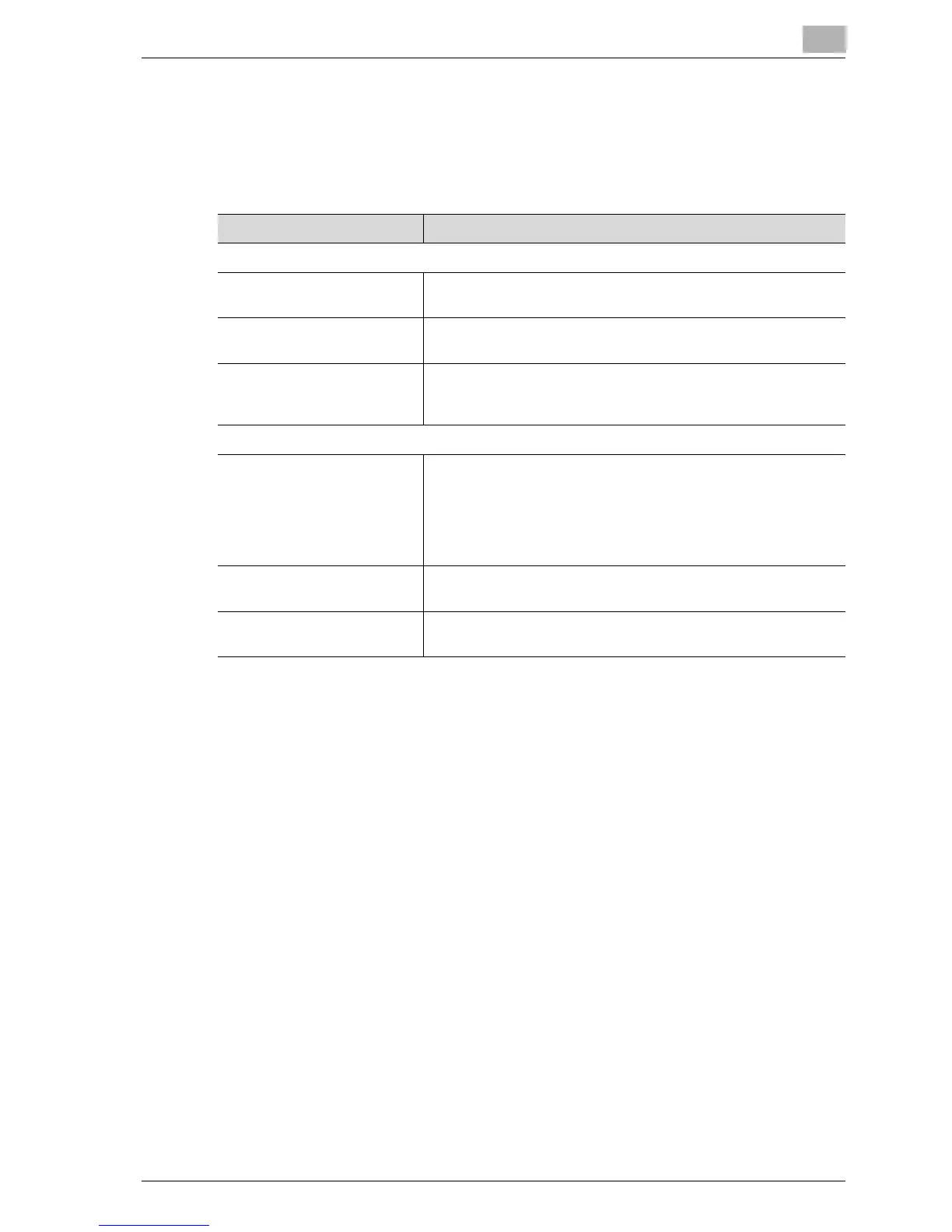
Settings can be specified for the following.
Item Description
Quality/Mode
Default Quality Specify the quality default value that is reset after an operation
is completed.
Default Density Specify the density default value that is reset after an operation
is completed.
Communication Mode Specify the communication mode default value that is reset af-
ter an operation is completed. Select from PC (e-mail) or Inter-
net FAX (Internet FAX).
Comm. Menu
TSI Select the transmission source name.
OFF: Does not attach the transmission source name.
Inside Body Text: Prints the transmission source name on the
original document.
Outside Body Text: Does not print the transmission source
name on the original document.
Rotation TX Specify whether to reset the rotation transmission after an op-
eration is completed.
2-Sided TX Specify whether to reset the duplex transmission after an oper-
ation is completed.



 To Next Page