Specifying settings using Web Connection
9
VarioLink 2221/2821/3621 9-49
9.8 TX Settings (Administrator mode)
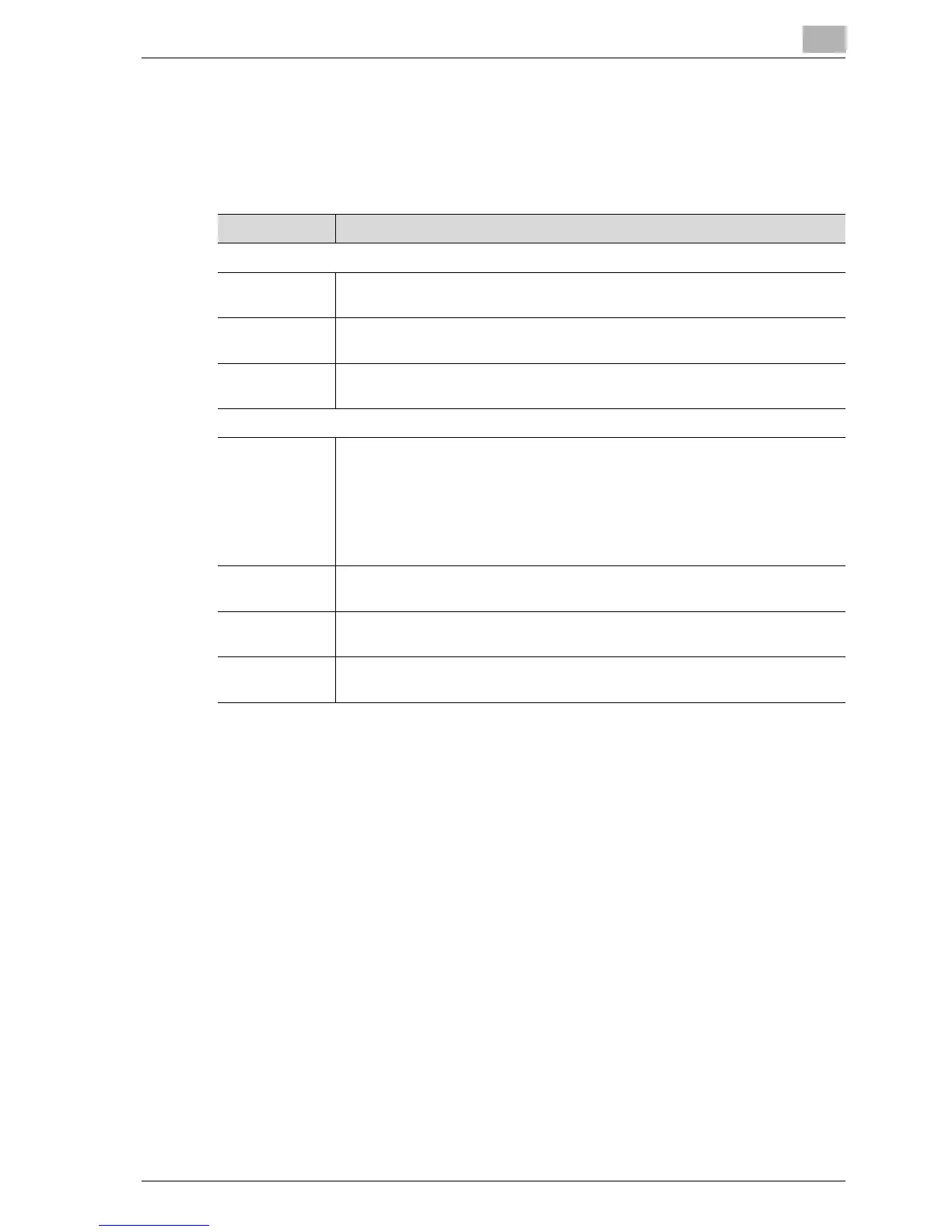
Default transmission settings can be specified.
Settings can be specified for the following.
Item Description
Quality/Mode
Default Quality Select the default quality setting that is specified after an operation is com-
plete.
Default Density Select the default density setting that is specified after an operation is com-
plete.
Com. Mode Select the default communication mode that is specified after an operation is
complete. Select "TX: PC (E-mail)" or "TX: Internet FAX".
FAX Menu
TSI Select how the transmission source name is attached and the type of trans-
mission source information from 1 through 8.
Off: Select this setting to not attach the transmission source name.
Inside Body Text: Select this setting to print the transmission source name on
the original document.
Outside Body Text: Select this setting to not print the transmission source
name on the original document.
Rotation TX Specify whether to reset the rotation transmission after the operation is com-
plete.
2-Sided TX Specify whether to reset the double-sided transmission after the operation is
complete.
Original Bind
Direction
If "2-Sided TX" was set to "On", select from "Left Binding", "Top Binding" or
"Auto" for the binding position of the document.



 To Next Page