Specifying management settings
10
VarioLink 2221/2821/3621 10-35
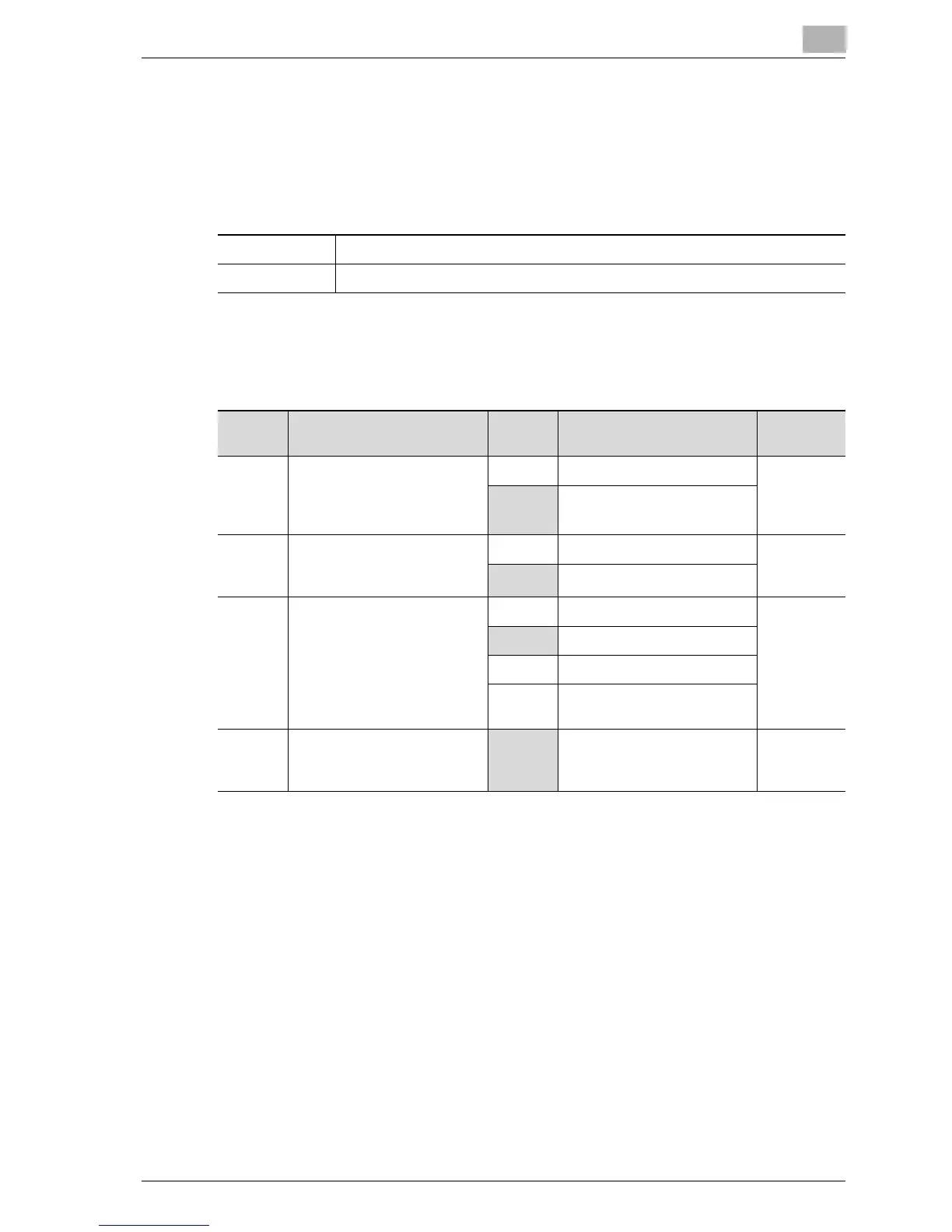
Specifying administrator forwarding settings (mode 198)
You can specify whether a received document is forwarded to a destination
specified by the administrator.
Factory settings
Specifying settings
The shaded cells represent the factory settings. The page numbers on the
right refer to the descriptions of the corresponding functions.
(*)
Bit 7 of mode 198 is enabled only when "1 (transmit)" is specified.
Bit 7 6 5 4 3 2 1 0
Setting 1 1 0 1 0 0 0 0 (HEX: D0)
Bit Description Setting Description Page Ref-
erence
7 Specifies whether a received
document is forwarded to a
destination specified by the
administrator.
0Not forwarded page10-2
0
1Forwarded
6 Specifies whether to enable
TX Forwarding when scan-
ning.(*)
0 Not forwarded ---------
1Forwarded
5, 4 Specifies the print condi-
tions of transmission reports
for TX Forwarding.(*)
00 Not output ---------
01 Undeliverable
10 Always prints
11 *Do not specify these set-
tings.
3, 2, 1, 0 -----------------------------
0000 *Do not change these bits
when specifying settings for
this function.
---------



 To Next Page