Specifying settings using Web Connection
9
VarioLink 2221/2821/3621 9-17
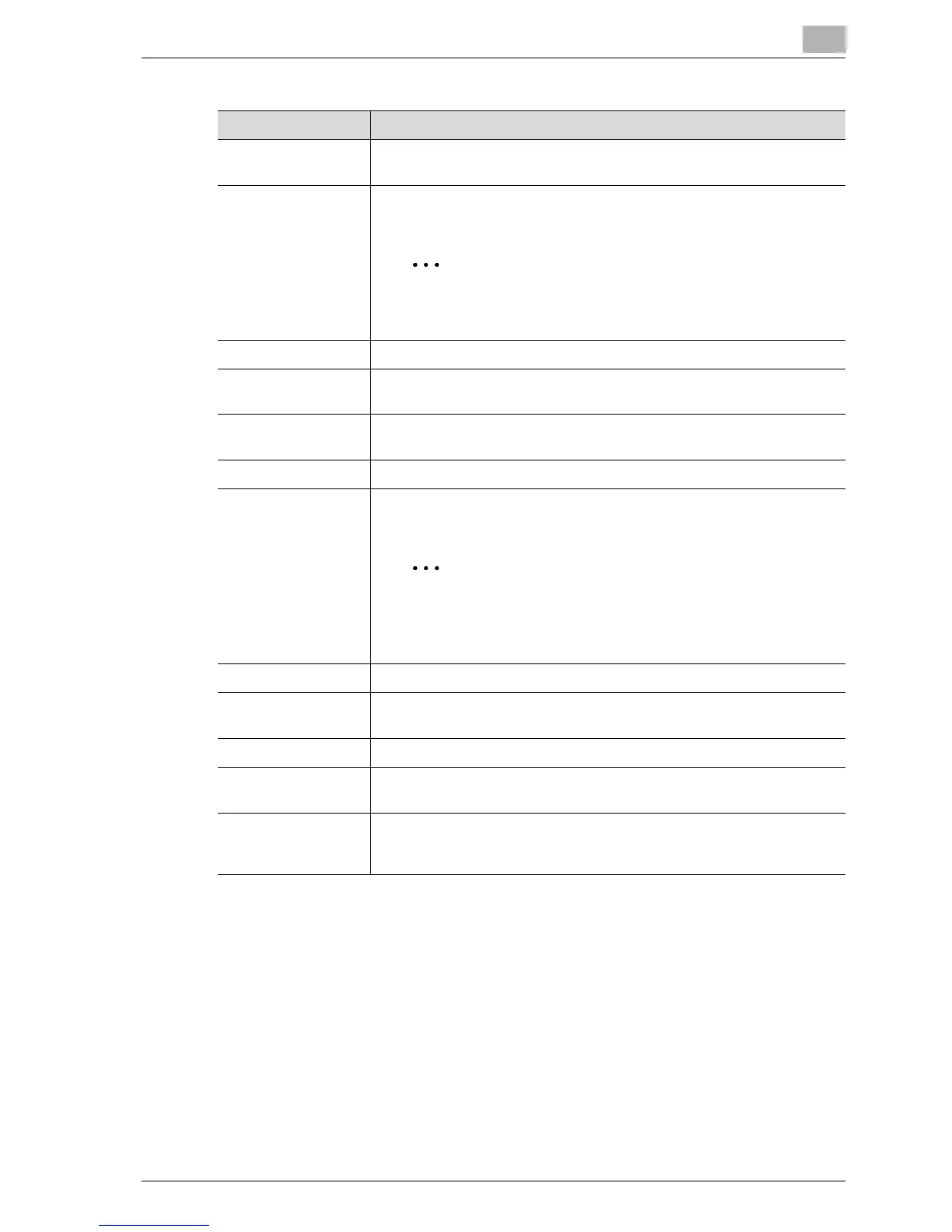
Item Description
One-Touch Name Type in the name of the recipient that will appear as the name of the one-
touch dial destination. Up to 12 characters can be entered.
FTP Server Address Type in the IP address or host name of the server where the data is to
be uploaded.
Note
The host name can be entered if "DNS Setting" in the Net-
work Setting screen is set to "YES".
Use Proxy Select whether to use a proxy server when uploading data.
Port Number Enter the server port number. Enter a numeric value within the range of
1 to 65535.
Anonymous Select whether to permit anonymous user access (access that does not
require a login name or password).
User Name Enter the user name. Up to 32 characters can be entered.
Password Enter the login password for the server. Up to 32 characters can be en-
tered.
Note
The password appears as "••••". To correct the entered
password, clear "••••", and then type in the correct pass-
word.
Retype Password Reenter the login password.
Directory Specify the name of the directory where the data is to be uploaded. Up
to 128 characters can be entered.
Passive Mode Select whether to enable or disable the passive mode.
File Type Select the format ("Multi Page TIFF", "Single Page TIFF" or "PDF") of the
file that is to be sent.
Coding Method Select the coding method ("MH" or "MMR") for the data to be sent. The
data amount with the MMR coding method is less than with the MH
method.



 To Next Page