9
Specifying settings using Web Connection
9-78 VarioLink 2221/2821/3621
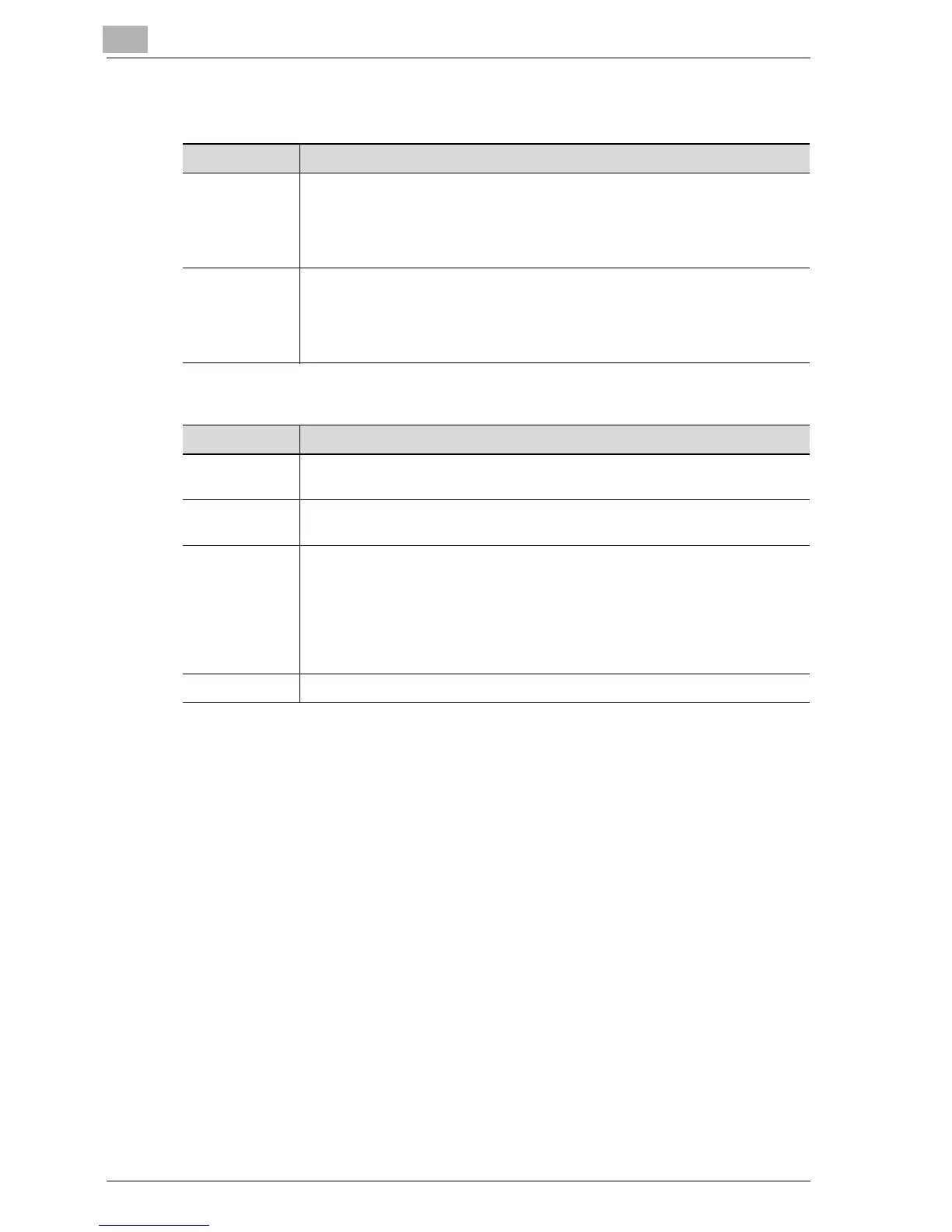
Subject/Text
Other
Item Description
Subject 1 to 4 The subject can be specified for sending data with the Scan to E-Mail or In-
ternet fax operation.
Up to 4 subjects can be registered, therefore, subjects can be used depend-
ing on the contents of the transmission.
Up to 40 characters can be entered.
Text Type in the text attached to data sent with the Scan to E-Mail or Internet fax
operation. Text that has been specified in advance is "fixed text", and text that
can be specified freely is "custom text". The text entered here is registered as
"custom text".
Up to 256 characters can be entered.
Item Description
Activity Report Specify whether to notify the destination of the results when an Internet fax is
received.
RX Doc. Head-
er Print
Select whether to print the e-mail header on the first page of the received doc-
ument when an Internet fax is printed.
TX Doc. Text
Insert
Text can be inserted into the text of data sent with the Scan to E-Mail or In-
ternet fax operation.
No: Select this setting to not insert text. For the Scan to E-Mail operation,
fixed text is inserted even if "No" is selected.
Default: Select this setting to insert the fixed text that has been saved in ad-
vance on this machine.
Custom: Select this setting to insert text that can be set freely.
Gateway TX Select "Restict" for this machine.



 To Next Page