Delivering a Bolus with the SmartBolus Calculator 17
220
17 Delivering a Bolus with the SmartBolus Calculator
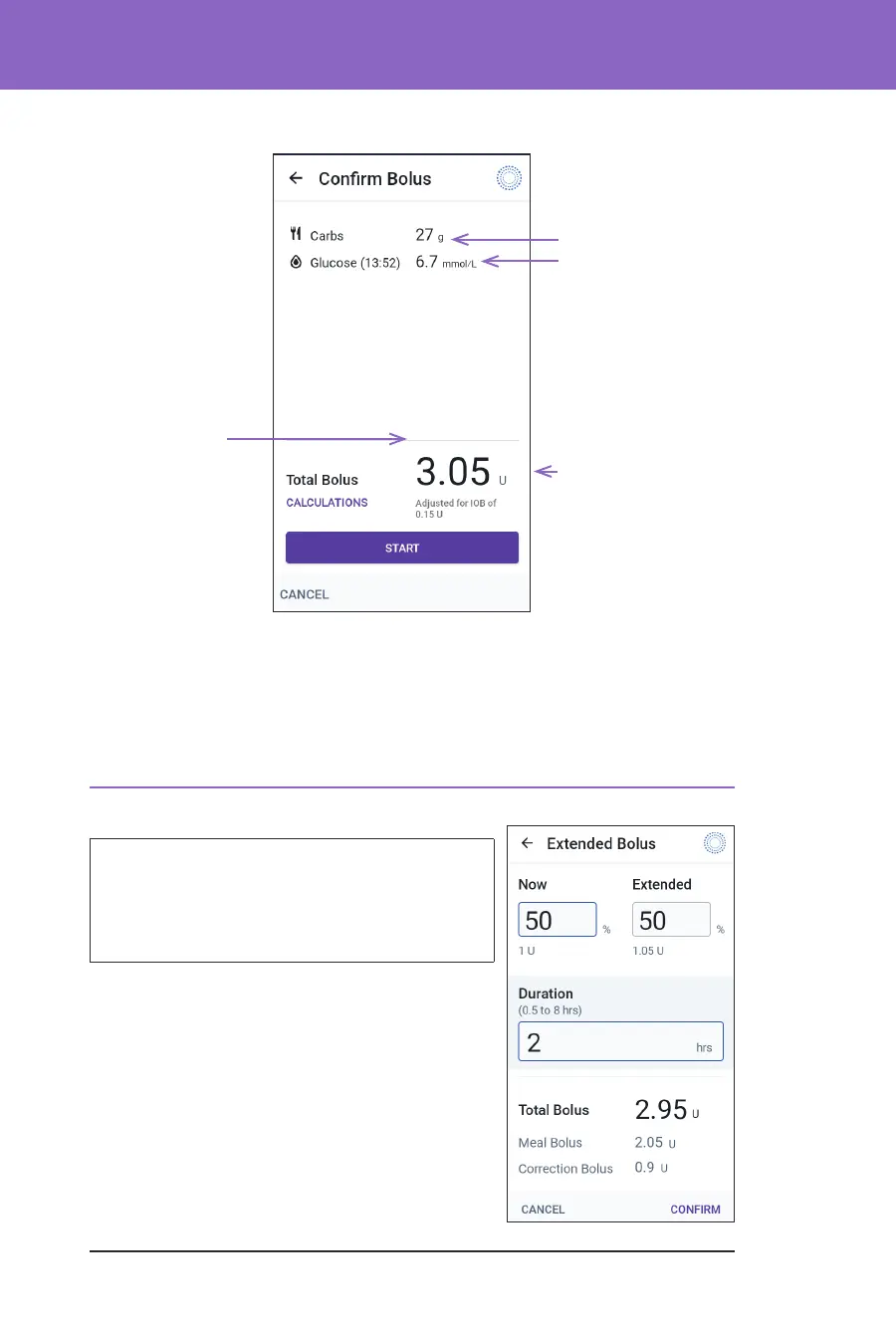
6. Review the bolus details on the Conrm Bolus screen.
7. Tap START to begin the bolus.
e Home screen tracks the delivery of an immediate or extended bolus
(see “16.3. Tracking the Progress of a Bolus” on page 208).
17.7. Delivering an Extended Bolus
Warning: ALWAYS check your glucose
frequently when you use the extended
bolus function to avoid hypoglycaemia or
hyperglycaemia.
Note: You can extend a bolus only while in
Manual Mode.
To review, extend and deliver the bolus:
1. Review the suggested bolus.
a. To adjust it, tap the Total Bolus eld and
enter a revised bolus.
2. To review the specics of calculations, tap
CALCULATIONS. You may need to swipe
up or down to see all of the calculations. Tap
Adjusted for
IOB of x U means the
SmartBolus
Calculator took IOB
into account.
The total bolus
includes any IOB
adjustments and
any adjustments
you made to the
calculated bolus.
Blood glucose or
sensor glucose value
Grams of carbs



 To Next Page