Omnipod 5 System Overview 3
42
3 Omnipod 5 System Overview
INSULIN Tab
e INSULIN tab label changes to ACTIVITY when the Activity feature is enabled in
Automated Mode or to TEMP ON when a temp basal is running in Manual Mode.
Manual Mode
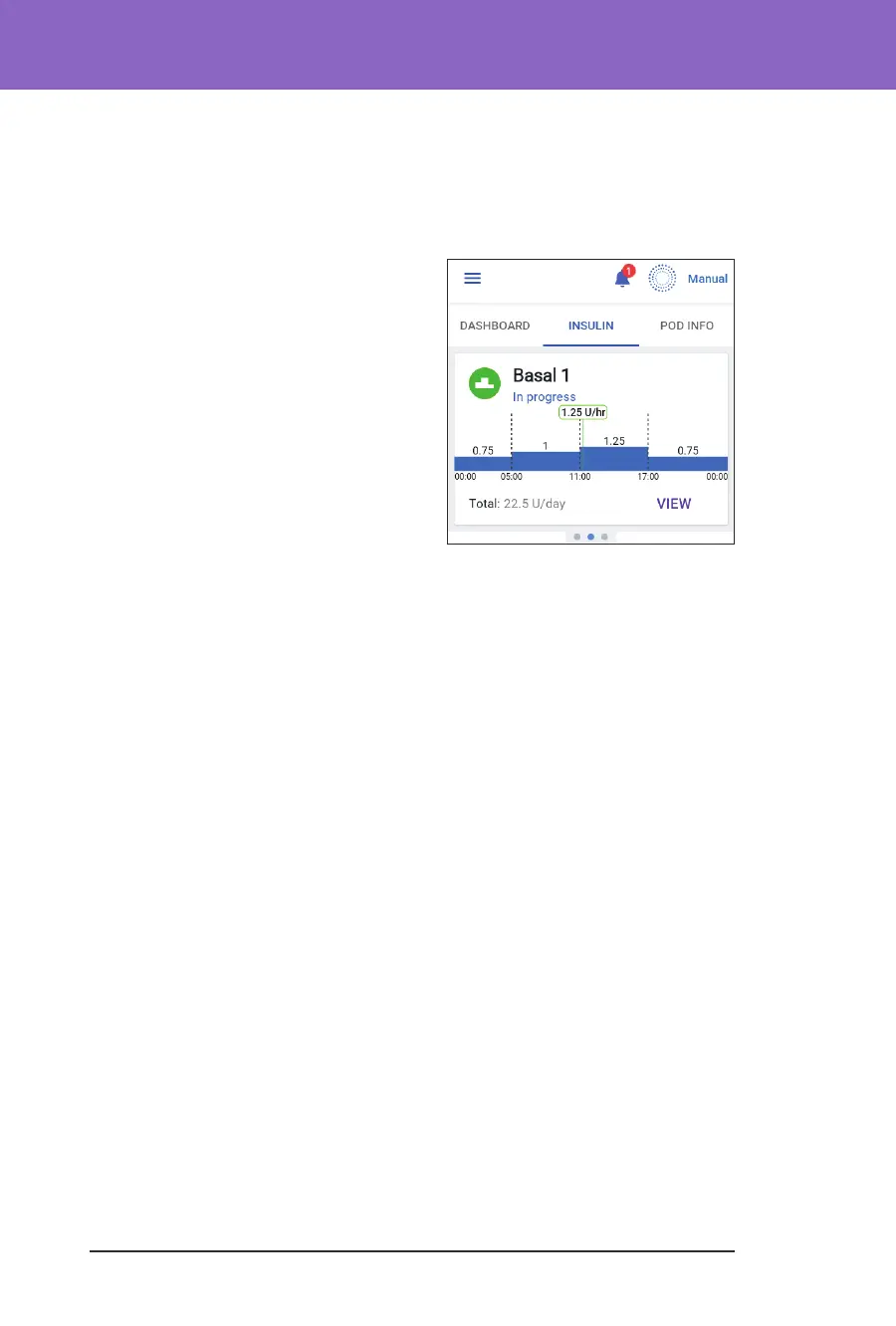
By default, in Manual Mode, the INSULIN
tab shows the name and graph of the user-
dened Basal Programme. A label below
the Basal Programme's name indicates
whether the listed Basal Programme is:
• In progress—is programme is
running on the active Pod.
• Paused—is programme will resume
when you start insulin delivery.
• Current—ere is no active Pod. is
programme will be sent to your next
Pod during activation.
When there is a Basal Programme in progress, a green vertical line marks the
current time. e numbers above the graph indicate the basal rate for each time
segment.
e total daily amount of basal insulin in Manual Mode is shown beneath the
graph. is total is the amount of insulin that the Basal Programme in progress
is scheduled to deliver in a 24-hour period. is total does not account for temp
basals or boluses.
To see the total amount of insulin that your Pod has actually delivered, including
temp basals and boluses, see “Browsing Your History and Records” on page 125.
Tap VIEW to see details about other Basal Programmes.



 To Next Page