Setting Up Your Omnipod5 Application 4
66
4 Setting Up Your Omnipod5 Application
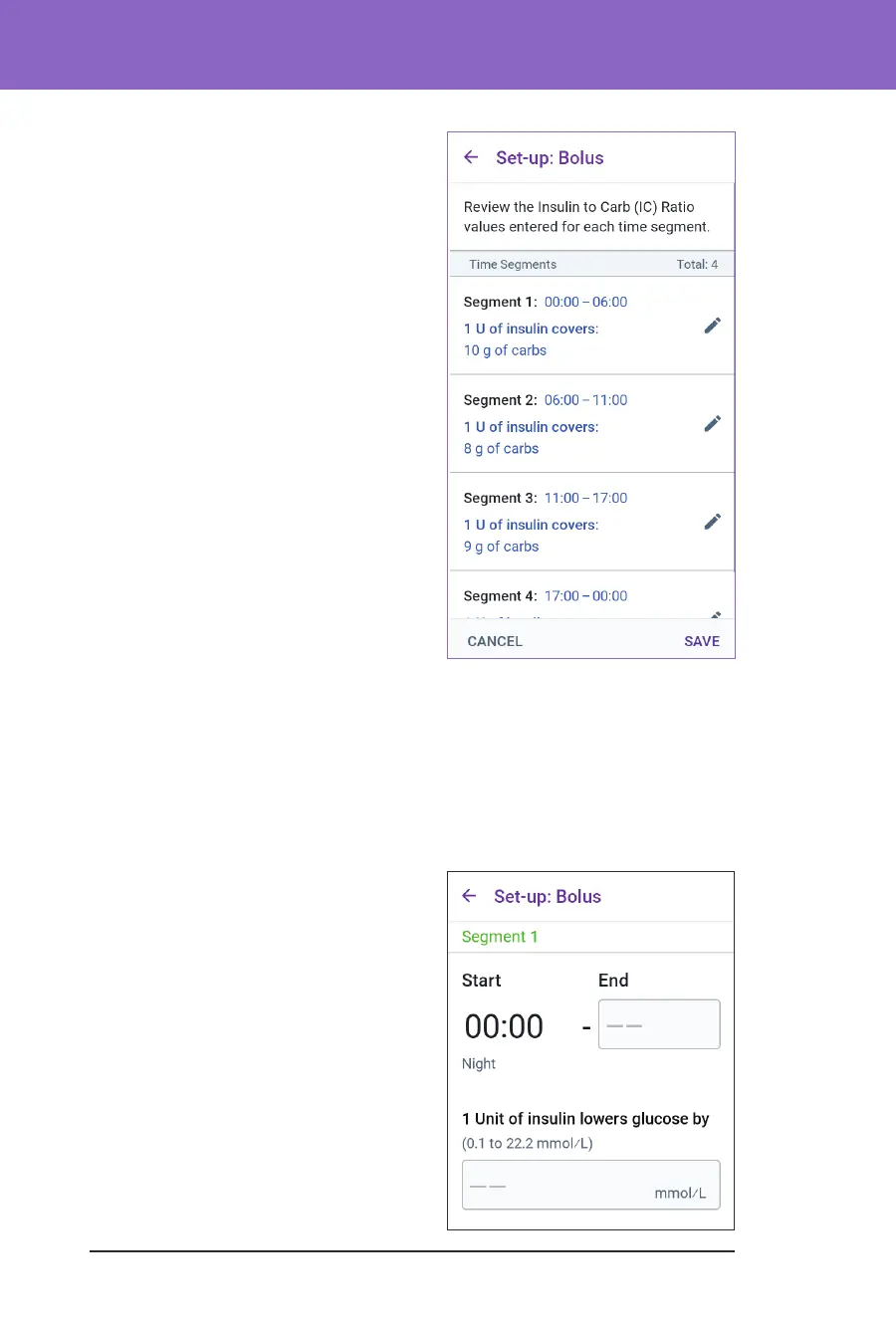
6. Review your 24-hour IC Ratio
segments.
7. To change any of the entries:
a. Tap the row containing the entry to
be changed and enter the corrected
value.
b. Review and correct any remaining
segments as needed.
8. When the segments and values are
correct, tap SAVE.
Correction Factor
Your Correction Factor denes how much one unit of insulin lowers your glucose.
For example, if your Correction Factor is 2.8, one unit of insulin lowers your
glucose by 2.8 mmol/L.
e SmartBolus Calculator uses the Correction Factor to calculate the correction
portion of a suggested bolus. You can create up to eight Correction Factor
segments per day.
¾ Tap NEXT on the Set Correction
Factors description screen to move to
the segment screen.
Dene the segments
1. Tap the End Time eld and specify an
end time for the segment.
2. Tap the 1 Unit of insulin lowers
glucose by eld and specify the
Correction Factor for this segment.
3. Review and tap NEXT.



 To Next Page