R&S
®
ZVA / R&S
®
ZVB / R&S
®
ZVT GUI Reference
Channel Menu
Operating Manual 1145.1084.12 – 30 260
Inserting and Deleting Segments
Individual Segment Settings
Point List, Segment Import and Export
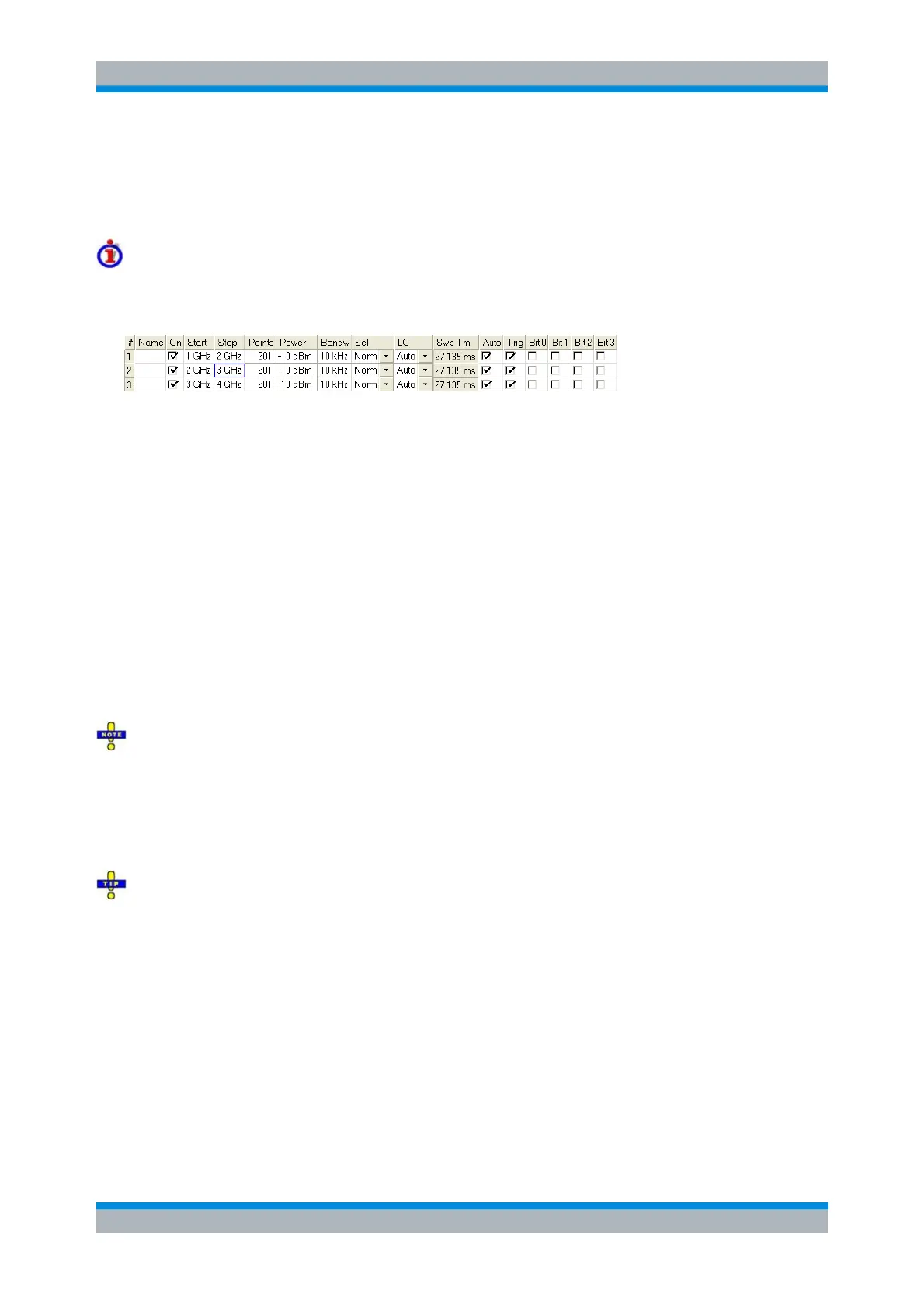
Columns in the Define Segments table
The table contains an automatically assigned current number for each segment plus the following editable
or non-editable columns:
On provides check boxes to activate or deactivate each individual segment. Sweep points
belonging to inactive segments only are not measured and not listed in the Point List.
Start is the stimulus (x-axis) value of the first point of the segment. If the segment contains more
than one Point, then Start must be smaller than the Stop value. If a Start value equal to or larger
than the current Stop value is set, Stop is adjusted to the new Start value plus 1 Hz.
Stop is the stimulus (x-axis) value of the last point of the segment. If the segment contains more
than one Point, then Stop must be larger or equal than the Start value. If a Stop value equal to or
smaller than the current Start value is set, Start is adjusted to the new Stop value minus 1 Hz.
Points is the number of sweep points in the segment. A single segment can consist of only one
point. If Points is set to 1, then the Stop frequency is set equal to the Start frequency.
The Trig column is only visible if Trigger is enabled in the Individual Segment Settings. It allows to
deactivate triggering for selected segments.
The remaining columns show the channel settings for each segment. They are displayed only if they are
selected in the Individual Segment Settings panel.
Limitations for overlapping segments
When overlapping sweep segments are created, the marker functions, trace evaluation functions, trace
search functions and band filter functions are still available. It is possible, however, that these tools show
an unexpected behavior when used in overlapping sweep segments.
The reason is that the assignment of markers to traces in overlapping segments is ambiguous. To avoid
any problem, it is recommended to turn off the sweep segments that overlap with the one that needs to be
analyzed in detail with the aid of a marker function.
Use the paste marker list for convenient entry of Start and Stop values.
The commands in the [SENSe<Chn>:]SEGMent... subsystem define all sweep
segment settings.
Inserting and Deleting Segments
Three buttons on the left side below the table in the Define Segments dialog extend or shorten the
segment list:
Add
adds a new segment to the list. The new segment is inserted after the active segment. The



 To Next Page