R&S
®
ZVA / R&S
®
ZVB / R&S
®
ZVT GUI Reference
Channel Menu
Operating Manual 1145.1084.12 – 30 401
Relative phase examples
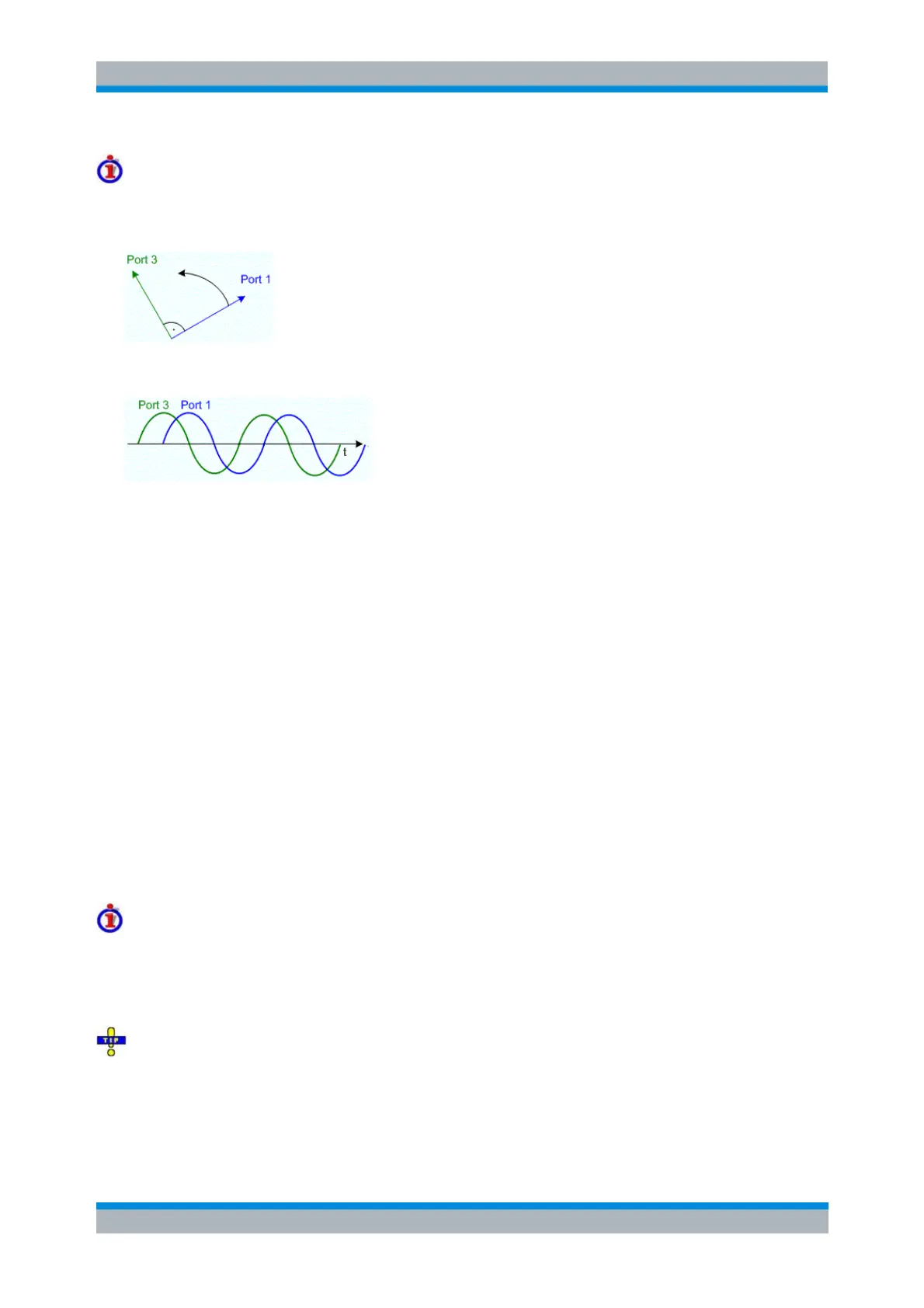
Suppose that Port 1 is the reference port and the coherent signal at Port 3 is defined with a relative phase
setting of +90°. In the complex I/Q plane, the Port 3 signal precedes the Port 1 signal by 90°.
An oscilloscope shows the Port 3 and Port 1 signals as depicted below.
SOURce<Ch>:CMODe:CMODe:PORT<Pt>:AMPlitude
SOURce<Ch>:CMODe:CMODe:PORT<Pt>:PHASe
SOURce<Ch>:CMODe:PORT<Pt>[:STATe]
SOURce<Ch>:CMODe:CMODe:RPORt
SOURce<Ch>:CMODe:TOLerance:AMPLitude
SOURce<Ch>:CMODe:TOLerance:PHASe
Alternating Sweeps
Activates or deactivates the operating mode where the analyzer performs only one partial measurement
per sweep.
In normal sweep mode (Alternating Sweeps off), the analyzer completes the necessary sequence
of partial measurements at each sweep point and obtains the result (measurement point) before
proceeding to the next sweep point.
Alternating Sweeps reverses the order of partial measurements and sweeps: A partial
measurement is performed at all sweep points (partial sweep) before the hardware settings are
changed and the next partial measurement is carried out in an additional sweep.
The Alternating Sweeps mode is also valid during a system error correction.
Advantages of both sweep modes, alternative settings
If the settling time between adjacent frequency points is smaller than the settling time between the partial
measurements, then the Alternating Sweeps measurement is faster than a normal sweep so that a smaller
sweep times can be set. On the other hand, an Alternating Sweeps measurement provides a result only
during the last partial sweep.
Use the Alternating Sweeps mode to increase the accuracy of measurements on DUTs with long level
settling times (e.g. quartzes, SAW filters). To measure DUTs with short settling times or obtain a trace
from the beginning of the sweep, deactivate the Alternating Sweeps mode.
As an alternative to activating the Alternating Sweeps mode, it is possible to insert a Meas. Delay before
each partial measurement and thus improve the accuracy. The delay slows down the measurement.



 To Next Page