8.2
SEL-751A Relay Instruction Manual Date Code 20100129
Front-Panel Operations
Human-Machine Interface
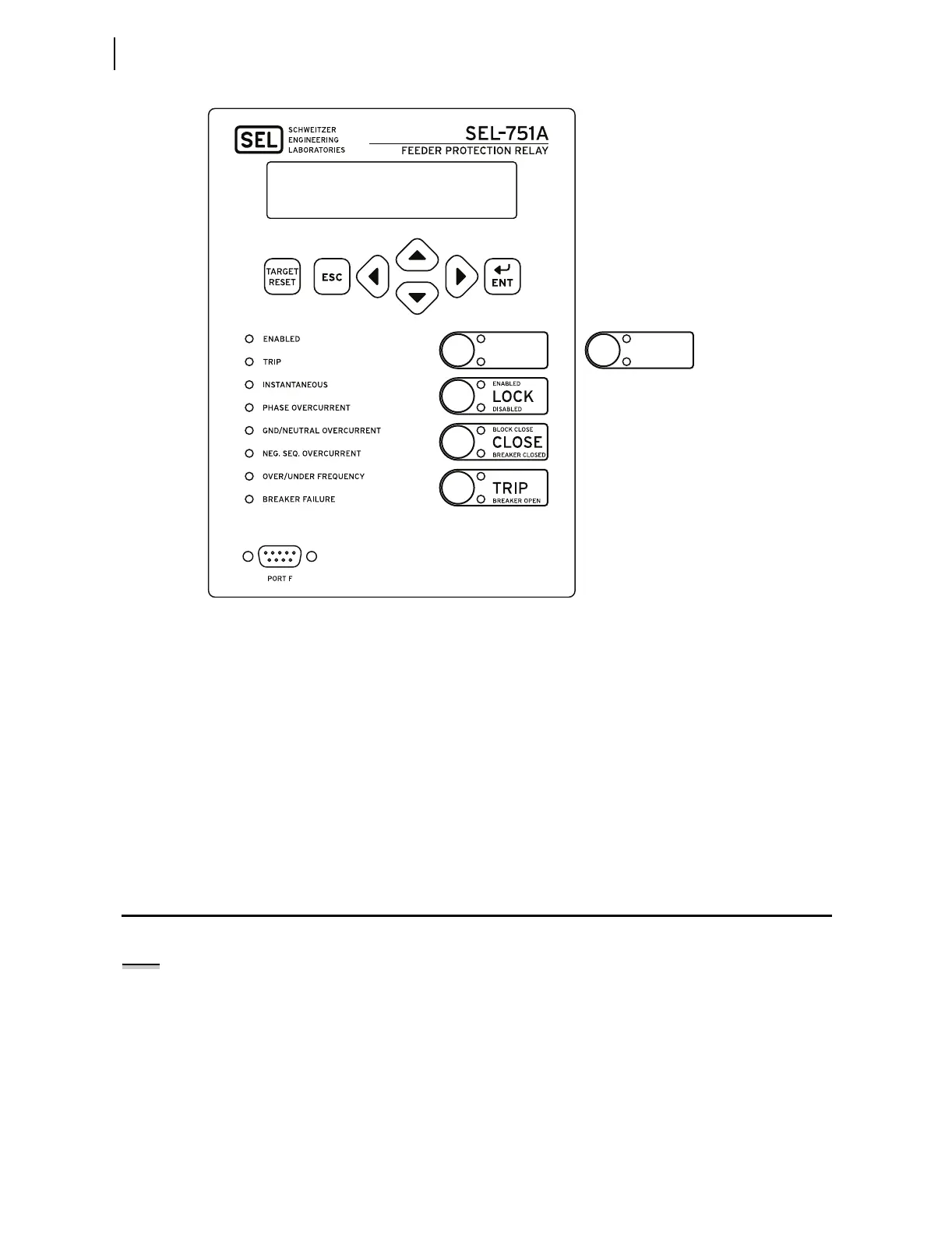
Figure 8.1 Front-Panel Overview
This versatile front panel supports the following features so you can customize
it for your needs:
➤ Rotating display on the HMI
➤ Programmable target LEDs
➤ Programmable pushbutton LEDs
➤ Optional slide-in configurable front-panel labels to change the
identification of target LEDs, pushbuttons, pushbutton LEDs
and their operation.
Human-Machine Interface
Contrast
You can adjust the LCD screen contrast to suit your viewing angle and
lighting conditions. To change screen contrast, press and hold the {ESC}
pushbutton for two seconds. The SEL-751A displays a contrast adjustment
box. Pressing the {Right Arrow} pushbutton increases the contrast. Pressing the
{Left Arrow} pushbutton decreases the screen contrast. When you are finished
adjusting the screen contrast, press the {ENT} pushbutton; this process is a
shortcut for changing the LCD contrast setting FP_CONT in the front-panel
settings.
i4143a
RECL RESET
RECL LOCKOUT
In Reclosing Models Only
AUX1
NOTE: See the Preface for an
explanation of typographic
conventions used to describe menus,
the front-panel display, and the front-
panel pushbuttons.



 To Next Page