8.5
Date Code 20100129 Instruction Manual SEL-751A Relay
Front-Panel Operations
Human-Machine Interface
The SEL-751A automatically scrolls information that requires more space
than provided by a 16-character LCD line. Use the {Left Arrow} and {Right
Arrow} pushbuttons to suspend automatic scrolling and enable manual
scrolling of this information.
MAIN Menu
Figure 8.5 shows the MAIN menu screen. Using the {Up Arrow} or {Down Arrow}
and {ENT} pushbuttons, you can navigate to specific menu item in the
MAIN
menu. Each menu item is explained in detail in the following paragraphs.
Figure 8.5 Main Menu
Meter Menu
Select the Meter menu item from the MAIN menu as shown in Figure 8.6 to
view metering data. The
Meter menu has menu items for viewing different
types of metering data like Fundamental, rms, Thermal, etc. Select the type of
metering and view the data using the {Up Arrow} or {Down Arrow} pushbuttons.
See Metering on page 5.2 for a description of the available data fields.
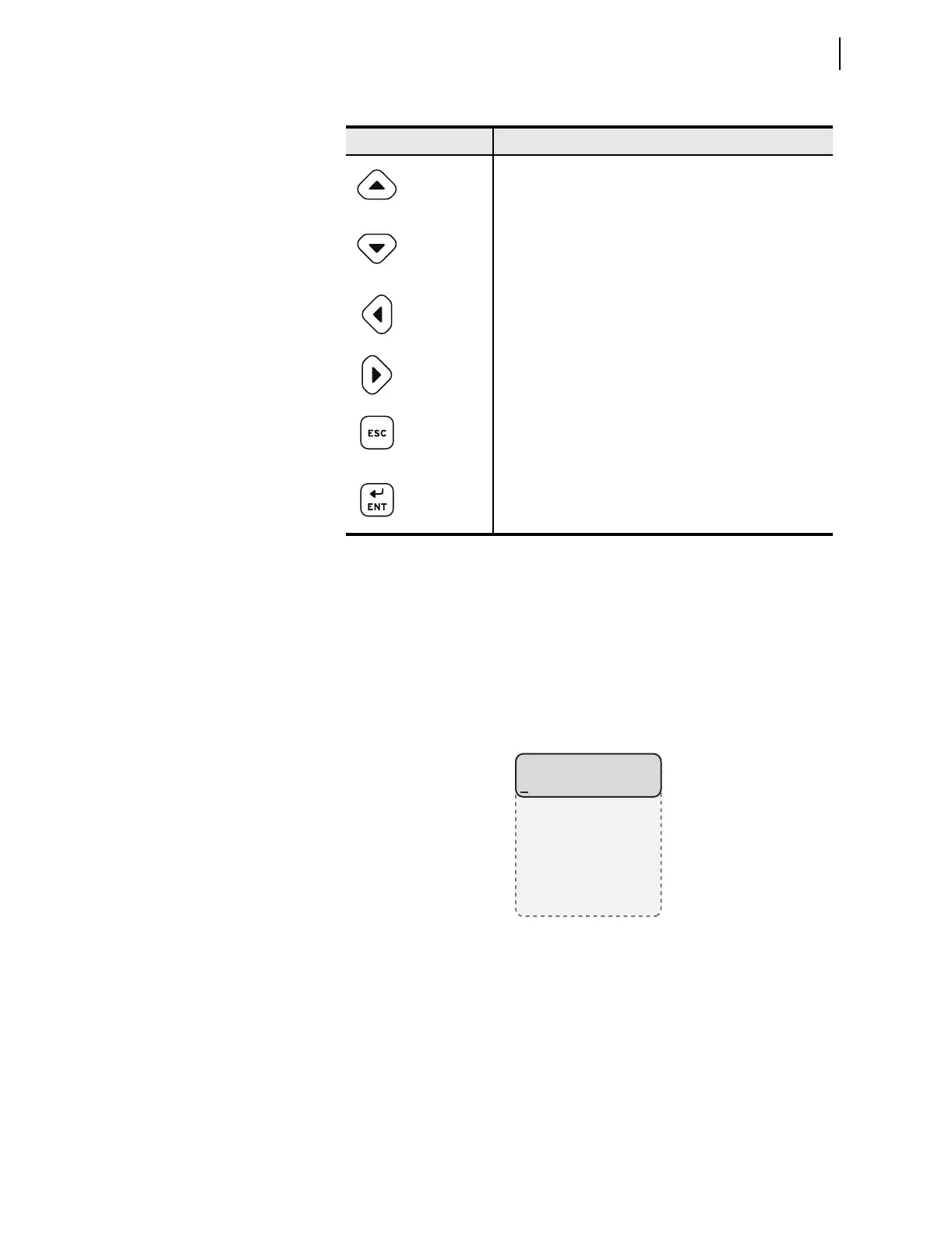
Table 8.2 Front-Panel Pushbutton Functions
Pushbutton Function
{Up Arrow} Move up within a menu or data list.
While editing a setting value, increase the value of the
underlined digit.
{Down Arrow} Move down within a menu or data list.
While editing a setting value, decrease the value of the
underlined digit.
{Left Arrow} Move the cursor to the left.
{Right Arrow} Move the cursor to the right.
{ESC} Escape from the current menu or display.
Displays additional information if lockout condition exists.
Hold for two seconds to display contrast adjustment screen.
{ENT} Move from the rotating display to the
MAIN menu.
Select the menu item at the cursor.
Select the displayed setting to edit that setting.
MAIN
Meter
Events
Targets
Control
Set/Show
Status
Breaker



 To Next Page