208
Basic Procedure for Wipe Settings
Chapter 5 Wipes
Semi: semi-linked mode
Applying the effect of a diamond dust wipe to the selected
pattern (Dust mix)
1
In the Pattern Mix menu, press [Dust Mix], turning it on.
2
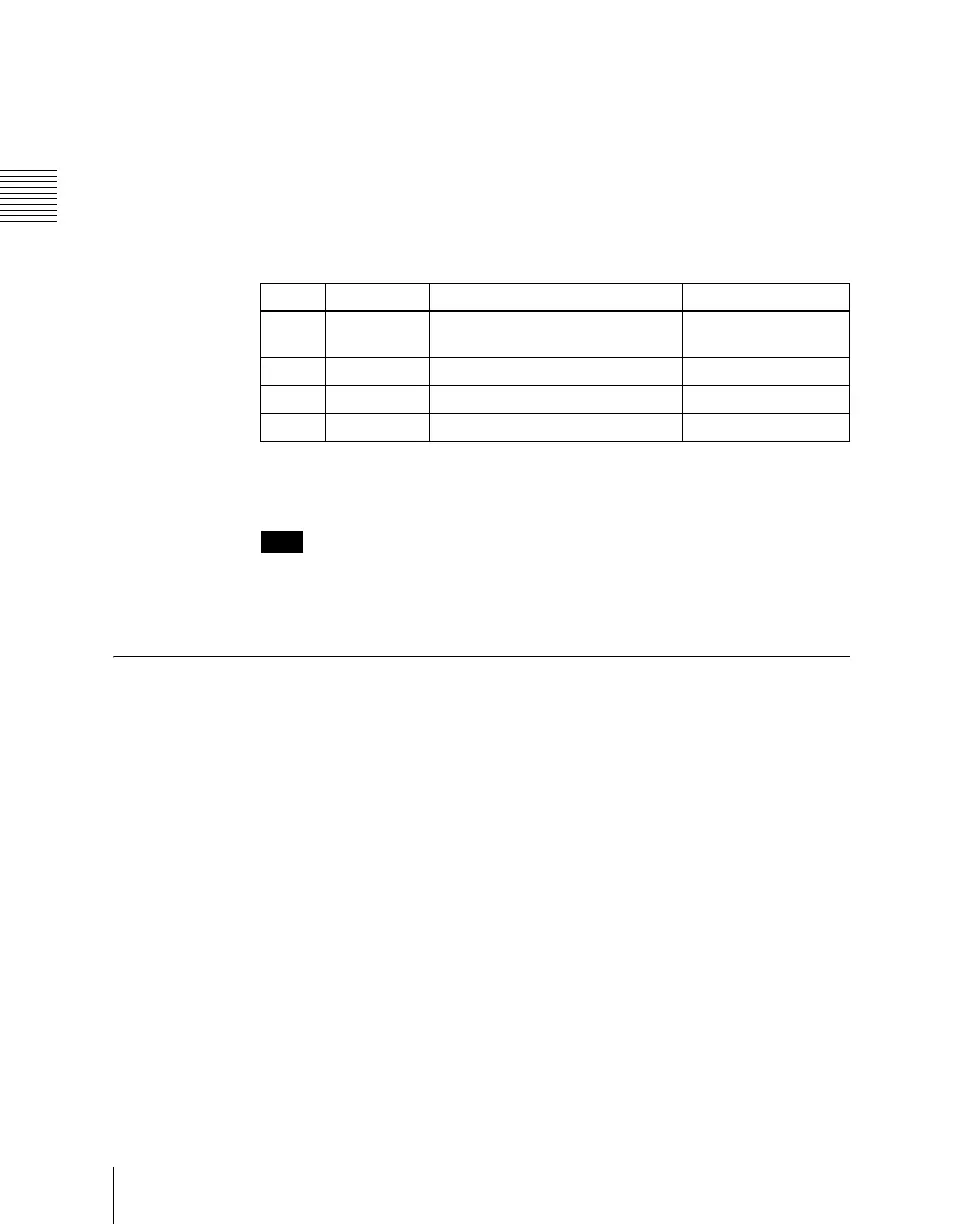
Set the following parameters as required.
You can also apply the dust mix function to the pattern generated by a
pattern mix.
Note
When a random/diamond dust wipe (pattern numbers 270-274) is selected,
the dust mix function is not available.
Setting Wipe Modifiers
You can apply various modifiers to the wipe pattern: setting the wipe direction,
pattern position, and so on.
Note that the available modifiers may depend on the pattern you are using. For
details, see “Possible combinations of wipe patterns and modifiers” (page
225).
Main pattern and sub pattern modifiers
You can make independent settings of the modifiers for the main pattern and
sub pattern.
• To set the modifiers for the main pattern, in the M/E-1 >Wipe menu, select
HF5 ‘Main Modify,’ and make the settings in the Main Modify menu.
• To set the modifiers for the sub pattern, select HF6 ‘Sub Modify,’ and make
the settings in the Sub Modify menu.
Operations in the Main Modify menu and Sub Modify menu are the same.
Knob Parameter Adjustment Setting values
1 Mix Ratio Proportion of diamond dust
pattern in mix
0.00 to 100.00
2 H Size Particle width 0.00 to 100.00
3 V Size Particle height 0.00 to 100.00
4 Flash Rate Rate of generation of particles 0.00 to 100.00













 To Next Page