491DME Special Effect Operations
Chapter 11 DME Operations
This enables the Glow effect.
Note
When using the MVE-9000/BKDS-9470, the key border function and
Glow function cannot be turned on at the same time. The function most
recently turned on is effective.
3
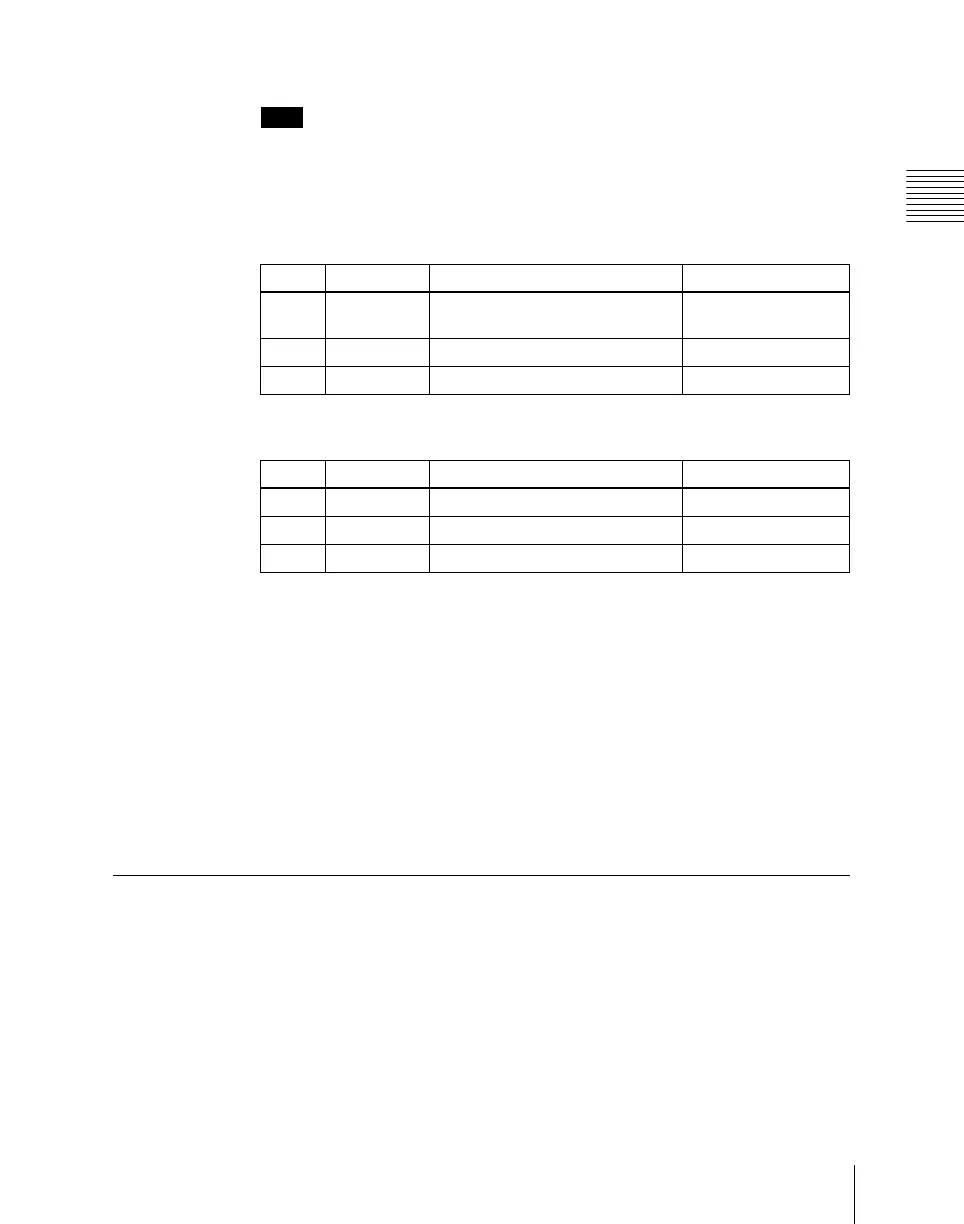
Set the parameters.
4
Press [Matte] and set the glow color.
Inverting the highlight areas
Press [Glow Invert], turning it on.
The highlight and non-highlight areas are inverted.
Masking the Glow effect with a selected pattern
Press [Mask] to display the Mask menu and set the type of pattern and
modifiers.
For details, see “Mask Settings” (page 491).
Mask Settings
Applying masks
1
In the DME menu, select VF2 ‘Video Modify’ and HF7 ‘Mask.’
The Mask menu appears.
Knob Parameter Adjustment Setting values
1 Clip Reference level for highlight
detection
0.00 to 100.00
2 Gain Amount of gain for highlights –100.00 to +100.00
3 Soft Softness 0.00 to 100.00
Knob Parameter Adjustment Setting values
1 Luminance Luminance 0.00 to 100.00
2 Saturation Saturation 0.00 to 100.00
3 Hue Hue 359.99 to 0.00













 To Next Page