Chapter 17 Files
784
Operations on Individual Files
• To select a single file, press the arrow keys to scroll the reverse video
cursor, or press directly on the list in the status area.
5
Press [t Save].
This saves the selected register data in the specified location.
If there is already data in the specified location, a confirmation message
appears.
• Select “Yes” to overwrite the data.
• Select “No” to cancel saving all of the data.
Saving frame memory files
Between steps 3 and 4 of the procedure above, “Saving Files,” do as follows.
1
To select the frame memory folder, press [Default] in the device selection
in the list on the left.
A pull-down menu appears.
2
Press the required folder name.
3
Carry out the same operations as in steps 1 and 2 on the list on the right.
4
Select the type of data to be displayed.
• To display still image files, press [Still].
• To display clip files, press [Clip].
Loading Files
As an example, to load a snapshot file from hard disk or memory card to a
register, use the following procedure.
1
In the File menu, select VF3 ‘Snapshot’ and HF1 ‘Snapshot.’
2
In the device selection area on the left, select [Register].
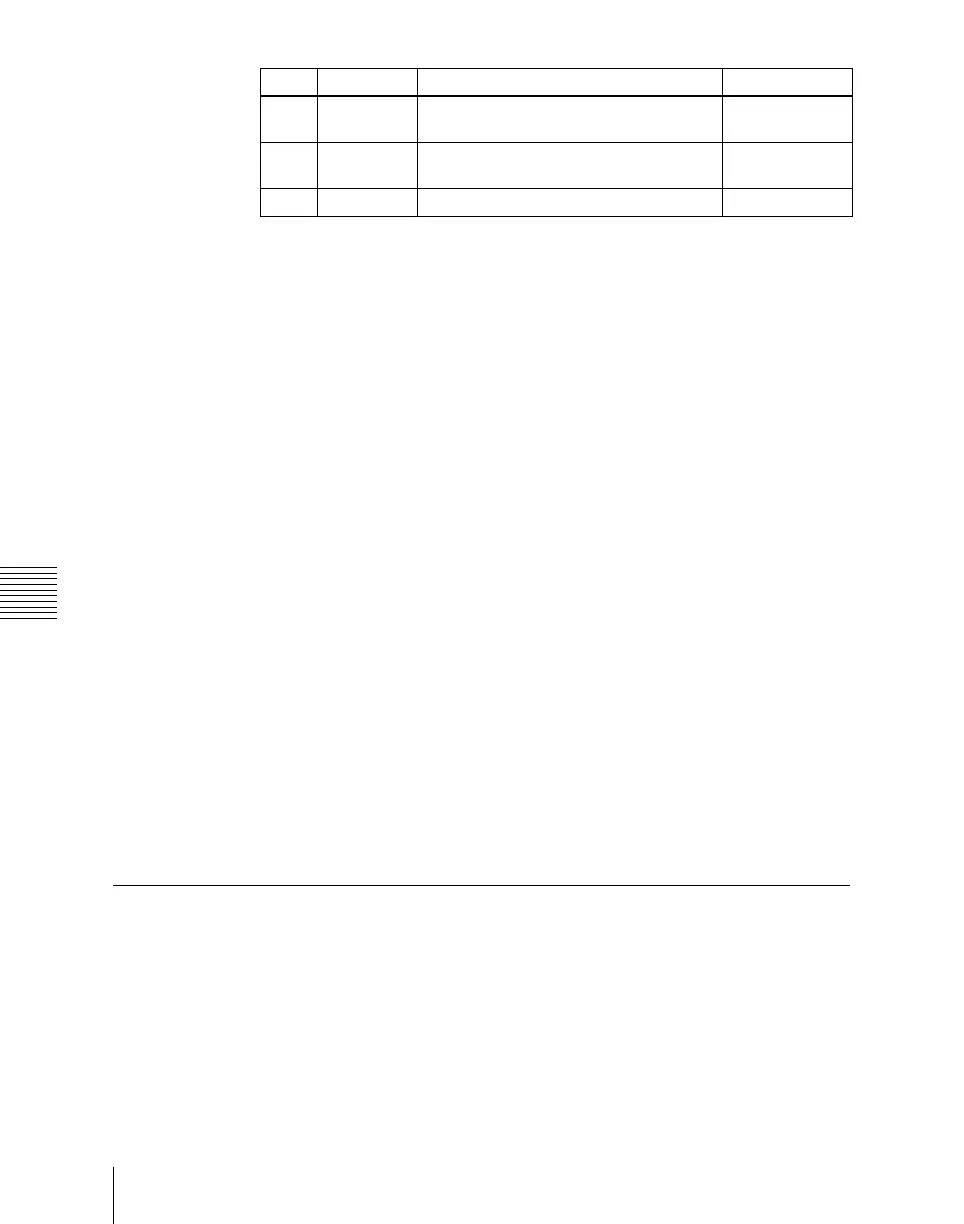
Knob Parameter Adjustment Setting values
1 List L Select the first register whose data is to
be saved
1 to 99
2 List R Select the first file to which data is to be
saved
1 to 99
3 Num Number of registers to be selected 1 to 99













 To Next Page