Chapter 11 DME Operations
484
DME Special Effect Operations
Nega Settings
Applying the Nega effect
1
In the DME menu, select VF2 ‘Video Modify’ and HF3 ‘Color Modify.’
The Color Modify menu appears.
2
Press [Nega Y] or [Nega C], turning it on, or press both buttons, turning
them on.
Nega Y: Reverse the luminance.
Nega C: Reverse the chroma.
Masking the Nega effect with a selected pattern
Press [Mask] to display the Mask menu, and set the pattern type and modifiers.
For details, see “Mask Settings” (page 491).
Contrast Settings
Applying the Contrast effect
1
In the DME menu, select VF2 ‘Video Modify’ and HF3 ‘Color Modify.’
The Color Modify menu appears.
2
Press [Contrast], turning it on.
The Contrast effect is enabled. You can adjust the luminance and chroma
contrast with the knobs.
3
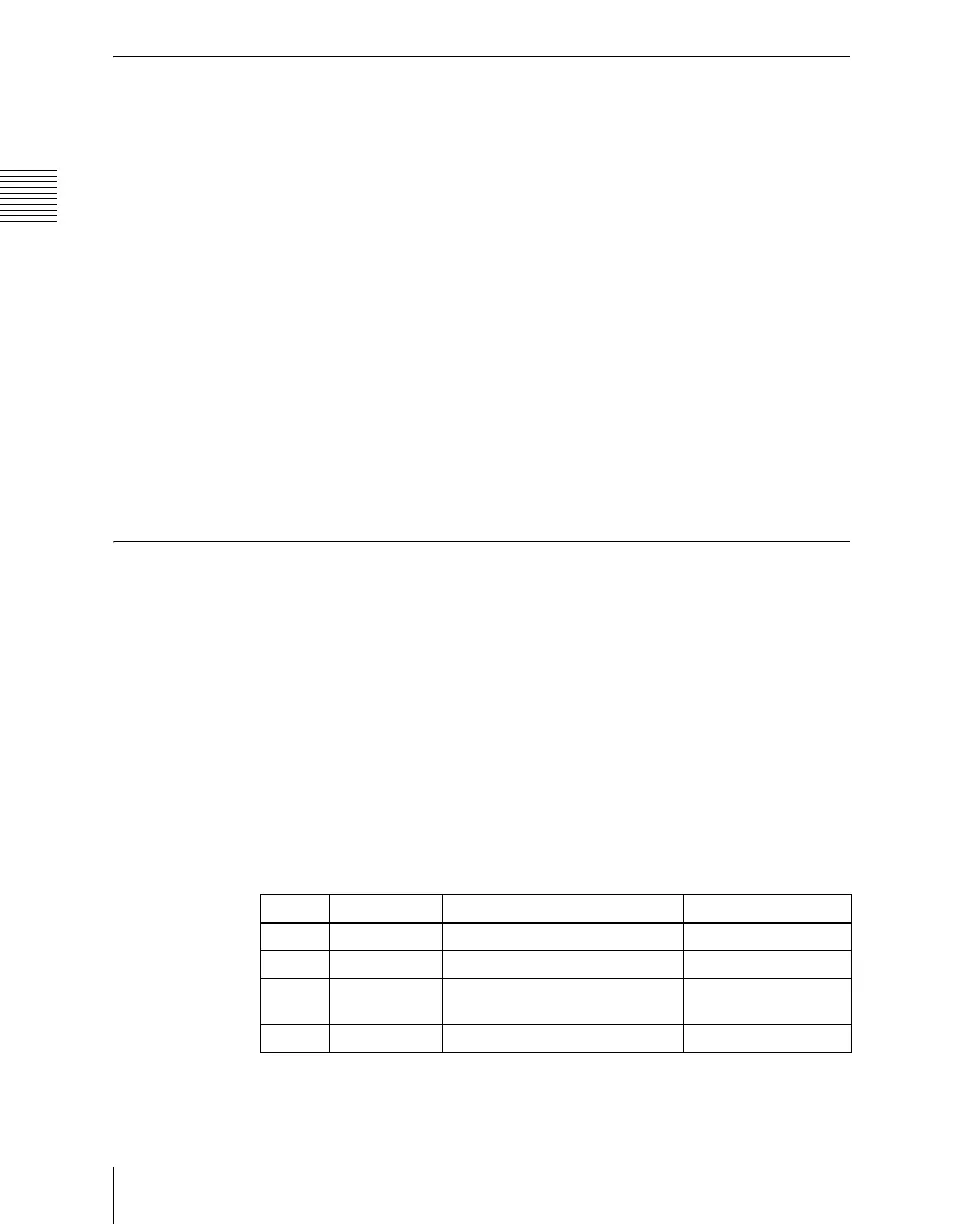
Set the parameters.
Knob Parameter Adjustment Setting values
1 Y Clip Luminance clip level +109.59 to –7.31
2 Y Gain Luminance contrast gradient –100.00 to +100.00
3 Y Offset Luminance offset level
increment
–100.00 to +100.00
4 C Gain Chroma contrast gradient –100.00 to +100.00













 To Next Page