168
Key Setting Operations Using Menus
Chapter 4 Keys
4
Select the combining pattern in the <Mix Pattern> group.
Key Wipe: The wipe pattern selected for an independent key transition is
used for combination. You can change this pattern by pressing [Pattern
Select] to open the menu for key wipe pattern selection (Pattern Select
menu), and make adjustments by pressing [Pattern Adjust] to open the
menu for pattern adjustment (Wipe Adjust menu).
Key Edge Pattern: Combine using the dedicated pattern selected for the
color mix in the key edge fill. You can change this pattern by pressing
[Pattern Select] to open the menu for edge color mix dedicated wipe
pattern selection (Mix Pattern Select menu), and make adjustments by
pressing [Pattern Adjust] to open the menu for pattern adjustment
(Matte Adjust menu).
For details, see “Carrying out a color mix for the key edge fill matte”
(page 172).
5
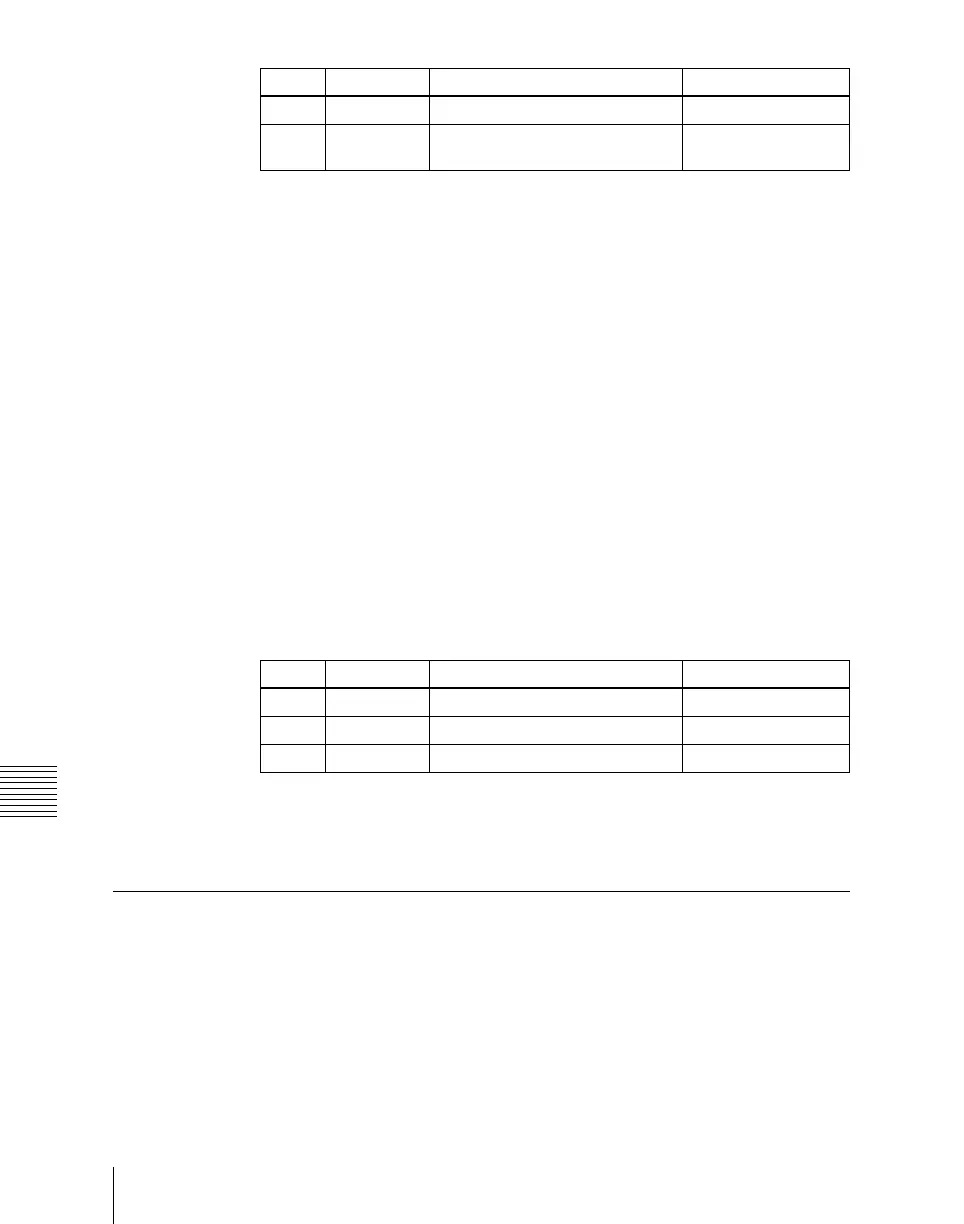
In the Type menu, adjust color 1 and color 2.
To adjust color 1, select [Color1], and to adjust color 2, select [Color2],
then adjust the following parameters.
6
To interchange color 1 and color 2, press the [Color Invert] button, turning
it on.
Key Edge Modifications
To modify the key edge of key 1 on the M/E-1 bank, use the following
procedure.
1
In the M/E-1 >Key1 menu, select HF2 ‘Edge.’
The Edge menu appears.
Knob Parameter Adjustment Setting values
1 Size Pattern size 0.00 to 100.00
2 Soft Softness of the edge of the
pattern
0.00 to 100.00
Knob Parameter Adjustment Setting values
1 Luminance Luminance 0.00 to 100.00
2 Saturation Saturation 0.00 to 100.00
3 Hue Hue 359.99 to 0.00













 To Next Page