981Settings Relating to Signal Inputs (Input Menu)
Chapter 21 DME Setup (DME)
• If you selected 16:9 in step 1
To return the parameter values to their default values
Press [Unity] in the <Crop> group.
Setting an Illegal Color Limit for Matte Signals
To enable the illegal color limiter for the signals generated by the DME internal
matte generator, press [Matte Illeg Col Limit] for DME1 in the DME >Input
menu, turning it on.
Making DME System Phase Adjustment
To adjust the DME reference phase, use the following procedure.
1
In the DME >Input menu, press [System Phase].
2
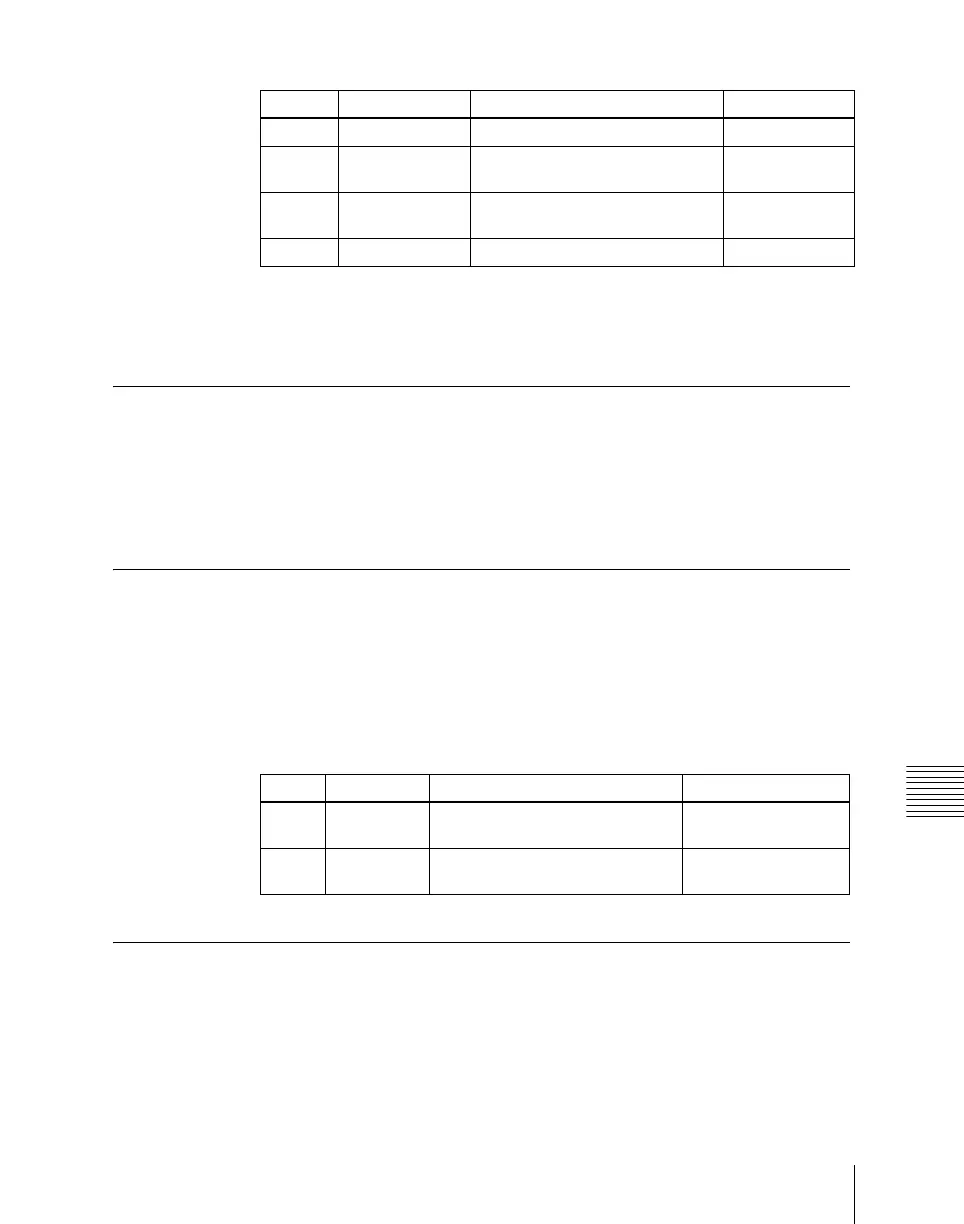
Set the following parameters.
Setting the TBC Window Center Position
When the MVE-8000A/MVE-9000 is connected through SDI interface, the
DME >Input >TBC Center menu allows you to set the TBC window center
position.
Knob Parameter Adjustment Setting values
1 Top Position of top side –9.00 to +9.00
2 Left Position of left side –16.00 to
+16.00
3 Right Position of right side –16.00 to
+16.00
4 Bottom Position of bottom side –9.00 to +9.00
Knob Parameter Adjustment Setting values
1DME1
Phase
DME1 system phase adjustment –32.00 to +96.00
2DME2
Phase
DME2 system phase adjustment –32.00 to +96.00













 To Next Page