81Basic Menu Operations
Chapter 2 Menus and Control Panel
a) The menu recalled depends on which of the M/E delegation buttons and key delegation buttons
are selected in the key control block.
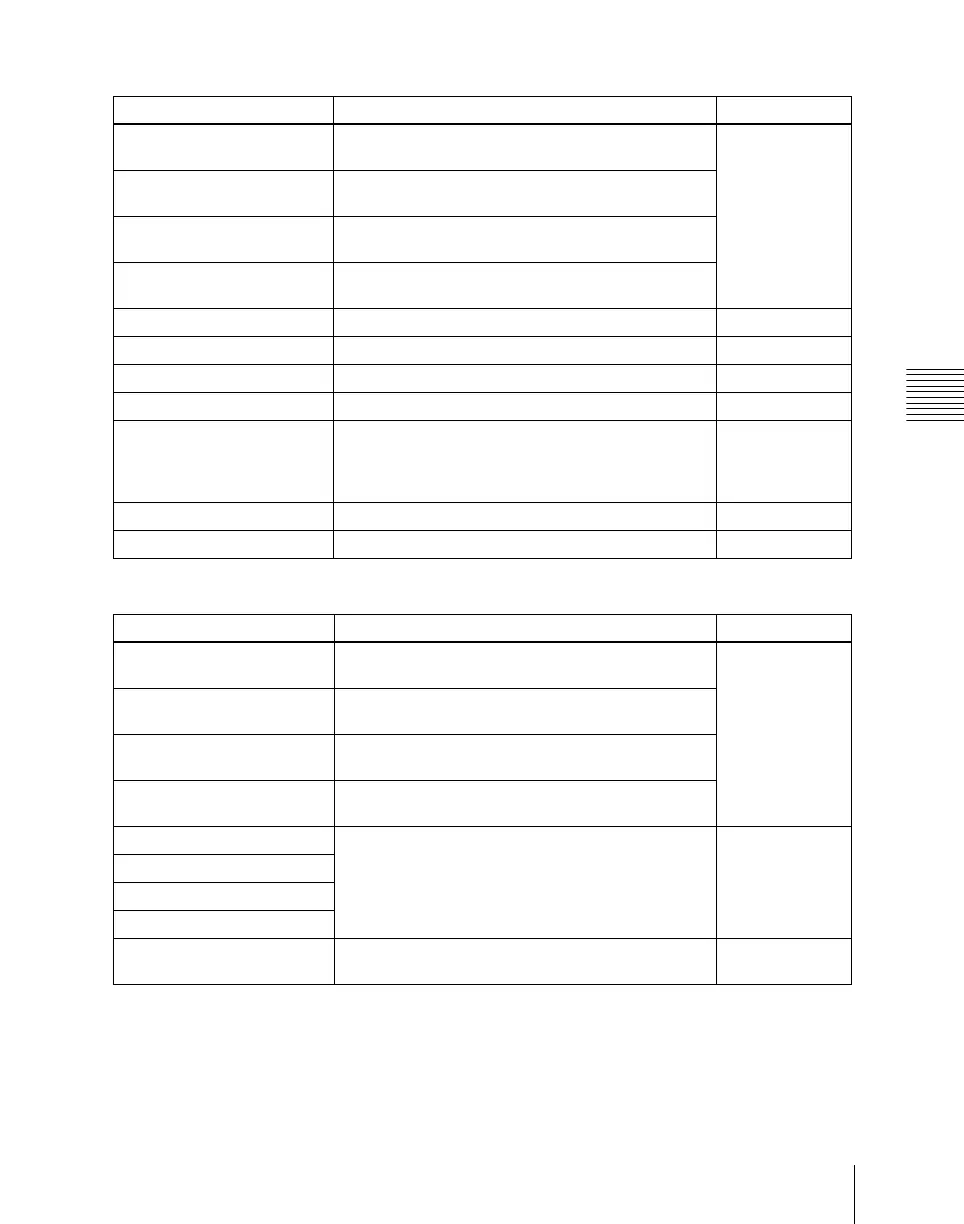
Transition control block
Buttons Menus See
KEY1 (DSK1) • M/E-1 >Key1 >XX
• PGM/PST >DSK1 >XX
page 155
KEY2 (DSK2) • M/E-1 >Key2 >XX
• PGM/PST >DSK2 >XX
KEY3 (DSK3) • M/E-1 >Key3 >XX
• PGM/PST >DSK3 >XX
KEY4 (DSK4) • M/E-1 >Key4 >XX
• PGM/PST >DSK4 >XX
WIPE M/E-1, PGM/PST >Wipe >Main Pattern page 201
DME M/E-1, PGM/PST >DME Wipe >XX page 245
SUPER MIX M/E-1, PGM/PST >Misc >Transition page 123
PST COLOR MIX M/E-1, PGM/PST >Misc >Transition page 124
FM1&2 CLIP,
FM3&4 CLIP,
FM5&6 CLIP,
FM7&8 CLIP
M/E-1, 2, 3, PGM/PST >Misc >ClipTransition page 305
PRIOR SET M/E-1, PGM/PST >Misc >Key Priority page 119
KEY PRIOR M/E-1, PGM/PST >Misc >Next Key Priority page 120
Key control block
a)
Buttons Menus See
KEY1 • M/E-1 >Key1 >XX
• PGM/PST >DSK1 >XX
page 155
KEY2 • M/E-1 > Key2 > XX
• PGM/PST >DSK2 >XX
KEY3 • M/E-1 >Key3 >XX
• PGM/PST >DSK3 >XX
KEY4 • M/E-1 >Key4 >XX
• PGM/PST >DSK4 >XX
LUM • M/E-1 >Key1, 2, 3, 4 >Type
• PGM/PST >DSK1, 2, 3, 4 >Type
page 156
LIN
CVK
PTN
CRK • M/E-1 >Key 1, 2, 3, 4 >Type >Chroma Adjust
• PGM/PST >DSK1, 2, 3, 4 >Type >Chroma Adjust
page 161













 To Next Page