913Setting Button Assignments (Prefs/Utility Menu)
Chapter 19 Control Panel Setup (Panel)
a) For the safe title on/off commands (from ME1 PGM1 ST-ME1 PGM4 ST to AUX1 ST-AUX48
ST), the name of the assigned output signal is shown.
Assigning a menu shortcut to a user preference button
1
Referring to the procedure up to step 2 on page 909, select [Menu
Shortcut].
The user preference buttons [PREFS 1] to [PREFS 16] flash amber.
2
Using any of the following methods, display the menu to which you want
to make a shortcut.
• In the menu control block, press the relevant top menu selection button,
then select VF and HF.
• Press the menu page number button in the upper left corner of the menu
screen, then enter a menu number from the numeric keypad window.
• Press a particular control panel button twice in rapid succession.
3
Press the user preference button to which you want to assign the shortcut.
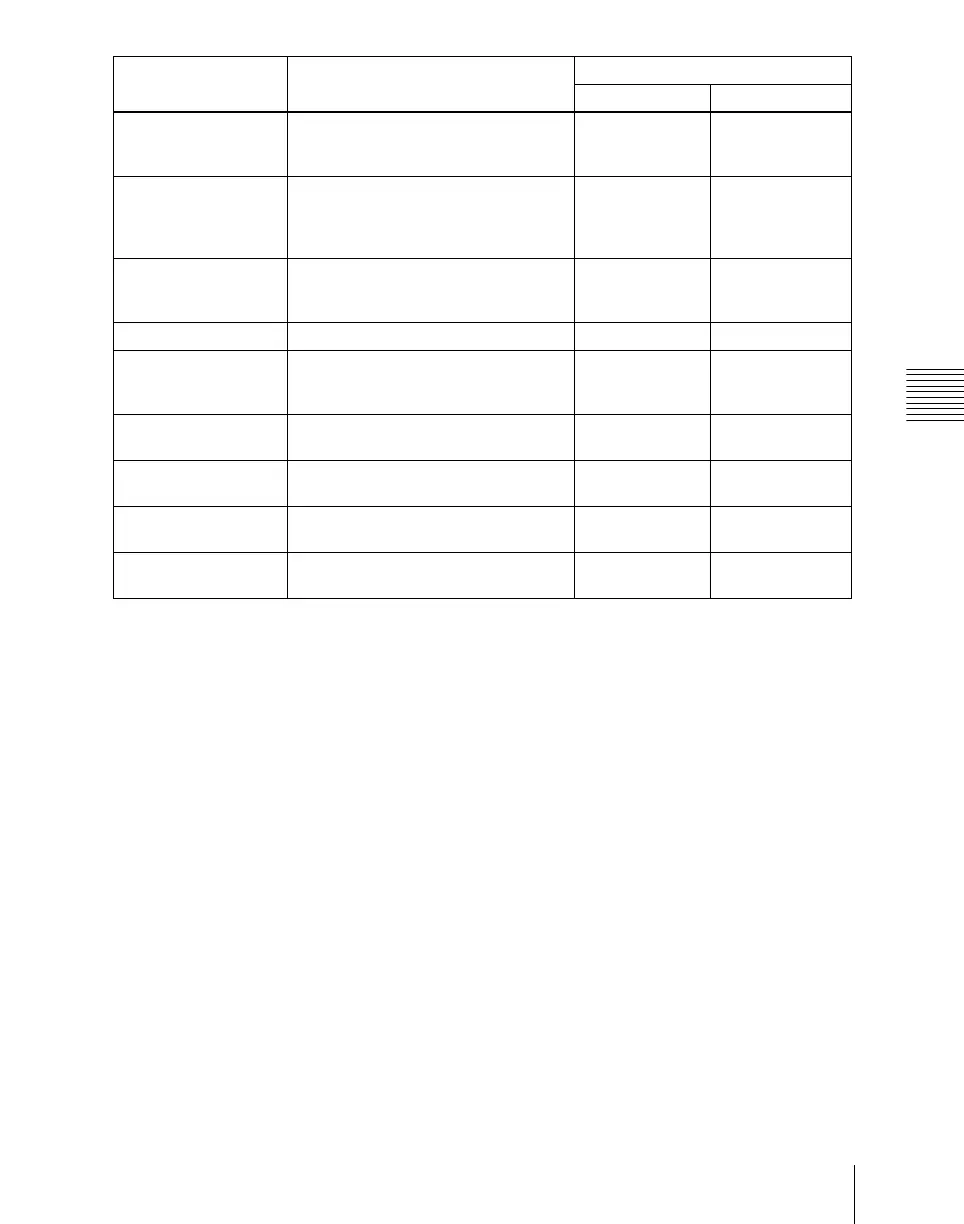
Macro AT with Rate When registering an auto transition
macro event, on/off setting of mode to
save transition rate
On Off
Macro AT with A/B Bus When registering an auto transition
macro event for the transition control
block, on/off setting of mode to save A/
B Bus cross-point settings
On Off
Macro TL with Region When registering a timeline macro
event, on/off setting of mode to save
applicable region
On Off
DME Override DME override on/off On Off
DME Graphic DME graphics on/off (Applies to
graphics for channel selected in device
control block)
On Off
System Manager Enbl Enable/disable operation from System
Manager
Enabled Disabled
Plug-In Editor Enbl Enable/disable operation from an
editing keyboard
Enabled Disabled
Inhibit Set Inhibit cross-point button Can be set only
while pressed (lit)
When the function
is assigned
Inhibit All Clear Clear all cross-point button inhibit
settings
Can be set only
while pressed (lit)
When the function
is assigned
Command name
a)
Function Button status
Lit amber Off





 To Next Page