c.
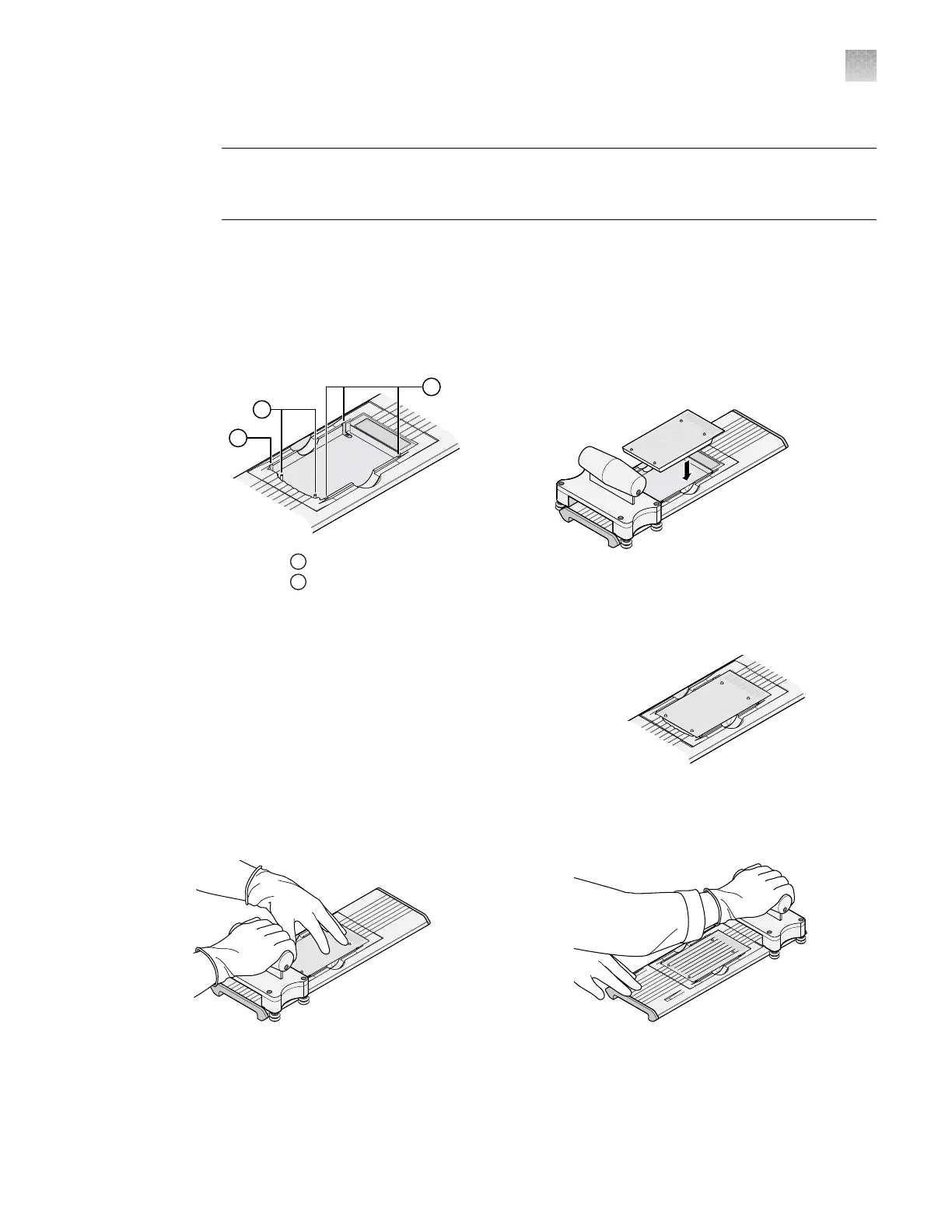
Ensure that the carriage for the sealer is at the starting position.
IMPORTANT! Do not insert a filled card into the sealer if the carriage is not in its starting
position. The card will be irreparably damaged if the carriage is moved backwards across the
card towards the starting position.
2.
Inser
t a filled, centrifuged card into the sealer.
a.
Hold the card with its foil‑side up.
b.
Orient the card over the sealer with the fill reservoirs of the card toward the ending position.
c.
Align the rear pin grooves of the card to the alignment pins of the sealer.
1
Alignment pins
2
Spring clips
d.
Gently place the car
d on top of the sealer.
e.
Gently push the card until it is seated securely in the
sealer.
When properly seated, the foil surface of the card is
level with the base of the sealer and the spring clips
hold the card securely in place.
3.
Slowly and steadily push the carriage across the sealer in the direction of the engraved arrows.
Push the carriage across the entire length of the card until the carriage meets the mechanical stops
at the ending position.
►
Appendix C Detailed procedures for preparation of a TaqMan
™
Array Card
Seal the card
C
QuantStudio
™
6 Pro Real-Time PCR System and QuantStudio
™
7 Pro Real-Time PCR System User Guide
207












 To Next Page