F6000 Family of Power System Simulators User Guide
72A-1589 Rev. C 02/01 A-3
D
DD
D
R
RR
R
A
AA
A
F
FF
F
T
TT
T
2
22
2
/
//
/
2
22
2
0
00
0
/
//
/
0
00
0
1
11
1
Use Verify to determine whether a package file is already in the FLASH.
The same determination can be made by comparing the software
revision of the F6150 with the one in the package file. The software
revision of the F6150 displays at power on. A package file consists of
ASCII data followed by a Control-z (DOS end of file character) followed
by binary data. The software revision is in the second line of the package
file as an ASCII string. The package file can be viewed in a text editor
such as Windows Notepad, or by using the type command in a DOS
window.
Communications Parameters
If the revised firmware does not load successfully, check the setup for
communication between the computer and the F6000 Instrument. To
verify or change the communications settings:
1. Click Change in the Flash Loader display.
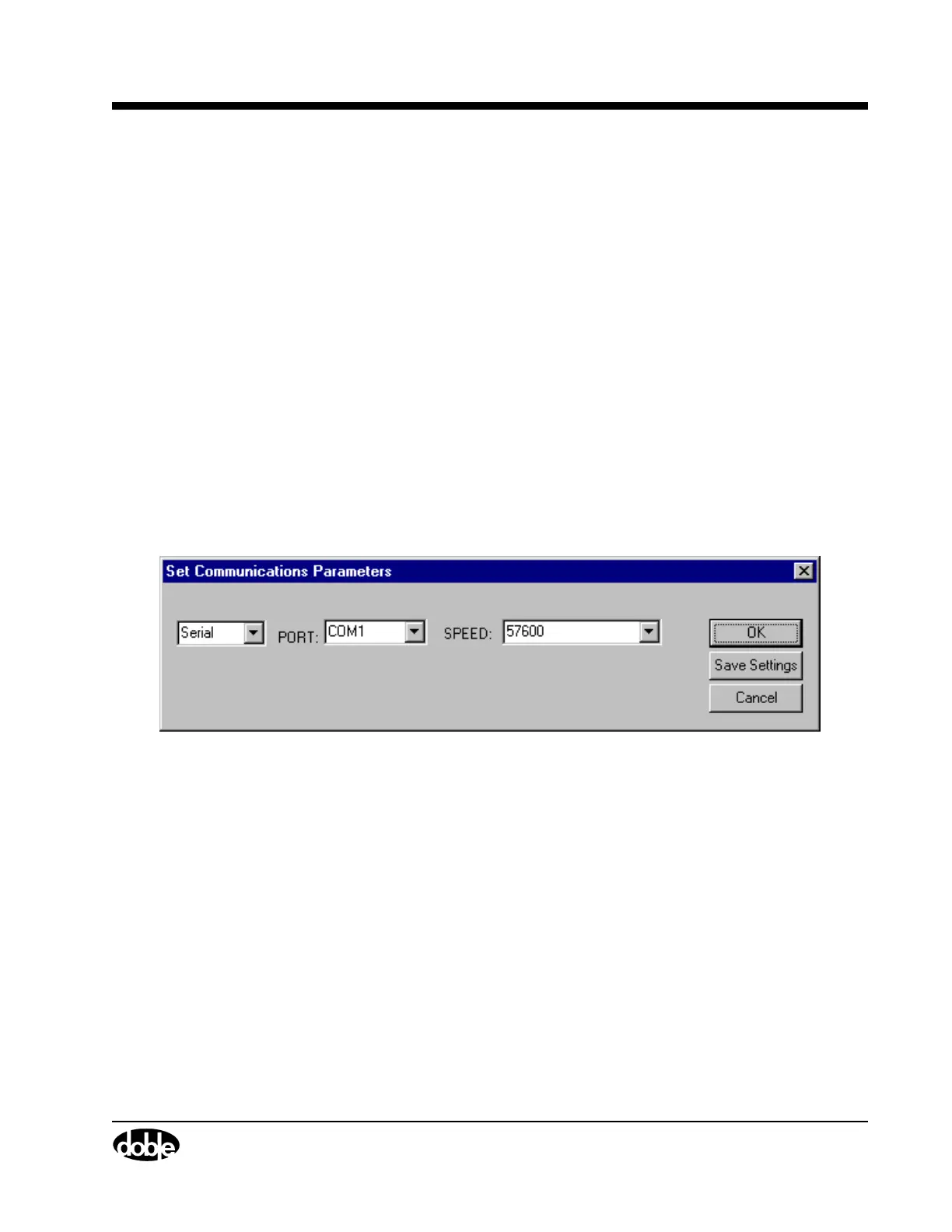
The Set Communications Parameters display appears (Figure A.2).
Figure A.2 Set Communications Parameters
2. Select the correct setting from each of the three pick lists in the
display:
• Connection type: Serial or Ethernet
• Port: COM1 through COM4
• Speed: The connection speed must be 57,600 baud per second
3. Click OK to save the settings and close the display.
To abort the action, click Cancel.



 To Next Page