98
────────────────────────────────────────────────────
7.4 Taking Measurements
────────────────────────────────────────────────────
.4.2 Starting Demand Measurement
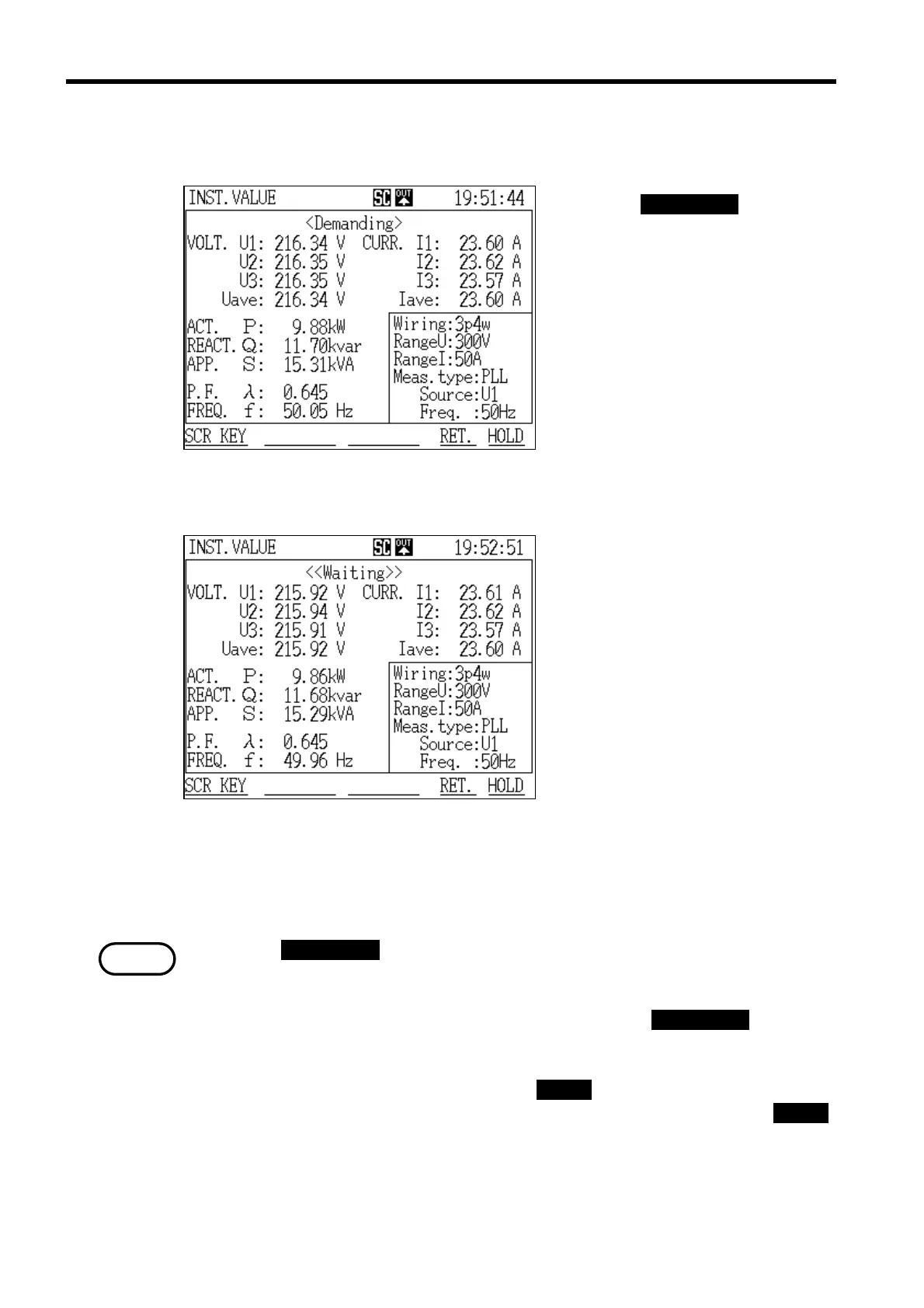
Demand Measurement in Progress Screen
Demand Measurement Standby Screen
NOTE
The demand measurement operation start at the set date and time.
Press the START/STOP key.
The power meter enters the
standby state until the preset
start time arrives; once the start
time arrives, the power meter
begins the demand measurement
operation.
While the power meter is in
standby, the message "Waiting" is
displayed on the screen; once the
demand measurement operation
starts, the message changes to
"Demanding ."
Reference If the preset start time has already passed, the demand measurement
operation does not begin.
・Once the START/STOP key is pressed and demand measurement is initiated, it
is no longer possible to change the measurement range or the contents of the
settings.
To change the settings, it is necessary to first press the START/STOP key again
to stop the demand measurement operation.
・The key lock function can be used when necessary to prevent misoperation. To
activate the key lock condition, press the CHECK key and set "Key Lock" to
ON in the "Check" window. To cancel the key lock condition, press the CHECK
key and set "Key Lock" to OFF.



 To Next Page